The Trados cloud platform will be undergoing maintenance on Saturday, 9th May 2026 between 05:00 to 17:00 UTC. During this time, you will not be able to log in to the Trados platform.

Question about "Project Settings" -> "File Types" -> "MS Word" -> "Commom" -> "Treat special characters as inline"

Hi Team,

I would like to inquire about the settings within "Project Settings" -> "File Types" -> "MS Word" -> "Common" -> "Treat special characters as inline."
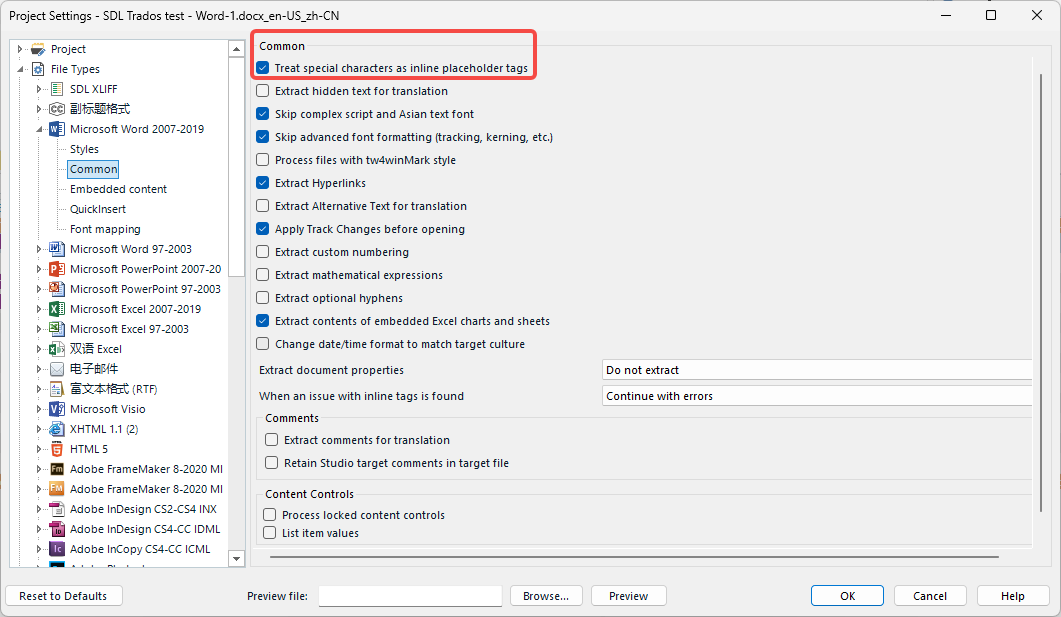
Trados Studio Project Settings window showing 'File Types' with 'MS Word' expanded and 'Common' selected. 'Treat special characters as inline placeholder tags' is highlighted.

I have reviewed the RWS Documentation, which states the following:

  • Treat special characters as inline placeholder tags - treats non-breaking space, hyphens and special characters as tags. Em dash and en dash characters are always treated as text.
    (refer to RWS Documentation)

However, I conducted tests using this setting with the following content:

NBSP


Hyphen

-

en dash

em dash

member of

Copyright

©

Number

Dot

Plus

+

Minus

-

At

@

USD

$

Unfortunately, the content did not convert as I had expected.
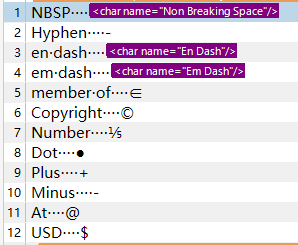
Text editor displaying a list of special characters and their conversion in Trados Studio. Non-breaking space, en dash, and em dash are incorrectly converted to tags.

Furthermore, the document mentions that "Em dash and en dash characters are always treated as text."

Nevertheless, as evidenced by my samples, em dash and en dash characters have been converted to tags.

Could you kindly provide clarification on which special characters are intended to be converted into tags?


Generated Image Alt-Text
[edited by: Trados AI at 12:11 PM (GMT 0) on 29 Feb 2024]

emoji
  • Hello,

    I understand your confusion regarding the "Treat special characters as inline" setting in Trados Studio. This setting is designed to treat certain special characters as tags, but it may not cover all special characters.

    The documentation you referred to mentions that non-breaking space, hyphens, and special characters are treated as tags. However, it's important to note that the term "special characters" can be somewhat broad and may not include all characters you've tested.

    The em dash and en dash characters are indeed always treated as text, as per the documentation. However, in your case, they seem to have been converted to tags. This could be due to other settings in your project or the specific content of your document.

    Here's a general guideline on how to handle this:

    Step 1: Review your project settings and ensure they align with your requirements.

    Step 2: Test with a variety of special characters to understand which ones are treated as tags and which ones are treated as text.

    Step 3: If certain characters are not behaving as expected, you may need to adjust your settings or find a workaround, such as using Find and Replace to manually adjust these characters.

    Remember, Trados Studio is highly customizable, and you can adjust the settings to best suit your needs.

    I hope this helps clarify the situation. If you have further questions, feel free to ask.

    Best regards,

    RWS Community AI

    emoji
  • ,

    I’d like to know too what a special character mean.

    I don’t have the definitive answer, and I guess the help content needs to be edited and be like this (?):

    • non-breaking hyphens are always treated as tags.
    • em dashes, en dashes, and non-breaking spaces are treated as tags if this checbox is ticked.

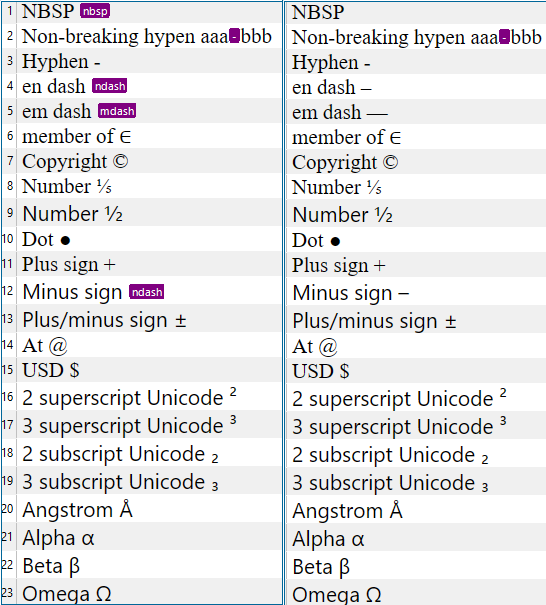
    I haven't been able to get inline tags with other special characters. Maybe they are special, but not special for Word, as thery are em dash (^+), en dash (^=) and non-breaking space (^s). This is a comparison ticking (left) and unticking (right) the checkbox:

    Screenshot of Trados Studio showing a comparison of special characters treatment with a checkbox ticked on the left and unticked on the right. Non-breaking hyphens and dashes are highlighted.

    emoji


    Generated Image Alt-Text
    [edited by: Trados AI at 12:11 PM (GMT 0) on 29 Feb 2024]
  •   

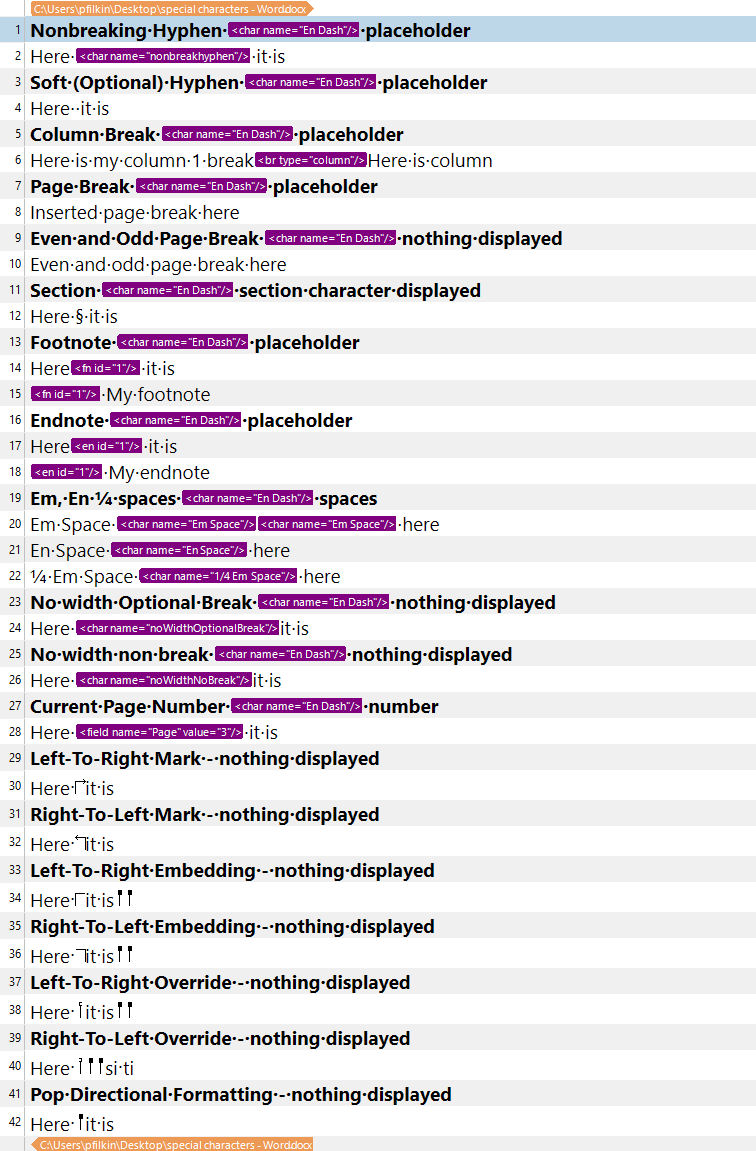
    Good questions!  I checked through the dev notes for this filetype and found that these seem to refer to special characters that are not supported in Studio as characters and how they are represented inside the docx file.  The list at the time (last modified in 2013) was this:

    • Nonbreaking Hyphen – placeholder
    • Soft Hyphen – placeholder
    • Column Break - placeholder
    • Page Break – placeholder
    • Even and Odd Page Break – nothing displayed
    • Section – section character displayed
    • Footnote - placeholder
    • Endnote - placeholder
    • Em, En ¼ spaces - spaces
    • No width Optional Break – nothing displayed
    • No width non break – nothing displayed
    • Current Page Number – number
    • Left-To-Right Mark - nothing displayed
    • Right-To-Left Mark - nothing displayed
    • Left-To-Right Embedding - nothing displayed
    • Right-To-Left Embedding - nothing displayed
    • Left-To-Right Override - nothing displayed
    • Right-To-Left Override - nothing displayed
    • Pop Directional Formatting - nothing displayed

    I put a word file here that I just created with this content if you want to test it:

    special characters - Word.zip

    Then I tested them in Trados Studio 2022:

    Screenshot of a Word document listing special characters and their representation in Trados Studio. Nonbreaking Hyphen, Soft Hyphen, Column Break, Page Break, Section, Footnote, and Endnote are marked as placeholders. Even and Odd Page Break, No width Optional Break, No width non break, Left-To-Right Mark, Right-To-Left Mark, Left-To-Right Embedding, Right-To-Left Embedding, Left-To-Right Override, Right-To-Left Override, and Pop Directional Formatting show nothing displayed. Current Page Number shows a number. Em, En, and 14 spaces are represented as spaces.

    Seems to make sense.  I can see that the directional markers are not inline tags, but this could easily because the filetype changed since 2013 and now we support them natively in Studio.

    Does that help?   may be able to elaborate more if he has a little time as he knows more about these filetypes than I do.

    Paul Filkin | RWS

    Design your own training!
    You've done the courses and still need to go a little further, or still not clear? 
    Tell us what you need in our Community Solutions Hub

    emoji


    Generated Image Alt-Text
    [edited by: Trados AI at 12:12 PM (GMT 0) on 29 Feb 2024]
  • Most of the characters you listed as not displayed, are actually "hidden" characters for which you need to enable "display hidden characters" feature in Studio. Some are "structural" (like section break) and these are not extracted for localization at all.

    The option in question is more less for backward compatibility reasons as it existed in past for older versions of the file type.