The Trados cloud platform will be undergoing maintenance on Saturday, 9th May 2026 between 05:00 to 17:00 UTC. During this time, you will not be able to log in to the Trados platform.

Embedded content is set up properly to include all reg-ex tags that are even in the beginning of the setnence.(But it won't show up selectively)

Working in game translation, we use reg-ex to set up certain codings that show up as "tags" using the embedded content function.

However, the embedded content is set up properly to include all reg-ex tags that are even in the beginning of the setnence.(But it won't show up selectively)

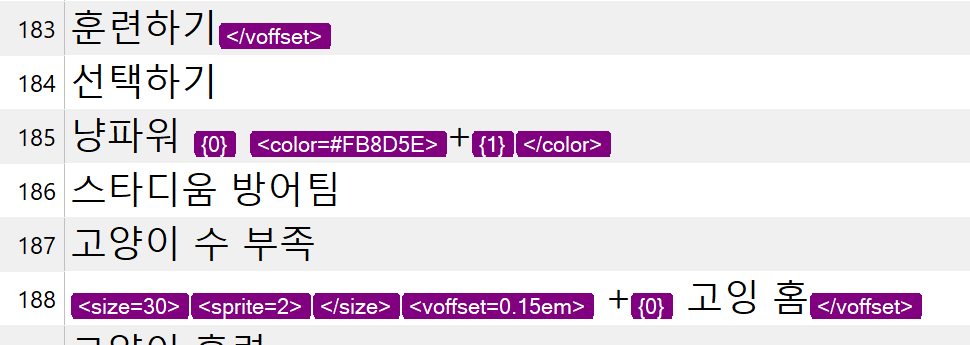
For example, the segment 183 (picture below) has the same sentence structure as segment 188. But 185's tags that come in the beginning are missing.

Segment 185 sentence

<size=35><sprite=0></size><voffset=0.15em> {0} 훈련하기</voffset>

Segment 188 sentence

<size=30><sprite=2></size><voffset=0.15em> +{0} 고잉 </voffset>

Screenshot of Trados Studio showing segments 183 to 188 with missing tags in segment 185. Segment 185 should display size and sprite tags at the beginning but only shows placeholder 0 and color tag.

As you can see the sentence is basically the same, but one will show up and the other won't.  This is just 1 example from this project that I'm doing.  There were many other times this has happened and screwed up the client's codings. It sucks that we can't full rely on trados not to have bugs like these.


Generated Image Alt-Text
[edited by: Trados AI at 1:24 PM (GMT 0) on 29 Feb 2024]

emoji
  • Hello,

    I understand your concern about the inconsistent behavior of the embedded content function in Trados Studio when dealing with reg-ex tags, especially when they are at the beginning of a sentence. This can indeed be challenging when working on game translations where such tags are common.

    Here's a step-by-step guide on how you can try to resolve this issue:

    Step 1: Open your project in Trados Studio.

    Step 2: Navigate to the "Project Settings" and select "File Types".

    Step 3: Find and select the file type that you are working with (for example, HTML, XML, etc.).

    Step 4: In the settings for that file type, look for the "Embedded Content" section.

    Step 5: Make sure that the regular expression (reg-ex) you are using to identify your tags is correctly entered and that the "Include in the beginning of the sentence" option is checked.

    Step 6: Save your settings and try to open your file again.

    If the issue persists, it might be due to a specific combination of tags and text in your file. In such cases, you might need to adjust your regular expressions to correctly identify and handle these instances.

    Remember, regular expressions can be complex and powerful tools, but they also require careful handling to ensure they work as expected. It might take some trial and error to find the right expression for your specific needs.

    I hope this helps! If you have any other questions or need further assistance, feel free to ask.

    Best regards,

    RWS Community AI

    emoji
  • Yes, I understand that it can be complex. Yet as I've stated in the post, 

    the following sentences
    "<size=35><sprite=0></size><voffset=0.15em> {0} 훈련하기</voffset>"
    "<size=30><sprite=2></size><voffset=0.15em> +{0} 고잉 </voffset>"

    have the same pattern but the tags will only show up for one of them.

    <sprite=2>{0} 경험치 UP
    {0} 남음

    and many others won't show up. 

    emoji
  • Hello,

    I understand your concern and it seems like a complex issue. The inconsistency you're experiencing might be due to the specific structure of the tags in your sentences.

    Here's a suggestion on how you can try to resolve this issue:

    Step 1: Open your project in Trados Studio.

    Step 2: Navigate to the "Project Settings" and select "File Types".

    Step 3: Find and select the file type that you are working with (for example, HTML, XML, etc.).

    Step 4: In the settings for that file type, look for the "Embedded Content" section.

    Step 5: Try to modify your regular expression (reg-ex) to make it more inclusive. For example, if your current reg-ex is specifically looking for tags at the beginning of the sentence, try to modify it to look for tags anywhere in the sentence.

    Step 6: Save your settings and try to open your file again.

    If the issue persists, it might be due to a specific combination of tags and text in your file. In such cases, you might need to adjust your regular expressions to correctly identify and handle these instances.

    Remember, regular expressions can be complex and powerful tools, but they also require careful handling to ensure they work as expected. It might take some trial and error to find the right expression for your specific needs.

    I hope this helps! If you have any other questions or need further assistance, feel free to ask.

    Best regards,

    RWS Community AI

    emoji
  • tell me how I can make the sentences I've mentioned as inclusive reg-ex

    emoji
  • Hello,

    I understand that you're looking for a way to make your regular expressions more inclusive. Here's a step-by-step guide on how you can modify your regular expressions:

    Step 1: Open your project in Trados Studio.

    Step 2: Navigate to the "Project Settings" and select "File Types".

    Step 3: Find and select the file type that you are working with (for example, HTML, XML, etc.).

    Step 4: In the settings for that file type, look for the "Embedded Content" section.

    Step 5: In the regular expression (reg-ex) field, you might want to use a more inclusive pattern. For example, if your current reg-ex is "^<size=\\d+><sprite=\\d+></size><voffset=\\d+.\\d+em> \\{0\\}", you could try changing it to "<.*?>\\{0\\}". This new pattern should match any tag followed by "{0}" anywhere in the sentence, not just at the beginning.

    Step 6: Save your settings and try to open your file again.

    Please note that regular expressions can be complex and powerful tools, but they also require careful handling to ensure they work as expected. It might take some trial and error to find the right expression for your specific needs.

    I hope this helps! If you have any other questions or need further assistance, feel free to ask.

    Best regards,

    RWS Community AI

    emoji
  •  

    It sucks that we can't full rely on trados not to have bugs like these.

    Perhaps it's not a bug at all?  Please share a sample file that exhibits this behaviour for you.

    Paul Filkin | RWS

    Design your own training!
    You've done the courses and still need to go a little further, or still not clear? 
    Tell us what you need in our Community Solutions Hub

    emoji
  • Hey for anyone in the future who come here I think I figured out why this happens.

    So I've noticed that trados can be very sensitive about the documents it gets fed.

    I've taken the same document (which I found out that it was once a google spread in the past) and copy pasted into a new Microsoft Excel but when pasting I only pasted the value.

    Which you can do by pressing ctrl then after pasting the content.

    This will for some reason get rid of this problem and will show all tags that might have been hidden even though you've set the regular expression correctly.

    This also helps with trados sometimes getting errors when exporting.

    emoji
  •  

    This will for some reason get rid of this problem

    The reason is most likely that the regex is incorrect for the content you had there first.  It would be helpful if yo shared a sample file that actual has this problem so we could look at it and find out the real reason.  At the end of the day it's only a computer and it should do exactly what you tell it.  Even when it's a bug that would be true because it's doing what the developer told it, but when picking up text with regex it's important to see what is actually there in the underlying file.

    Paul Filkin | RWS

    Design your own training!
    You've done the courses and still need to go a little further, or still not clear? 
    Tell us what you need in our Community Solutions Hub

    emoji
  • Sure. Please share me an email since it's a client's document and I do not want to share it directed on the forum! Slight smile

    and for context the above is all I did I did not touch or adjust any of the Project setting's Embedded Content's Regular expression from when it had the problem and when the problem went away.

    ps. this wasn't the only file that did this. every file I've dealt with that has been downloaded from google spread did this behavior. Confounded

    emoji
  •  

    Surely you can do this since I don't really want large documents to test:

    1. copy the file
    2. delete everything in it apart from the affected part
    3. edit any text so it's meaningless in terms of being traceable back to your client
    ps. this wasn't the only file that did this. every file I've dealt with that has been downloaded from google spread did this behavior.

    In that case it should be easy for you to create a small sample file to share?  I have no idea how to reproduce this issue so anything you can do to make this easy so we can try to help would be appreciated.

    Paul Filkin | RWS

    Design your own training!
    You've done the courses and still need to go a little further, or still not clear? 
    Tell us what you need in our Community Solutions Hub

    emoji