Make the content of a mrk tag visible in XLIFF file

I have an XLF file that contains remarks intended for the translator. These are hidden when I use the default XLIFF filter, and I want to make them visible.

Structure in XLIFF:

<source>This is the original text.

    <bpt id="N65b7945c3a930" equiv-text="remark" xml:space="preserve"><remark xinfo:translate="no"></bpt>
    <mrk mtype="protected">This is a remark for the translator</mrk>
    <ept id="N65b7945c3a930"></remark></ept>

</source>

The useful information is in the mrk tag, the bpt and ept tags can be ignored.

in the XLIFF filter (XLIFF 1.1-1.2 v 2.0.0.0), on the Embedded content page I've added a tag definition:
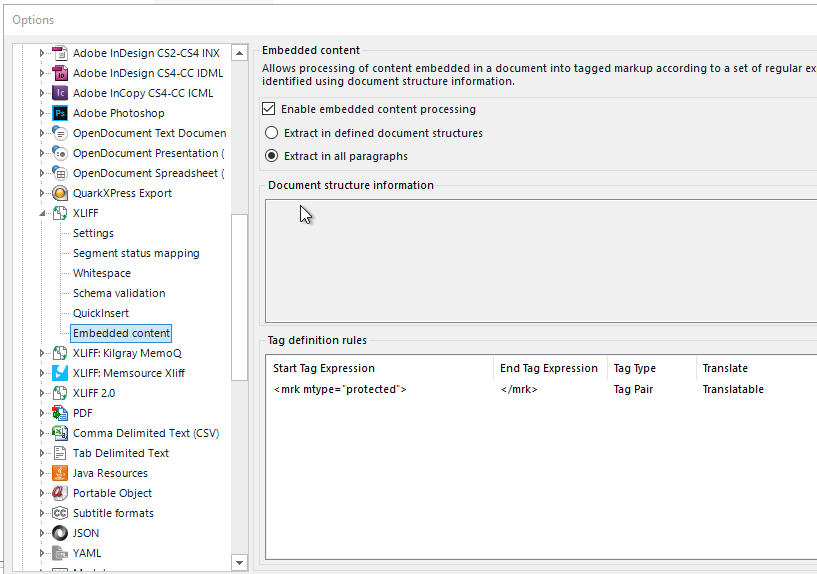
Trados Studio options menu with XLIFF selected, showing Embedded content settings. Enable embedded content processing is checked, with Document structure information section visible.

This does not have the desired result: the content of the mrk tag does not show up in the preview.

The source for the XLF is Paligo.


Generated Image Alt-Text
[edited by: Trados AI at 1:26 PM (GMT 0) on 29 Feb 2024]

emoji
  •  

    I have tried to look at this and had to create an xliff along the lines of your snippet:

    <?xml version="1.0" encoding="UTF-8"?>
    <xliff version="1.2" xmlns="urn:oasis:names:tc:xliff:document:1.2" xmlns:xinfo="http://www.example.com/xinfo">
        <file source-language="en-GB" target-language="ro-RO" datatype="plaintext" original="file.ext">
            <body>
                <trans-unit id="tu1">
                    <source>This is the first original text.
    
    <bpt id="b1" equiv-text="remark" xml:space="preserve"><remark xinfo:translate="no"/></bpt>
    <mrk mtype="protected" comment="Comment for the translator regarding the first remark">This is the first remark for the translator</mrk>
    <ept id="b1"></ept>
    
    </source>
    
                    <target>Acesta este primul text original.
    
    <bpt id="b1" equiv-text="remark" xml:space="preserve"><remark xinfo:translate="no"/></bpt>
    <mrk mtype="protected" comment="Comentariu pentru traducător referitor la prima remarcă">This is the first remark for the translator</mrk>
    <ept id="b1"></ept>
    
                    </target>
                    <note from="Developer" priority="2" annotates="general" xml:lang="en-GB">Please pay attention to the formatting tags and protected elements in the first unit.</note>
                </trans-unit>
                <trans-unit id="tu2">
                    <source>This is the second original text.
    
    <bpt id="b2" equiv-text="remark" xml:space="preserve"><remark xinfo:translate="no"/></bpt>
    <mrk mtype="protected" comment="Comment for the translator regarding the second remark">This is the second remark for the translator</mrk>
    <ept id="b2"></ept>
    
                    </source>
                    <target>Acesta este al doilea text original.
    
    <bpt id="b2" equiv-text="remark" xml:space="preserve"><remark xinfo:translate="no"/></bpt>
    <mrk mtype="protected" comment="Comentariu pentru traducător referitor la a doua remarcă">This is the second remark for the translator</mrk>
    <ept id="b2"></ept>
    
                    </target>
                    <note from="Developer" priority="2" annotates="general" xml:lang="en-GB">Ensure the second remark is properly preserved and not translated.</note>
                </trans-unit>
                <trans-unit id="tu3">
                    <source>This is the third original text.
    
    <bpt id="b3" equiv-text="remark" xml:space="preserve"><remark xinfo:translate="no"/></bpt>
    <mrk mtype="protected" comment="Comment for the translator regarding the third remark">This is the third remark for the translator</mrk>
    <ept id="b3"></ept>
    
                    </source>
                    <target>Acesta este al treilea text original.
    
    <bpt id="b3" equiv-text="remark" xml:space="preserve"><remark xinfo:translate="no"/></bpt>
    <mrk mtype="protected" comment="Comentariu pentru traducător referitor la a treia remarcă">This is the third remark for the translator</mrk>
    <ept id="b3"></ept>
    
                    </target>
                    <note from="Developer" priority="2" annotates="general" xml:lang="en-GB">The third unit contains important remarks. Do not translate them.</note>
                </trans-unit>
            </body>
        </file>
    </xliff>

    I would note that your snippet does have problems however because the tags are not nested correctly and this causes an issue with the remarks.  It would be better to have a sample similar to the one I showed that represented accurately what you are seeing.

    In the meantime this is what I get from my sample in Studio:

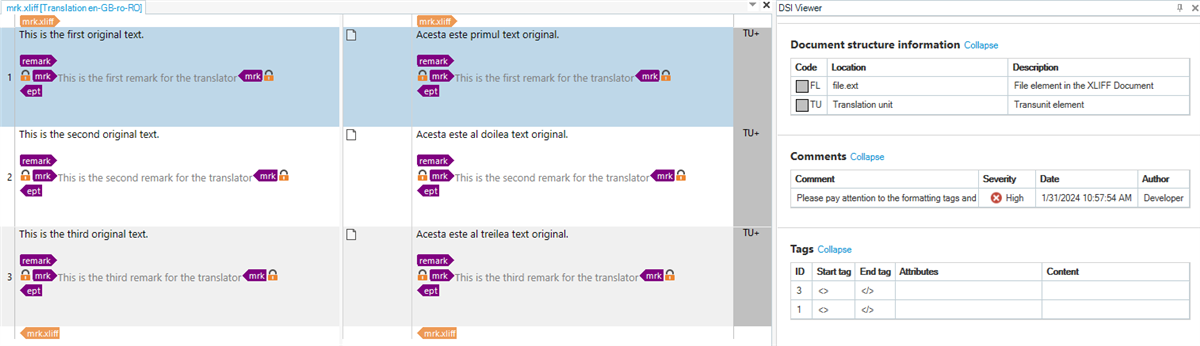
    Screnshot of the STudio Editor and the DSI Viewer showing the XLIFF sample opened and displaying the information available to the user .

    Like this I can see a fair bit of info via the DSI Viewer which may be helpful (although we need to make sure the comments wrap and will fix this in an update), and the part you are after is displayed in the editor where it can be seen as locked content.

    The use of embedded content will not help you here as this is not embedded content.

    Paul Filkin | RWS Group

    ________________________
    Design your own training!

    You've done the courses and still need to go a little further, or still not clear? 
    Tell us what you need in our Community Solutions Hub

    emoji
  • <?xml version="1.0" encoding="utf-8"?>
    <xliff xmlns="urn:oasis:names:tc:xliff:document:1.2" version="1.2" xmlns:xsi="http://www.w3.org/2001/XMLSchema-instance" xmlns:xsd="http://www.w3.org/2001/XMLSchema" xsi:schemaLocation="urn:oasis:names:tc:xliff:document:1.2 xliff-core-1.2-strict.xsd">
      <!-- ### Note: Approved translations are not included -->
      <!-- ### Note: Fuzzy translations are not included -->
      <file original="https://xyz.paligoapp.com//document/translate/149150/target/nl/source/en" source-language="en" target-language="nl" datatype="xml" product-name="uuid:UUID-efa320b2-79c4-7b41-978f-fce99fe075a7;u:5" date="2024-01-29T12:04:44Z">
        <body>
          <trans-unit id="UUID-97e416b9-4e15-1796-1b2b-4b0a9e56b5d4" reformat="yes">
            <source>Test Book</source>
            <target state="needs-translation"/>
          </trans-unit>
          <trans-unit id="UUID-fb1c928b-8a24-a97a-2715-24c74679e0db" reformat="yes">
            <source>Test chapter</source>
            <target state="needs-translation"/>
          </trans-unit>
          <trans-unit id="UUID-13b6d976-a980-9df7-5c51-efacdc7532d1" reformat="yes">
            <source>This is the original text.<bpt id="N65b7945c3a930" equiv-text="remark" xml:space="preserve">&lt;remark xinfo:translate="no"&gt;</bpt><mrk mtype="protected">This is a remark for the translator</mrk><ept id="N65b7945c3a930">&lt;/remark&gt;</ept></source>
            <target state="needs-translation"/>
          </trans-unit>
          <trans-unit id="UUID-2a6da41e-b32e-c618-7f08-de8b9c56b8be" reformat="yes">
            <source>Not anymore, it isn't</source>
            <target state="needs-translation"/>
          </trans-unit>
        </body>
      </file>
    </xliff>
    
    I've attached the original file. The snippet was modified when I pasted it. The start and end tags for Remark are inserted using less than and greater than HTML codes instead of using the < character and the > character.

    I had to append .txt to the file name so I could upload the file.

    So it looks like Paligo is generating the XLF incorrectly which makes it impossible for the filter to recognize the comments. It looks like I'll have to modify the XLFs to get them to import in Trados.

    emoji
  •  

    I mistakenly deleted my last two posts as I misread the format in the community and thought they were duplicating.

    I suggested a solution to manage the problems with a custom XML filetype.  Given you only have source content in your XLIFF you could copy the source content into a target element (either by opening the file in Studio and copying source to target, or using a basic script if you have many files) and then create a custom XML filetype to translate the target content.  You could also use a custom preview to deliver wat you need to see while translating.  I created a short video to explain:

    The files I used are here in case you find this a useful approach: Paligo_test.zip

    Paul Filkin | RWS Group

    ________________________
    Design your own training!

    You've done the courses and still need to go a little further, or still not clear? 
    Tell us what you need in our Community Solutions Hub

    emoji