Trying to add a new term onto my termbase currently open on Trados Studio is not possible, an error message appears

Hello, I have just updated my Trados Studio 2019 as I started using Windows 11 and my Studio went to be unable to create a project. I could open a single document only for translation. That problem has been solved by downloading a cumulative update for Trados Studio 2019, but I cannot add a new term from the document open on my Studio editor though I have highlighted both source and target terms, and the "add new term" button is not grayed-out. It shows an error message "Object reference not set to an instance of an object". I tried "quick-add" but the result was the same error message. Please help. I have seen similar posts but not a solution.

emoji
Parents Reply Children
  • <SDLErrorDetails time="26/03/2025 10:15:03">
      <ErrorMessage>Object reference not set to an instance of an object.</ErrorMessage>
      <Exception>
        <Type>System.NullReferenceException, mscorlib, Version=4.0.0.0, Culture=neutral, PublicKeyToken=b77a5c561934e089</Type>
        <HelpLink />
        <Source>Sdl.MultiTerm.Core.Common</Source>
        <HResult>-2147467261</HResult>
        <StackTrace><![CDATA[   at Sdl.MultiTerm.Core.Common.DataContainers.TermbaseStatus..ctor(ITermbaseInfo info)
       at Sdl.MultiTerm.Client.MiniEditor.MiniEditorControl..ctor(ITermbaseInfo activeTermbase, ITermHit activeTerm)
       at Sdl.TranslationStudio.Editor.Terminology.TermbaseViewer.MultiTermViewerWinFormsUI.AddTerm(ITermbaseInfo termbaseInfo, String source, String target)
       at Sdl.TranslationStudio.Editor.Terminology.TermbaseViewer.MultiTermViewerWinFormsUI.AddTerm(String source, String target)
       at Sdl.TranslationStudio.Editor.Terminology.TermbaseViewer.TermBaseViewPartX.TerminologyProviderViewerAddTerm(String source, String target)
       at Sdl.TranslationStudio.Editor.Terminology.TermbaseViewer.TermBaseViewPartX.AddTerm(ITerminologyProvider termbase, String source, String target)
       at Sdl.TranslationStudio.Editor.Terminology.EditorTermbaseUtils.AddTerm(IEditorService editorService, ITranslatableDocument translatableDocument, String sourceText, String targetText)
       at Sdl.TranslationStudio.Editor.Terminology.Actions.AbstractAddNewTermAction.AddTerm()
       at Sdl.TranslationStudio.Editor.Terminology.Actions.AddNewTerm.Execute()
       at Sdl.Desktop.Platform.Implementation.CommandBars.StaticAction.Execute()
       at Sdl.Desktop.Platform.Implementation.CommandBars.ActionService.<>c__DisplayClass30_0.<ExecuteAction>b__0()
       at Sdl.Desktop.Logger.Log.Resources(Object message, Action action)
       at Sdl.Desktop.Platform.Implementation.CommandBars.ActionService.ExecuteAction(IAction action, ActionOrigin origin, Boolean allowToggle)
       at Sdl.Desktop.Platform.WinForms.IgCommandBarAction.Execute()
       at Sdl.Desktop.Platform.WinForms.IgCommandBarAction._lazyButtonTool_ToolClick(Object sender, ToolClickEventArgs e)
       at Infragistics.Win.UltraWinToolbars.ToolBase.OnToolClick(ToolClickEventArgs e)
       at Infragistics.Win.UltraWinToolbars.UltraToolbarsManager.OnToolClick(ToolClickEventArgs e)
       at Infragistics.Win.UltraWinToolbars.UltraToolbarsManager.FireEvent(ToolbarEventIds id, EventArgs e)
       at Infragistics.Win.UltraWinToolbars.ToolBase.OnToolClick()
       at Infragistics.Win.UltraWinToolbars.ToolMenuItem.OnClick()
       at Infragistics.Win.UltraWinToolbars.PopupMenuItemUIElement.DoClickProcessing(MouseEventArgs e)
       at Infragistics.Win.UltraWinToolbars.PopupMenuItemUIElement.OnMouseUp(MouseEventArgs e)
       at Infragistics.Win.TextUIElementBase.OnMouseUp(MouseEventArgs e)
       at Infragistics.Win.ControlUIElementBase.ProcessMouseUpHelper(Object sender, MouseEventArgs e)
       at Infragistics.Win.ControlUIElementBase.ProcessMouseUp(Object sender, MouseEventArgs e)
       at Infragistics.Win.Utilities.ProcessEvent(Control control, ProcessEvent eventToProcess, EventArgs e)
       at Infragistics.Win.UltraWinToolbars.PopupControlBase.OnMouseUp(MouseEventArgs e)
       at System.Windows.Forms.Control.WmMouseUp(Message& m, MouseButtons button, Int32 clicks)
       at System.Windows.Forms.Control.WndProc(Message& m)
       at System.Windows.Forms.Control.ControlNativeWindow.OnMessage(Message& m)
       at System.Windows.Forms.Control.ControlNativeWindow.WndProc(Message& m)
       at System.Windows.Forms.NativeWindow.Callback(IntPtr hWnd, Int32 msg, IntPtr wparam, IntPtr lparam)]]></StackTrace>
      </Exception>
      <Environment>
        <ProductName>SDL Trados Studio</ProductName>
        <ProductVersion>15.0.0.0</ProductVersion>
        <EntryAssemblyFileVersion>15.2.8.3007</EntryAssemblyFileVersion>
        <OperatingSystem>Microsoft Windows 11 Pro</OperatingSystem>
        <ServicePack>NULL</ServicePack>
        <OperatingSystemLanguage>2057</OperatingSystemLanguage>
        <CodePage>1252</CodePage>
        <LoggedOnUser>DESKTOP-EI4BEEA\JPTR</LoggedOnUser>
        <DotNetFrameWork>4.0.30319.42000</DotNetFrameWork>
        <ComputerName>DESKTOP-EI4BEEA</ComputerName>
        <ConnectedToNetwork>True</ConnectedToNetwork>
        <PhysicalMemory>16619680 MB</PhysicalMemory>
      </Environment>
    </SDLErrorDetails>

    emoji
  • <SDLErrorDetails time="26/03/2025 09:37:56">
      <ErrorMessage>Object reference not set to an instance of an object.</ErrorMessage>
      <Exception>
        <Type>System.NullReferenceException, mscorlib, Version=4.0.0.0, Culture=neutral, PublicKeyToken=b77a5c561934e089</Type>
        <HelpLink />
        <Source>Sdl.MultiTerm.Core.Common</Source>
        <HResult>-2147467261</HResult>
        <StackTrace><![CDATA[   at Sdl.MultiTerm.Core.Common.DataContainers.TermbaseStatus..ctor(ITermbaseInfo info)
       at Sdl.MultiTerm.Client.MiniEditor.MiniEditorControl..ctor(ITermbaseInfo activeTermbase, ITermHit activeTerm)
       at Sdl.TranslationStudio.Editor.Terminology.TermbaseViewer.MultiTermViewerWinFormsUI.AddTerm(ITermbaseInfo termbaseInfo, String source, String target)
       at Sdl.TranslationStudio.Editor.Terminology.TermbaseViewer.MultiTermViewerWinFormsUI.AddTerm(String source, String target)
       at Sdl.TranslationStudio.Editor.Terminology.TermbaseViewer.TermBaseViewPartX.TerminologyProviderViewerAddTerm(String source, String target)
       at Sdl.TranslationStudio.Editor.Terminology.TermbaseViewer.TermBaseViewPartX.AddTerm(ITerminologyProvider termbase, String source, String target)
       at Sdl.TranslationStudio.Editor.Terminology.EditorTermbaseUtils.AddTerm(IEditorService editorService, ITranslatableDocument translatableDocument, String sourceText, String targetText)
       at Sdl.TranslationStudio.Editor.Terminology.Actions.AbstractAddNewTermAction.AddTerm()
       at Sdl.TranslationStudio.Editor.Terminology.Actions.AddNewTerm.Execute()
       at Sdl.Desktop.Platform.Implementation.CommandBars.StaticAction.Execute()
       at Sdl.Desktop.Platform.Implementation.CommandBars.ActionService.<>c__DisplayClass30_0.<ExecuteAction>b__0()
       at Sdl.Desktop.Logger.Log.Resources(Object message, Action action)
       at Sdl.Desktop.Platform.Implementation.CommandBars.ActionService.ExecuteAction(IAction action, ActionOrigin origin, Boolean allowToggle)
       at Sdl.Desktop.Platform.WinForms.IgCommandBarAction.Execute()
       at Sdl.Desktop.Platform.WinForms.IgCommandBarAction._lazyButtonTool_ToolClick(Object sender, ToolClickEventArgs e)
       at Infragistics.Win.UltraWinToolbars.ToolBase.OnToolClick(ToolClickEventArgs e)
       at Infragistics.Win.UltraWinToolbars.UltraToolbarsManager.OnToolClick(ToolClickEventArgs e)
       at Infragistics.Win.UltraWinToolbars.UltraToolbarsManager.FireEvent(ToolbarEventIds id, EventArgs e)
       at Infragistics.Win.UltraWinToolbars.ToolBase.OnToolClick()
       at Infragistics.Win.UltraWinToolbars.ToolMenuItem.OnClick()
       at Infragistics.Win.UltraWinToolbars.PopupMenuItemUIElement.DoClickProcessing(MouseEventArgs e)
       at Infragistics.Win.UltraWinToolbars.PopupMenuItemUIElement.OnMouseUp(MouseEventArgs e)
       at Infragistics.Win.TextUIElementBase.OnMouseUp(MouseEventArgs e)
       at Infragistics.Win.ControlUIElementBase.ProcessMouseUpHelper(Object sender, MouseEventArgs e)
       at Infragistics.Win.ControlUIElementBase.ProcessMouseUp(Object sender, MouseEventArgs e)
       at Infragistics.Win.Utilities.ProcessEvent(Control control, ProcessEvent eventToProcess, EventArgs e)
       at Infragistics.Win.UltraWinToolbars.PopupControlBase.OnMouseUp(MouseEventArgs e)
       at System.Windows.Forms.Control.WmMouseUp(Message& m, MouseButtons button, Int32 clicks)
       at System.Windows.Forms.Control.WndProc(Message& m)
       at System.Windows.Forms.Control.ControlNativeWindow.OnMessage(Message& m)
       at System.Windows.Forms.Control.ControlNativeWindow.WndProc(Message& m)
       at System.Windows.Forms.NativeWindow.Callback(IntPtr hWnd, Int32 msg, IntPtr wparam, IntPtr lparam)]]></StackTrace>
      </Exception>
      <Environment>
        <ProductName>SDL Trados Studio</ProductName>
        <ProductVersion>15.0.0.0</ProductVersion>
        <EntryAssemblyFileVersion>15.2.8.3007</EntryAssemblyFileVersion>
        <OperatingSystem>Microsoft Windows 11 Pro</OperatingSystem>
        <ServicePack>NULL</ServicePack>
        <OperatingSystemLanguage>2057</OperatingSystemLanguage>
        <CodePage>1252</CodePage>
        <LoggedOnUser>DESKTOP-EI4BEEA\JPTR</LoggedOnUser>
        <DotNetFrameWork>4.0.30319.42000</DotNetFrameWork>
        <ComputerName>DESKTOP-EI4BEEA</ComputerName>
        <ConnectedToNetwork>True</ConnectedToNetwork>
        <PhysicalMemory>16619680 MB</PhysicalMemory>
      </Environment>
    </SDLErrorDetails>

    emoji
  • Hello again Paul, this is the only way I have been able to upload the error file I saved yesterday, but I am not sure if you can receive it OK on your end. Thank you so much again for your help.

    emoji
  •  

    Thanks for sharing the error stack.  I think this is most likely the key: <Type>System.NullReferenceException

    An error like this can occur if you are using OneDrive and have stored the termbase on a path that is part of a OneDrive location.  For example:

    c:\Users\[USENAME]\OneDrive\Documents\Studio 2024\Termbases\my.sdltb

    If this is the case try copying the SDLTB to a location that is not on a path with OneDrive in it and see if this resolves the issue.

    Paul Filkin | RWS

    Design your own training!
    You've done the courses and still need to go a little further, or still not clear? 
    Tell us what you need in our Community Solutions Hub

    emoji
  • C:\Users\[USERNAME]\Documents\Studio 2019\Termbases\xxxxx.sdltb

    The above is the path of the termbase I am using, and the last entry was a month ago, so this is the most current one. However, I have updated my system to Windows 11 recently, and the termbase cannot have new terms added since then. I would appreciate your help here. I am not a OneDrive user either.

    emoji
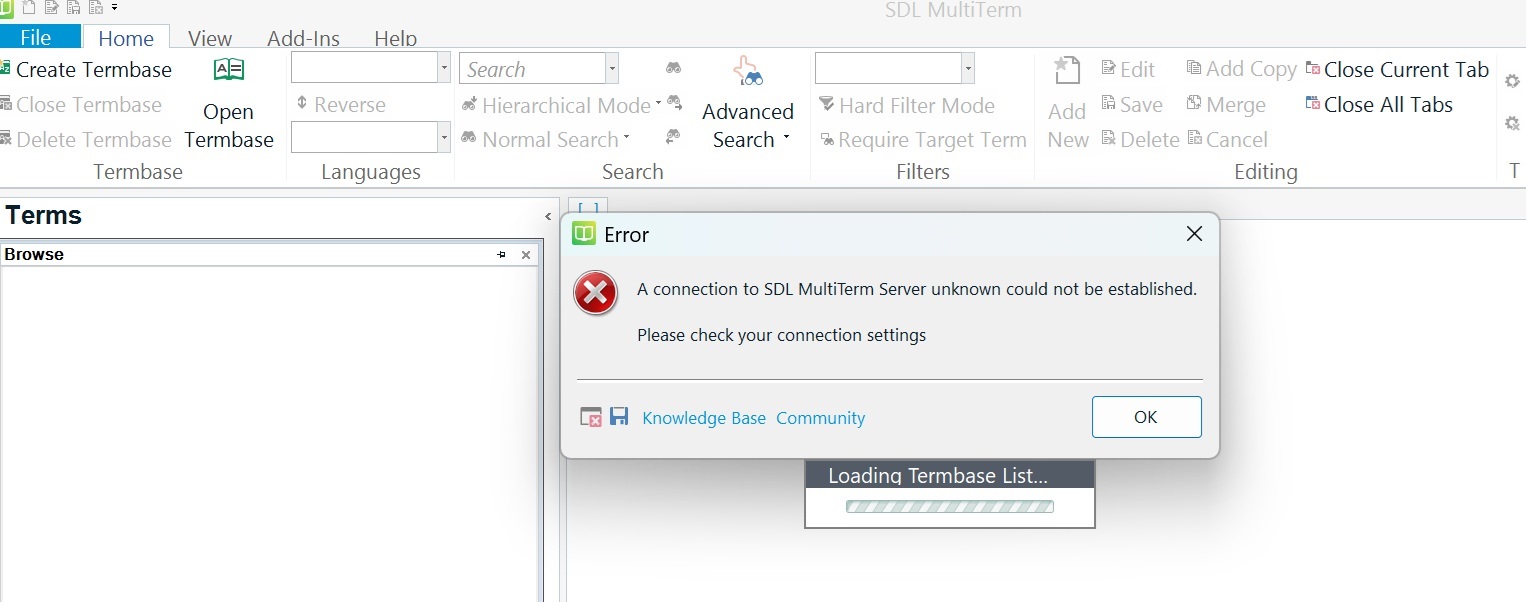
  • Hello again Paul, I have now opened my Multiterm 2019 and tried to open my termbases. Then it shows this error message, which I believe is related to my first problem. Please see the screen capture of the error message on my Multiterm 2019.

    <SDLErrorDetails time="27/03/2025 22:54:29">
      <ErrorMessage>A connection to SDL MultiTerm Server unknown could not be established.
    
    Please check your connection settings</ErrorMessage>
      <Exception>
        <Type>System.NullReferenceException, mscorlib, Version=4.0.0.0, Culture=neutral, PublicKeyToken=b77a5c561934e089</Type>
        <HelpLink />
        <Source>Sdl.MultiTerm.Client.Connectors</Source>
        <HResult>-2147467261</HResult>
        <StackTrace><![CDATA[   at Sdl.MultiTerm.TMO.Interop.TermbaseRepositoryClass.Connect(String UserId, String Password)
       at Sdl.MultiTerm.Core.Common.DataContainers.TermbaseConnector.Init()
       at Sdl.MultiTerm.Core.Common.DataContainers.TermbaseConnector..ctor()
       at Sdl.MultiTerm.Studio.Editor.TermbaseService.get_Connector()
       at Sdl.MultiTerm.Studio.Editor.Actions.TermbaseOpenAction.Execute(ITermbaseService termbaseService)]]></StackTrace>
      </Exception>
      <Environment>
        <ProductName>SDL MultiTerm</ProductName>
        <ProductVersion>MultiTerm15</ProductVersion>
        <EntryAssemblyFileVersion>15.0.6.56482</EntryAssemblyFileVersion>
        <OperatingSystem>Microsoft Windows 11 Pro</OperatingSystem>
        <ServicePack>NULL</ServicePack>
        <OperatingSystemLanguage>2057</OperatingSystemLanguage>
        <CodePage>1252</CodePage>
        <LoggedOnUser>DESKTOP-EI4BEEA\JPTR</LoggedOnUser>
        <DotNetFrameWork>4.0.30319.42000</DotNetFrameWork>
        <ComputerName>DESKTOP-EI4BEEA</ComputerName>
        <ConnectedToNetwork>True</ConnectedToNetwork>
        <PhysicalMemory>16619680 MB</PhysicalMemory>
      </Environment>
    </SDLErrorDetails>

    emoji
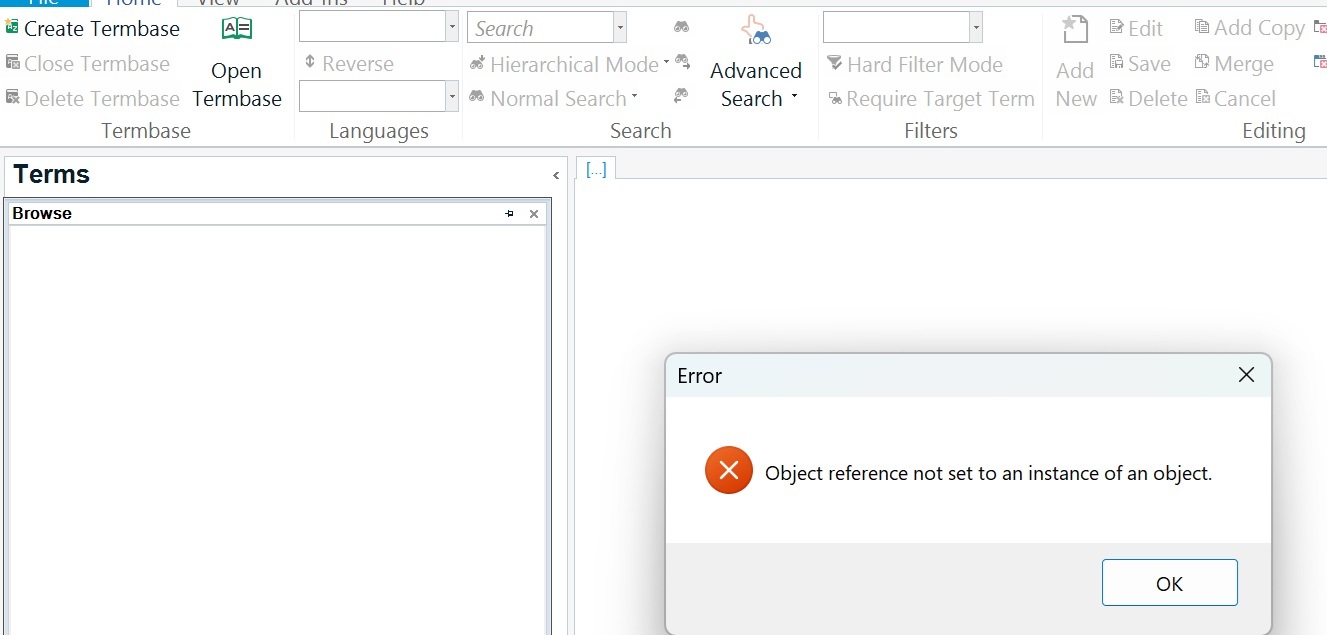
  • This is my 3rd error message with regards to my Multiterm 2019 so far... I couldn't open my most current termbase from my local folder, which is shown in my previous message, so I have tried to create a new termbase. This time, my local folder with all the other termbases were visible, so I tried to save a new termbase with a new name, then this error message appeared, and I don't have a disk icon on this error message... I would really appreciate your help here...Screenshot of Trados Studio with an error dialog box stating 'Object reference not set to an instance of an object.'

    emoji


    Generated Image Alt-Text
    [edited by: RWS Community AI at 11:09 PM (GMT 0) on 27 Mar 2025]
  •   

    I suggest you make sure you have the latest versions of 2019 installed:

    Trados Studio 2019 SR2 - 15.2.8.3007
    MultiTerm 2019 - 15.0.6.56482

    Also, review this article which may help: 

    https://gateway.rws.com/csm?id=kb_article_view&sysparm_article=KB0032712

    Paul Filkin | RWS

    Design your own training!
    You've done the courses and still need to go a little further, or still not clear? 
    Tell us what you need in our Community Solutions Hub

    emoji
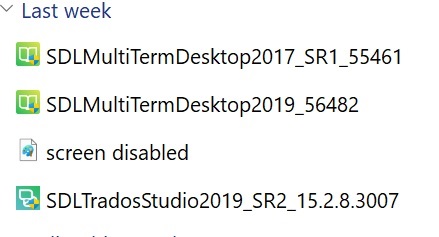
  • Yes, I have checked the installers I have used, and the screen capture is here:Folder view showing four items: 'SDLMultiTermDesktop2017_SR1_55461', 'SDLMultiTermDesktop2019_56482', 'screen disabled', and 'SDLTradosStudio2019_SR2_15.2.8.3007'.

    emoji


    Generated Image Alt-Text
    [edited by: RWS Community AI at 11:34 PM (GMT 0) on 27 Mar 2025]
  •  

    I suggest you repair MultiTerm 2019 in case the 2017 version causes any problems, and please try the solution in the KB article I provided.

    Paul Filkin | RWS

    Design your own training!
    You've done the courses and still need to go a little further, or still not clear? 
    Tell us what you need in our Community Solutions Hub

    emoji