Font mapping Simplified Chinese not working

Former Member
Former Member

Hi,

I am trying to map some fonts for Chinese in IDML file type, but I'm afraid it's not working as it's supposed to be. Or maybe I'm doing or understanding something wrong?

Here's what I do:

Project Settings > File Types > IDML > Font mapping
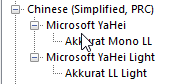
Font mapping settings in Trados Studio showing Akkurat Mono LL mapped to Microsoft YaHei and Akkurat LL Light mapped to Microsoft YaHei Light under Chinese (Simplified, PRC).

The way I understand it, this should map the Akkurat Mono LL of my source file to Microsoft YaHei in my target file. Idem with Akkurat LL Light and Microsoft YaHei Light.

However, when I open the generated Chinese IDML file in InDesign, it looks like this:
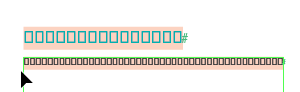
Generated Chinese IDML file in InDesign showing text replaced with square boxes, indicating font rendering issues.

What am I doing wrong?

Any help appreciated! :)

Kind regards,

Katharina

Trados Studio 2024 SR1 18.1.2.6370

InDesign: 20.5 x64


Generated Image Alt-Text
[edited by: RWS Community AI at 1:12 PM (GMT 1) on 20 Oct 2025]

emoji
Parents
  •  

    I can't be 100% on this but, I think this might be occurring because the font you mapped doesn’t actually support Chinese characters, or the mapping didn’t apply as expected.  Trados only swaps the font name in the IDML; it doesn’t ensure the new font has the right glyphs.  When InDesign opens it, you get boxes because it’s still referencing a Western font.

    This article might he helpful as I think this is more of an InDesign issue than a Trados one: https://community.adobe.com/t5/indesign-discussions/native-american-symbols-displaying-as-squares/m-p/12858168

    In short: check that Microsoft YaHei is installed, make sure the mapping matches exactly, and confirm the IDML actually uses that font when opened in a text editor.

    Paul Filkin | RWS

    Design your own training!
    You've done the courses and still need to go a little further, or still not clear? 
    Tell us what you need in our Community Solutions Hub

    emoji
  • Former Member
    0 Former Member in reply to Paul


    Thanks for your quick answer.

    Unfortunately, the graphics people in our company said the problem does seem to be Trados because the standard font mapping from all fonts to SimSun works fine. Only the custom mapping does not work. If they open the InDesign file, the boxes appear because the file is still in Akkurat font, which does not support Chinese characters.

    So ... any other ideas maybe?

    emoji
  •  

    ok -I had to mess around a little to figure this out.  I could reproduce your problem trying various scenraios, so I checked inside the Resources/Fonts.xml which you can find if you unzip the IDML and looked at the font name being used for the source.  What I found is that initially I used the name of the font as I saw it in my fonts. so I used this:

    IBMPlexMono-Regular

    That got me this:

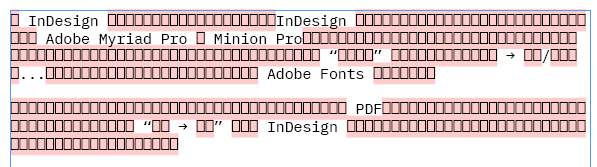
    Screenshot showing text in a pink-highlighted box with references to InDesign, Adobe Myriad Pro, Minion Pro, and Adobe Fonts.

    When I looked in the Font.xml InDesign used it was this:

    IBM Plex Mono

    Like this:

    	<FontFamily Self="di140" Name="IBM Plex Mono">
    		<Font Self="di140FontnIBM Plex Mono Regular" FontFamily="IBM Plex Mono" Name="IBM Plex Mono Regular" PostScriptName="IBMPlexMono-Regular" Status="Installed" FontStyleName="Regular" FontType="TrueType" WritingScript="0" FullName="IBM Plex Mono Regular" FullNameNative="IBM Plex Mono Regular" FontStyleNameNative="Regular" PlatformName="$ID/" Version="Version 2.3" TypekitID="$ID/" />
    	</FontFamily>

    So I removed the custom font settings and added them again with the correct name.  Then when I recreated my project and ran it through my TM the target file looked like this:

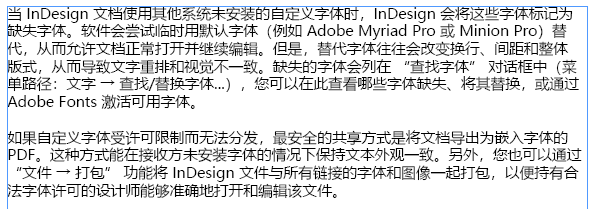
    Screenshot displaying text in Chinese discussing InDesign, missing fonts, Adobe Myriad Pro, Minion Pro, and font replacement options.

    So this seems to be all about using the correct name for the font exactly when you create the mapping.  Maybe you can check as I suggested before?

    Paul Filkin | RWS

    Design your own training!
    You've done the courses and still need to go a little further, or still not clear? 
    Tell us what you need in our Community Solutions Hub


    Generated Image Alt-Text
    [edited by: RWS Community AI at 8:36 AM (GMT 1) on 21 Oct 2025]
  • Former Member
    0 Former Member in reply to Paul


    Wow, thanks for all the research! I was so sure that this was the solution that I tested it right away ... sadly, with the same result. But I did use the font name and not the font family name. I'll try it again with the font family name.

    emoji
Reply Children
No Data