


Setting automatic contextual search

Hello,

I would like to set an automatic contextual search. It works well when I do the search manually (see screenshot).
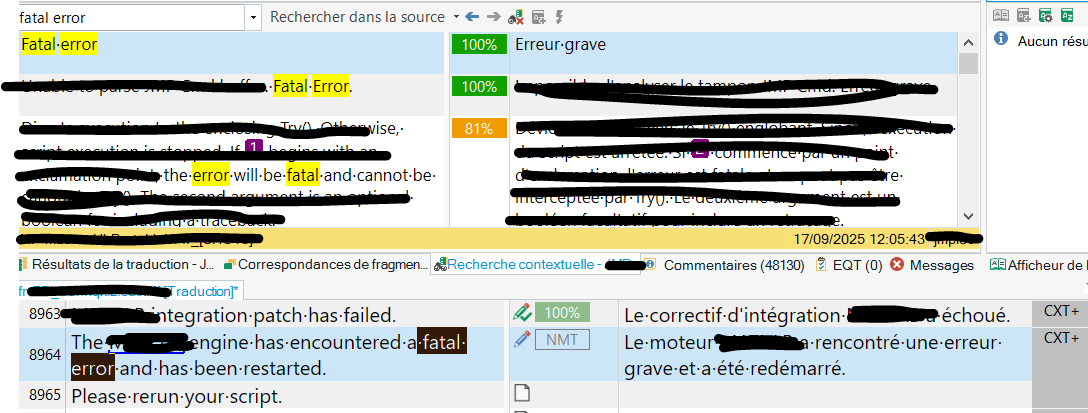
Screenshot showing a search for 'fatal error' with highlighted results in yellow, translation matches, and a message about a fatal error in the translation engine.

But I'm sure there is a way to have the search run automatically. I can't, however, find how to set the settings correctly so it can work.

I've set this, but it does not help
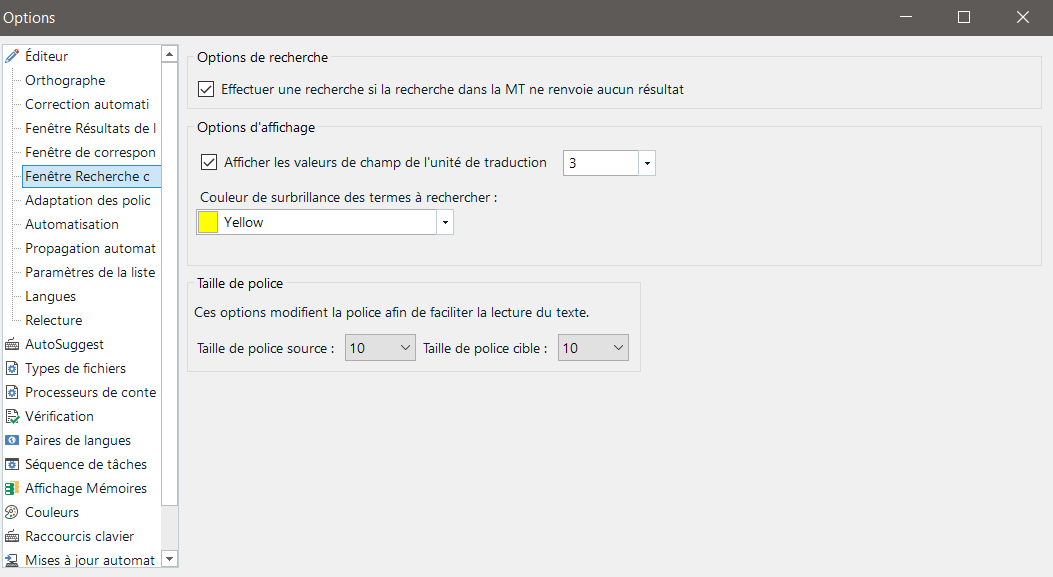
 Screenshot of the options menu with settings for search, display options, and font size. The term highlight color is set to yellow, and font sizes are set to 10 for both source and target.

Could you please advise how these can be set?

Thank you


Removed AI Suggestion
[edited by: Aubeline Brandamir at 4:52 PM (GMT 0) on 18 Nov 2025]

emoji
Parents
  • Probability score: 0.8  

    Question improvement suggestion: Please provide the exact version of Trados Studio you are using, as well as any specific error messages or issues encountered when trying to set the automatic contextual search.  

    In the meantime, based on the information you have provided, here is a suggested answer to your question:  

    Hello,  

    To set up automatic contextual search in Trados Studio, please follow these steps:  

    **Step 1:** Open Trados Studio and go to the **Options** dialog box. You can find this under the **File** menu.  

    **Step 2:** In the Options dialog, navigate to **Translation Memory** and then select **Editor**.  

    **Step 3:** Click on **Concordance Search Window**.  

    **Step 4:** Look for the **Search Options** section on the right side. Here, you should find the option labeled **Perform search if the TM lookup returns no results**. Make sure this option is checked.  

    **Step 5:** After making these changes, click **OK** to save your settings.  

    This configuration should enable the automatic concordance search feature, allowing it to run automatically when the TM lookup does not yield results. If you have followed these steps and it still does not work, please ensure that you are using the latest version of Trados Studio, as updates may include important fixes and enhancements.  

    I hope this answer addressed your question. If not, please reject the answer, add the question improvement suggestion information, and click the RWS Community AI checkbox on the right to try again.  

    RWS Community AI

    emoji
Reply
  • Probability score: 0.8  

    Question improvement suggestion: Please provide the exact version of Trados Studio you are using, as well as any specific error messages or issues encountered when trying to set the automatic contextual search.  

    In the meantime, based on the information you have provided, here is a suggested answer to your question:  

    Hello,  

    To set up automatic contextual search in Trados Studio, please follow these steps:  

    **Step 1:** Open Trados Studio and go to the **Options** dialog box. You can find this under the **File** menu.  

    **Step 2:** In the Options dialog, navigate to **Translation Memory** and then select **Editor**.  

    **Step 3:** Click on **Concordance Search Window**.  

    **Step 4:** Look for the **Search Options** section on the right side. Here, you should find the option labeled **Perform search if the TM lookup returns no results**. Make sure this option is checked.  

    **Step 5:** After making these changes, click **OK** to save your settings.  

    This configuration should enable the automatic concordance search feature, allowing it to run automatically when the TM lookup does not yield results. If you have followed these steps and it still does not work, please ensure that you are using the latest version of Trados Studio, as updates may include important fixes and enhancements.  

    I hope this answer addressed your question. If not, please reject the answer, add the question improvement suggestion information, and click the RWS Community AI checkbox on the right to try again.  

    RWS Community AI

    emoji
Children