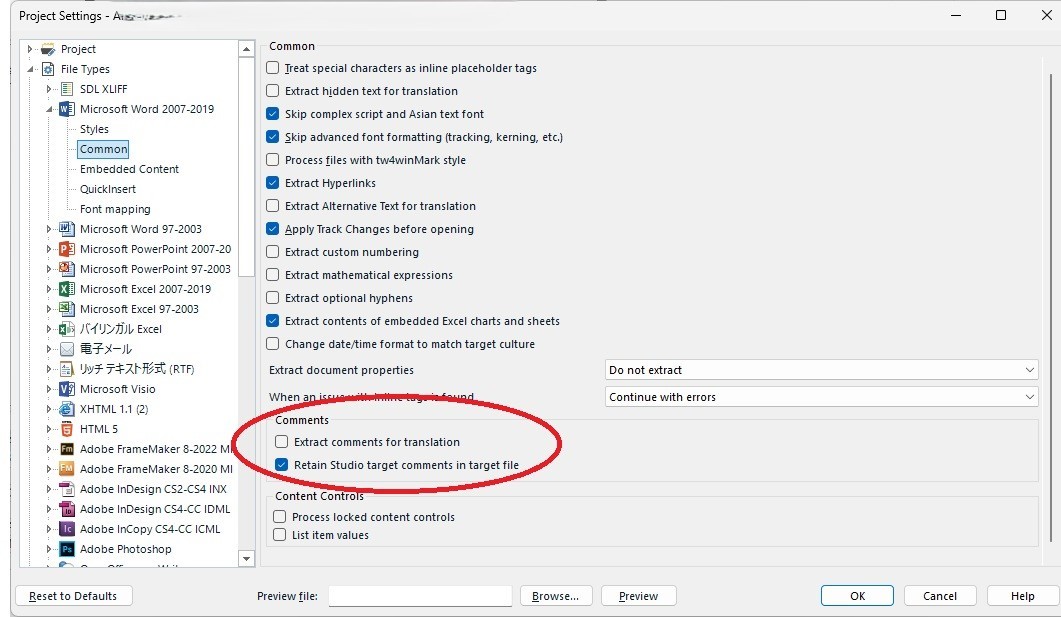
Check box for "Retain Studio target comments in target file" not shown in Japanese language

Hello,

I am using Trados Studio 2024 SR1_18.1.3.6657, and am having trouble displaying the checkbox for “Retain Studio target comments in target file” when using the Japanese-language interface.

It is shown and can be selected when using English-language interface.

Is there any way I can show and select it in Japanese-language interface?

I did not have this problem when using Studio 2022.
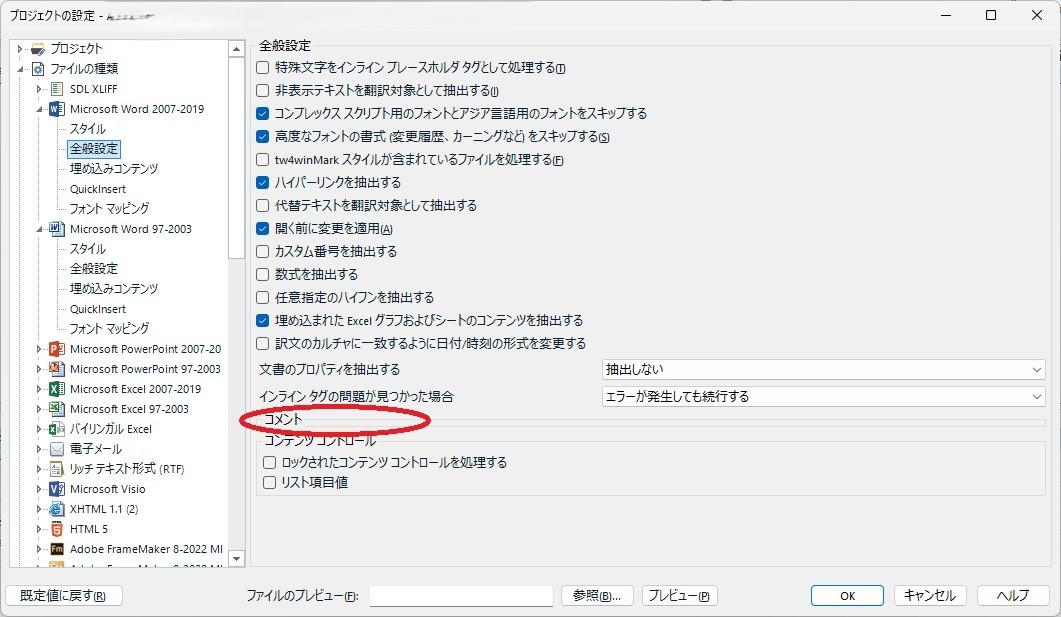
Screenshot of Trados Studio 2024 SR1 Japanese interface showing project settings. The 'Comments' section is circled, but the 'Retain Studio target comments in target file' checkbox is missing.

Screenshot of Trados Studio 2024 SR1 English interface showing project settings. The 'Comments' section is circled, and the 'Retain Studio target comments in target file' checkbox is visible and selected.

Thank you and best regards,

Aki


Removed AI Suggestion
[edited by: Aki Machiyama at 5:21 AM (GMT 0) on 1 Dec 2025]
emoji
  • Probability score: 0.7  

    Question improvement suggestion: Please provide a detailed description of the steps you have taken to troubleshoot this issue, including any settings you have checked or modified in the Japanese interface.  

    In the meantime, based on the information you have provided, here is a suggested answer to your question:  

    Hello Aki,  

    Thank you for reaching out! It seems you are experiencing an issue with the checkbox for "Retain Studio target comments in target file" not being displayed in the Japanese-language interface of Trados Studio 2024. Here are some steps you can take to troubleshoot this issue:  

    **Step 1:** Switch to the English-language interface temporarily. You can do this by going to the top right corner of the application and selecting the language option. Check if the checkbox appears in the English interface.  

    **Step 2:** If the checkbox is visible in English, it may indicate a language-specific issue. You can report this to the development team, as it has been noted that similar issues have been logged previously (e.g., CRQ-22767).  

    **Step 3:** Ensure that you have the latest updates installed for Trados Studio 2024. Sometimes, issues like these are resolved in subsequent updates.  

    **Step 4:** If you need to work in Japanese, consider adjusting your settings in the English interface and then switching back to Japanese to see if the changes take effect.  

    **Step 5:** If the problem persists, you may want to check the RWS AppStore for any plugins or updates that might address this issue.  

    I hope these steps help you resolve the issue! If you have any further questions or need additional assistance, feel free to ask.  

    I hope this answer addressed your question. If not, please reject the answer, add the question improvement suggestion information, and click the RWS Community AI checkbox on the right to try again.  

    RWS Community AI

    emoji