


Trados fuzzy matches with negative values

Hi,

We use Trados Studio 2024 and it seems that there are some reports that show us negative values in the fuzzy match 95%-99%.

This is totally random, it doesn't happen to all of our projects.

I checked our fuzzy matches categories and they are fine; we didn't change them, so it shouldn't be a problem anyways.

I put all my penalties on 0.. I don't know what to try next to get rid of these values.

I don't know what is causing this.

Is anyone experiencing the same issue? Has anyone managed to solve it?

Thank you very much,
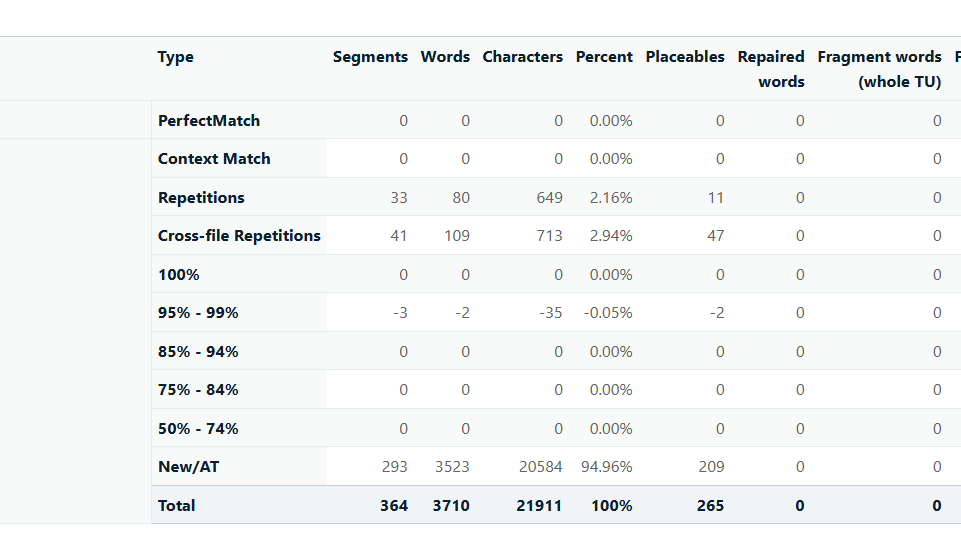
Trados Studio 2024 report table showing negative values in the 95%-99% fuzzy match category, with -3 segments, -2 words, and -35 characters, and a percentage of -0.05%.


Removed AI Suggestion
[edited by: Antoaneta Flurchi at 3:01 PM (GMT 0) on 5 Dec 2025]
emoji
  • Probability score: 0.6  

    Question improvement suggestion: Provide specific examples of the negative values you are encountering and clarify if any error messages are displayed.  

    In the meantime, based on the information you have provided, here is a suggested answer to your question:  

    Hello,  

    It sounds like you're experiencing an unusual issue with negative values appearing in the fuzzy match percentages in Trados Studio 2024. Here are some steps you can take to troubleshoot and potentially resolve this issue:  

    **Step 1:** **Check Fuzzy Match Settings**  

    - Go to Project Settings > Language Pairs > All Language Pairs > Translation Memory and Automated Translation > Penalties.  

    - Ensure that all penalties, including the Missing Formatting penalty, are set to 0. This can help eliminate any unintended deductions that might be causing negative values.  

    **Step 2:** **Review Translation Memory (TM)**  

    - Open the Translation Memory you are using in your project and search for the source segments that are showing negative fuzzy match values.  

    - Check if there are any discrepancies in tags or formatting between the source and target segments. Correcting these mismatches can help improve the accuracy of fuzzy matches.  

    **Step 3:** **Adjust Minimum Match Value**  

    - In Project Settings, navigate to Language Pairs > All Language Pairs > Search.  

    - Set the Minimum Match Value to a lower percentage (e.g., 70%) to see if this resolves the issue. This adjustment can help in retrieving more relevant fuzzy matches.  

    **Step 4:** **Test with Different Projects**  

    - Since you mentioned that this issue does not occur in all projects, try creating a new project with similar settings to see if the problem persists. This can help identify if the issue is project-specific.  

    **Step 5:** **Check for Software Updates**  

    - Ensure that you are using the latest version of Trados Studio 2024. Sometimes, bugs are fixed in newer releases, so checking for updates can be beneficial.  

    If these steps do not resolve the issue, it may be helpful to gather more specific examples of the negative values and any error messages you encounter. This information can assist in further diagnosing the problem.  

    I hope this answer addressed your question. If not, please reject the answer, add the question improvement suggestion information, and click the RWS Community AI checkbox on the right to try again.  

    RWS Community AI

    emoji
