


Looking for an explanation of image depth.

XPP 9.7, Linux server, running classic format specs not CSS.

The image is not resizing even though we've adjust the depth setting and depth_auto settings. We are still getting imag text overlay which seems to be due to FN tags and rendering of FN text on the page.

Below is an example of changing image depth from 150 to 300...which does allow the text/footnote and footnote text to render.  It's not clear in the documentation the interaction of the image depth and depth-auto functions and the interaction with the text/FN.  Maybe something with the "priority" for the image or text?

This is an issue as multiple images exist and the default supplied depth is causing image overlay of the text.  Below is an example -after- resizing depth.  With the default image depth the image completely overlays the text on the page and partially overlays the FN stream area.
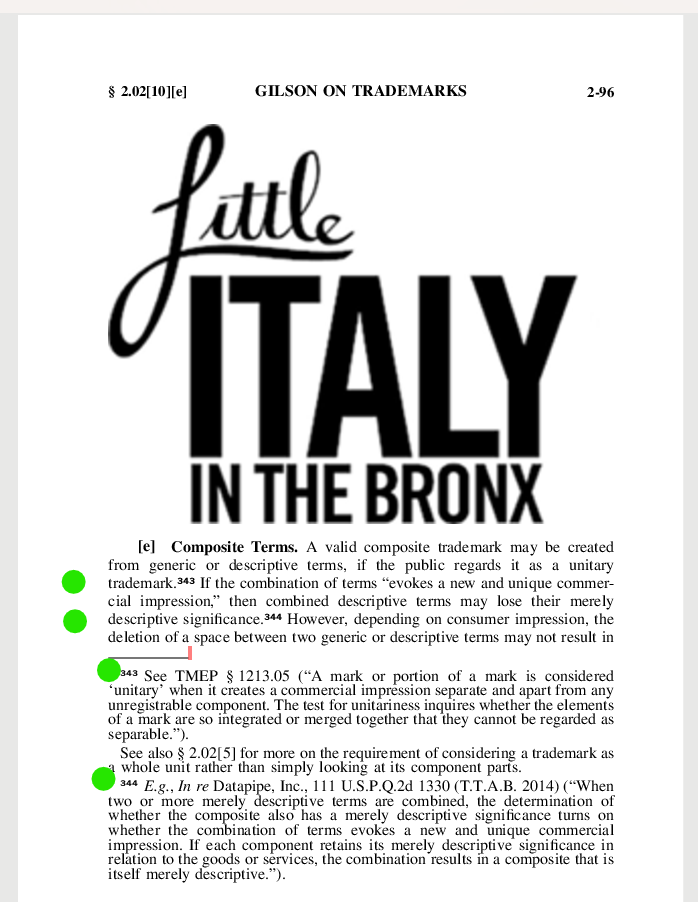
A page from 'Gilson on Trademarks' showing the heading 'Composite Terms' with a logo reading 'Little Italy in the Bronx' and text discussing composite trademarks.


Removed AI Suggestion
[edited by: John Ibbotson at 1:28 PM (GMT 0) on 24 Dec 2025]

emoji
  • Probability score: 0.4  

    Question improvement suggestion: Provide specific details about the steps taken to adjust the image depth settings and any error messages encountered. Additionally, clarify the expected behavior versus the actual behavior regarding the image and text overlay.  

    In the meantime, based on the information you have provided, here is a suggested answer to your question:  

    Hello,  

    It seems you are experiencing issues with image depth settings in XPP 9.7 on a Linux server, particularly with images overlaying text and footnotes. Here’s a step-by-step approach to help you troubleshoot this issue:

    **Step 1:** Verify the Image Depth Settings  

    Ensure that the image depth settings are correctly configured. You mentioned adjusting the depth from 150 to 300, which allowed the text and footnotes to render. Double-check that these settings are applied consistently across all images.

    **Step 2:** Review FN Tags and Rendering  

    Since you noted that FN tags are causing text overlay, examine how these tags are being processed. It may be beneficial to adjust the rendering settings for FN tags to see if that alleviates the overlay issue.

    **Step 3:** Check Documentation for Interactions  

    You mentioned that the documentation does not clearly explain the interaction between image depth and FN tags. It may be helpful to reach out to your documentation team or check for any updates that clarify these interactions.

    **Step 4:** Test with Different Depth Settings  

    Experiment with various depth settings beyond 150 and 300 to see if there is a specific threshold that resolves the overlay issue without compromising the visibility of the text.

    **Step 5:** Consider Custom File Type Configuration  

    If the default settings are causing issues, consider creating a custom file type configuration that sets image content as non-translatable, as this may help manage how images and text interact.

    **Step 6:** Monitor for Updates or Patches  

    Keep an eye on any updates or patches for XPP that may address this issue, as software updates can often resolve unexpected behavior.

    If you continue to experience difficulties, please provide more specific details about the steps you've taken and any error messages you encounter. This will help in diagnosing the issue more effectively.  

    I hope this answer addressed your question. If not, please reject the answer, add the question improvement suggestion information, and click the RWS Community AI checkbox on the right to try again.  

    RWS Community AI

    emoji
  • Actually I just answered yes as the RWS AI suggested this one...I was originally posting in the XPP forum.  

    emoji
