
 Translate



Hello there,
In November, I had issues with my company's XLF files consistently crashing. Unfortunately, we were unable to find a solution. Virgil recommended that I work from my C drive, since my company network had a lot going on. But the XLF files continued to crash within 10 to 45 minutes. As a workaround, I asked my colleagues to convert the XLF files to Word. In this format, TRADOS did not crash. However, now that I am ready to generate the target translations, the Batch tasks "Generate Target Translations" is not working. Save Target as also does not work. I get the following error message.
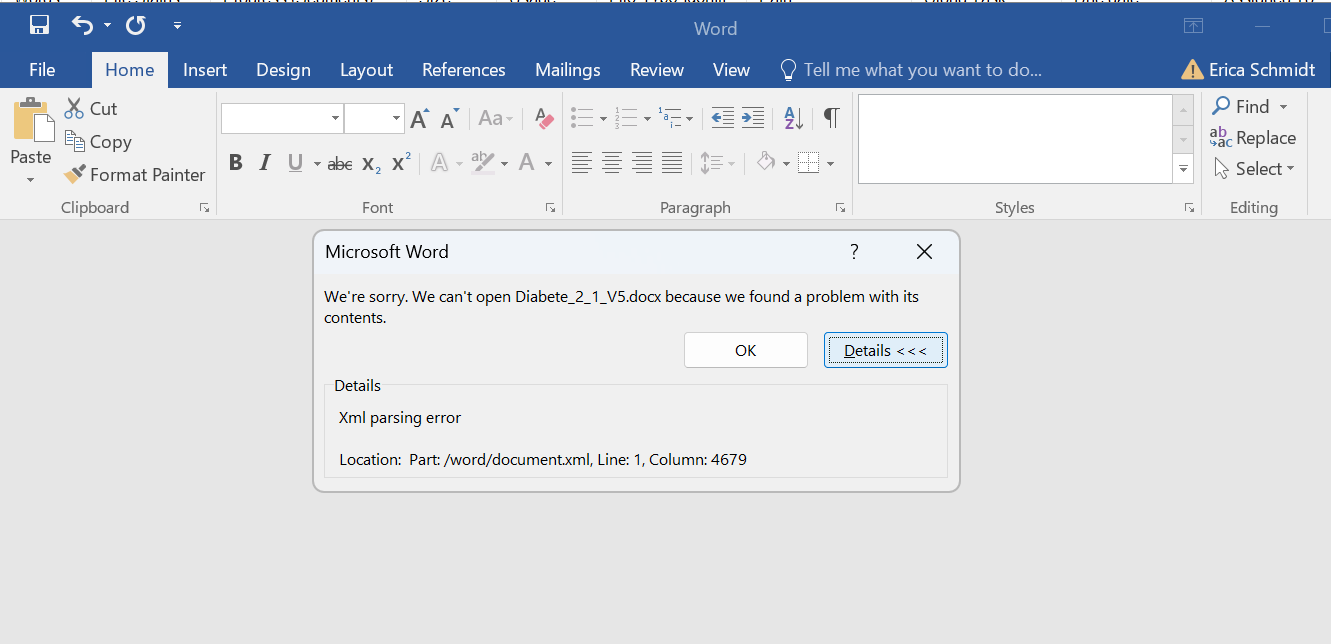
As recommended by tech support, I have recently updated to the latest version of TRADOS but to no avail. As suggested in various TRADOS queries, I tried converting the target translation file to RTF of uploading it to Google docs. The files were unusable.
There is no Column 4679 in the document, so I don't know what I would do correct this.
Both my IT team and Trados support has done everything they could to find a solution here, but it is truly baffling. I welcome your feedback and suggestions.
Thank you and best wishes, Erica
Generated Image Alt-Text
[edited by: RWS Community AI at 3:29 PM (GMT 0) on 30 Dec 2025]



