
 Translate



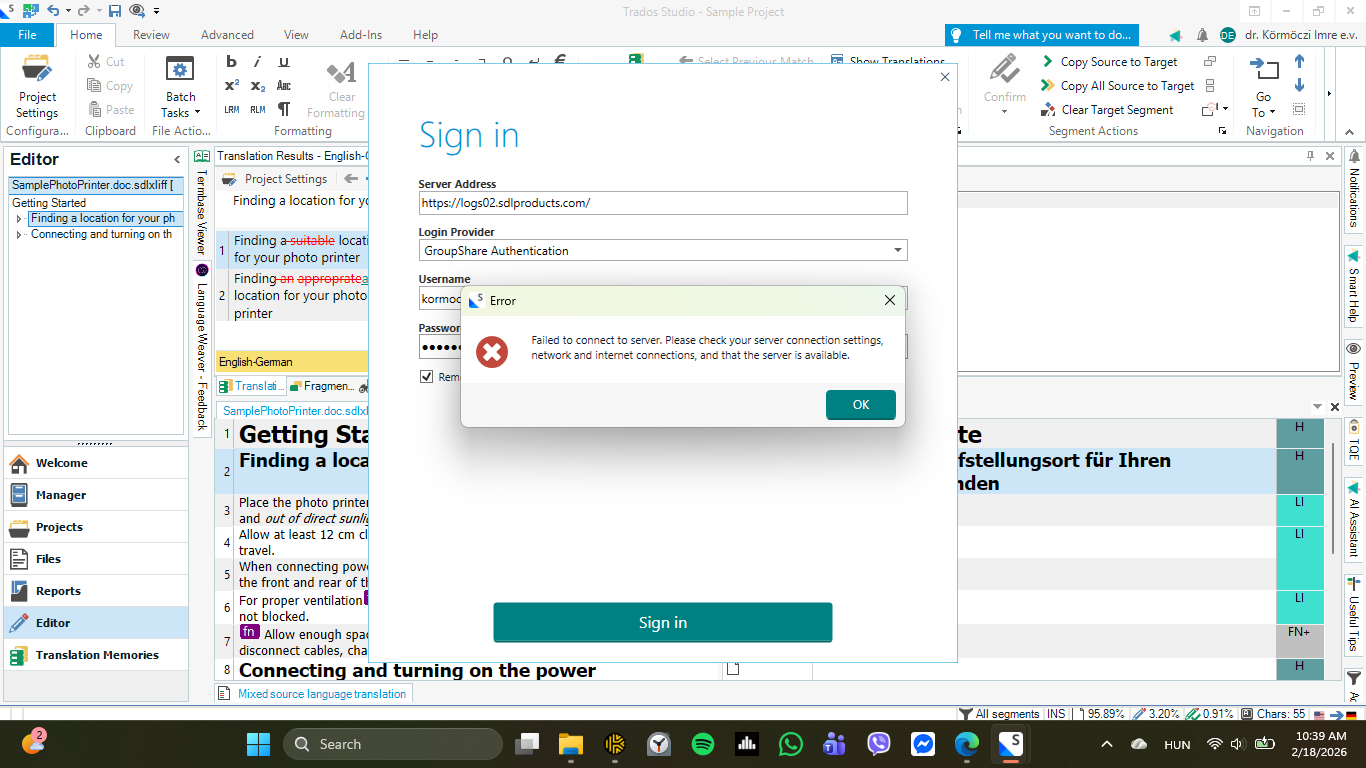
Whenever I open a file for translation, a sign in popup window appears, requiring me to sign in to the https://logs02.sdlproducts.com/ server address, using either GroupShare Authentication, Windows Authentication or (Auth) as login provider. But at this point, I am already signed in, as can be seen in the top right corner of the below screenshot. I tried all possible email address-password combinations with every login provider, but nothing works. If I close this window, it reappears in about 20 seconds, causing a lot of distraction and annoyance while I work. I have already spent hours trying to get rid of this popup, but so far I couldn't. There is nothing wrong with my internet connection, so that couldn't be the culprit. This whole issue started after I installed SR1, and then proceeded to delete old versions of Studio from my laptop to free up space, as Windows started complaining about the lack of it.
Version number: Trados Studio 2024 SR1 - 18.1.3.6657
Removed AI Suggestion
[edited by: Imre Körmöczi at 9:57 AM (GMT 0) on 18 Feb 2026]




