 Translate



I cannot use the Find option anymore. I click on it and can see "Find next" and "Find previous" in grey. I have tried resetting the keyboard. I looked for the "repair" function but cannot see it and do not know what to do.


I cannot use the Find option anymore. I click on it and can see "Find next" and "Find previous" in grey. I have tried resetting the keyboard. I looked for the "repair" function but cannot see it and do not know what to do.
Hi Paolo Cortucci,
When clicking on Find, a window normally pops up, otherwise the two options you mentioned appear grey in the dropdown:
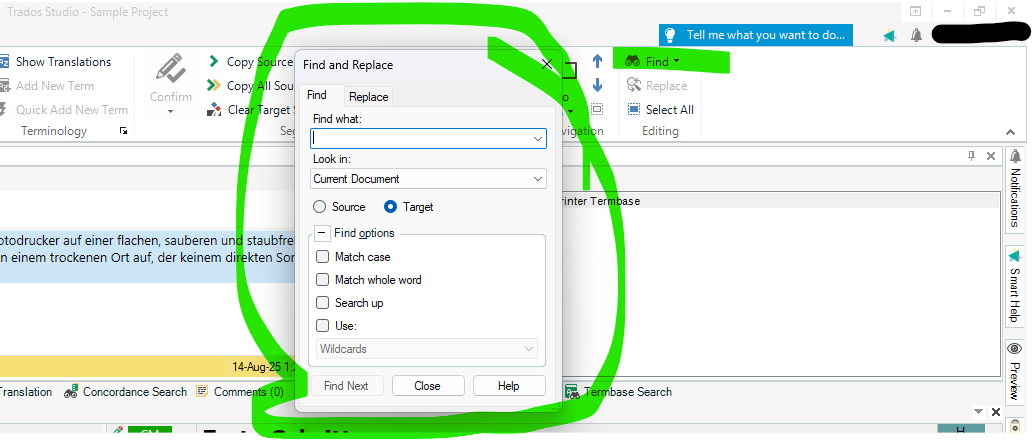
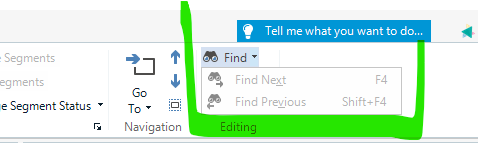
So do you get the Window in the first screenshot when you click on Find? If not, please try this:
Go to the View tab > Reset Window Layout (in the User Interface group).
Best regards,
Anca
Anca Stoian | RWS Group


Thank you very much, Anca. I have tried out but it does not work, alas! It is really annoying because it was working!

You can try the Repair for Trados https://gateway.rws.com/csm?sys_kb_id=b24f61e983466690396947426daad39d&id=kb_article_view&sysparm_rank=1&sysparm_tsqueryId=be103b6883fb225415c56180deaad368
and next step would be a reset to default settings.
Just a small question, before doing the above procedures - also because this happened to me once with a Window in Trados, if you minimize Trados perhaps the window for Find is under it? And if it is, you can just move it back.
Otherwise, please check the above article, it describes both how to repair Trados or reset it to default if necessary.
Best regards,
Anca
Anca Stoian | RWS Group
Just press Ctrl+F
The "Find next" and "Find previous" options are greyed out when you click the dropdown menu arrow. It is by design. You have to select a word for searching first. Press Ctrl+F, type the word you want to find and then click again the dropdown menu triangle (the one against the Find icon). Viola! The "Find next" and "Find previous" options are not greyed out now. This is because you cannot find either next or previous occurrence until you specify what you want to find. It is not a bug and it does not require fixing, resetting layouts or repairs.
Dear Anca,
Again, thank you very much for your kind assistance but for God knows what reason I do not have the repair option, only the uninstall option. I'll have tried all the workaround but nothing. Again, for some reason I don't have the SDL folder and cannot therefore write _old. I cannot reset it to default or not able to. I am going to need someone from RWS who can guide me.
Did you use a second display? In my case, I had the problem where I displayed the Find window on a second monitor and after I disconnected my laptop, I couldn't access the Find window anymore.

Hi Jérôme Pott
This could be the issue, so Paolo Cortucci I would recommend the instructions in this article (Missing Wiki Page) Even though this is an older article, the info in there remains correct. Hope this helps.
Kind regards,
Elisa Maxim| RWS Group
Design your own training!
You've done the courses and still need to go a little further, or still not clear?
Tell us what you need in our Community Solutions Hub
Thank you very much, Jérôme. I will definitely look into it. Best wishes. Paolo

read the article which, hopefully, will do the trick. Best wishes. Paolo
Dear Elisa, Sorry to bother you but I have been away and was about to read the article you recommended to sort out my problem with Trados but there is no link. Only: Missing Wiki Page. Could you resend the link for me when you have a minute, please? Many many many thanks.
Best
Paolo

