Trados Studio 2022/2024 freezes while creating project package when clicing on "users" button

We have two computers showing the behavior: "Trados Studio 2022/2024 freezes while creating project package when clicing on "users" button" 

The behavior is exactly as described by Paul Filkin in  https://community.rws.com/product-groups/trados-portfolio/trados-studio/f/studio/56969/cannot-use-create-project-package-because-selecting-users-crashes-trados-studio-2024/191528  

Both computers are configured like this:

Trados Studio 2022 SR2 (17.2.12.19268)
Trados Studio 2024 SR1 - 18.1.3.6657
MS Office Home and Business 2019 -de-de (16.0.19127.20302)
OS: Win11
.NET 4.72and 6 respectively.

What we have tried so far (but it did not solve the issue):

Deleting these folders:
%appdata%\Trados\Trados Studio\Studio17\
%appdata%\Trados\Trados Studio\17\

Repair Office (off- and online)

Repair Trados Studio (2022 and 2024) 

Update Trados Studio (2024)

Deinstall Office

After repairing Office, we can go through package creation including selecting one user, but then Trados Studio will freeze at the end (close button will not be active).

What else can we try to fix the error?

kind regards,

Victor Linnemann


Removed AI Suggestion
[edited by: Victor Linnemann at 9:53 AM (GMT 0) on 25 Feb 2026]
emoji
  • Deinstalling Office and then restarting the computer "solved" the issue. We now can again create translation packages/return packages.
    Of course this is not a good solution because now MS Office is missing on these computers.

    Can you provide a fix or workaround with MS Office and Trados Studio 2022/2024 installed on these computers? - We have other computers where this works without problems.

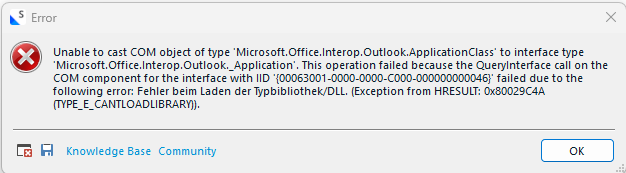
    Maybe this is related to the whole thing: On one of the computers (with o365 and Trados Studio 2024) not showing the behavior, I will get an error message, when I go to  File/Setup/Users and then click the "Import" button:

    Error message stating 'Unable to cast COM object of type Microsoft.Office.Interop.Outlook.ApplicationClass to interface type Microsoft.Office.Interop.Outlook.Application'.

    Regards
    Victor Linnemann 

    emoji


    Generated Image Alt-Text
    [edited by: RWS Community AI at 11:29 AM (GMT 0) on 25 Feb 2026]
  • Hi ,

    One question about these two computers, was Outlook configured on those particular computers when the issues occurred? If not, please install MS Office again and configure Outlook on the two computers and let me know if the issue persists.

    If Outlook is not configured, when getting to the package creation phase where you'd select users, Studio hangs until an Outlook process in the background is ended via Task Manager or Outlook is configured. This is a bug that we are already aware of and the team is working on fixing it. The workaround is to configure Outlook. 

    Please try this and let me know if it solves the issue.

    Best regards,

    Anca

    Anca Stoian RWS Group

    emoji