Impossible de se connecter à RWS dans studio

Hello,

When I try to connect to RWS in Studio, I get the following error message:


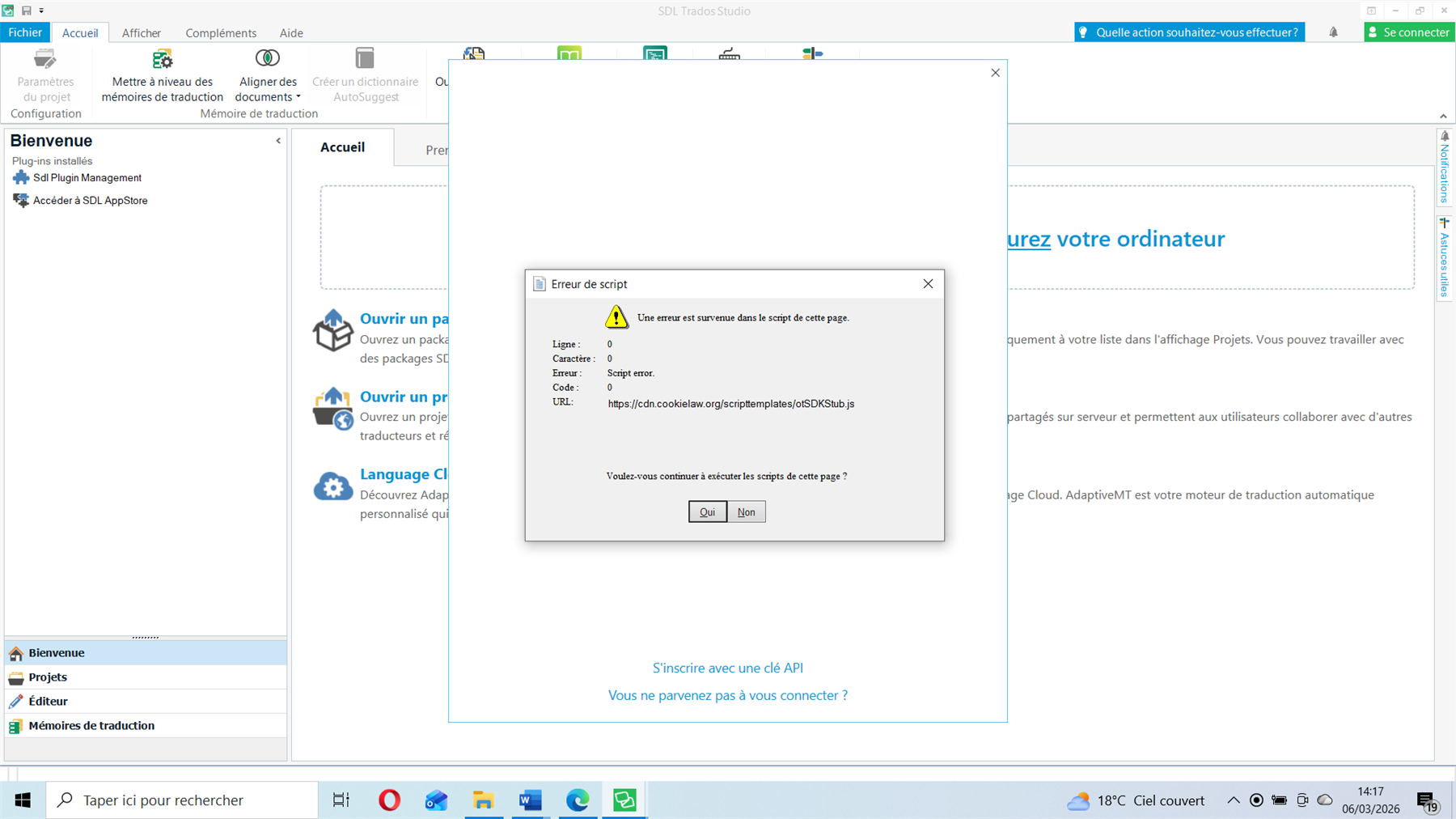
"Une erreur de script est survenant dans le script de cette page"

(A script error has occurred in the script on this page’)

Could you help, please ?

Thanks in adavance,

Sandrine


Removed AI Suggestion
[edited by: Sandrine Olejnik at 10:41 AM (GMT 0) on 6 Mar 2026]

emoji
  • Probability score: 0.6  

    Question improvement suggestion: Please provide the exact version of Trados Studio you are using and any recent changes made to your system or software.  

    In the meantime, based on the information you have provided, here is a suggested answer to your question:  

    Hello Sandrine,  

    It seems you are encountering a script error when trying to connect to RWS in Trados Studio. Here are some steps you can take to troubleshoot this issue:  

    **Step 1:** Ensure that your Internet Explorer is updated, as Trados Studio relies on it for certain functionalities.  

    **Step 2:** Check your security settings:  

    - Open Internet Explorer.  

    - Click on Tools from the Menu ribbon.  

    - Go to Internet Options.  

    - Click on the Security tab and then on Custom Level.  

    - Scroll down to find Active Scripting and ensure it is enabled.  

    **Step 3:** If you are using Windows, make sure that you have installed any pending Windows Updates and restart your computer.  

    **Step 4:** You may also want to check if TLS 1.2 is enabled on your system. You can do this by downloading the registry fix wizard or following the instructions to enable TLS 1.2 manually.  

    **Step 5:** If the issue persists, consider running a repair installation of Trados Studio:  

    - Close all RWS applications.  

    - Open Control Panel > Programs > Programs and Features.  

    - Select Trados Studio and choose Uninstall/Change > Repair.  

    - Restart Trados Studio after the repair process is complete.  

    **Step 6:** If you are still facing issues, please check if you are logged into the same Language Cloud account in both the web browser and Trados Studio.  

    If none of these steps resolve the issue, please provide the exact version of Trados Studio you are using and any recent changes made to your system or software for further assistance.  

    I hope this answer addressed your question. If not, please reject the answer, add the question improvement suggestion information, and click the RWS Community AI checkbox on the right to try again.  

    RWS Community AI

    emoji
  • Hi ,

    What exactly are you trying to Login to?

    You have a SDL Trados Studio 2019 Freelance linked to the email in Community, but if you have a different license with a different email, please indicate the edition of Trados you are using, and it would also help (if possible) to share a screenshot (without personal details) of where you are trying to Login and the error.

    Best regards,

    Anca

    Anca Stoian RWS Group

    emoji
  • Hi Anca,

    Thanks for your answer.

    I confirm I have the SDL Tradio Studio 2019 Freelance edition.

    Below is the screenshot: (I'm trying to log in to Groupshare)

    A screenshot of SDL Trados Studio 2019 Freelance edition showing a script error dialog. The error states 'An error has occurred in the script on this page' with details including Line: 0, Character: 0, Error: Script error, Code: 0, and URL: https:cdn.cookielaw.orgscripttemplatesotSDKStub.js. The dialog asks 'Do you want to continue running scripts on this page?' with 'Yes' and 'No' buttons.

    emoji


    Generated Image Alt-Text
    [edited by: RWS Community AI at 1:18 PM (GMT 0) on 6 Mar 2026]
  • Hi Sandrine,

    When you tried to login to GroupShare, did you follow the steps for adding the server? Is this how the error happens?

    Procedure for this:

    Go to File > Setup.
    Select Servers and select Add.
    In the Add SDL Server dialog, enter the server address and your SDL Trados GroupShare credentials.
    Select OK.

    Best regards,

    Anca

    Anca Stoian RWS Group

    emoji