


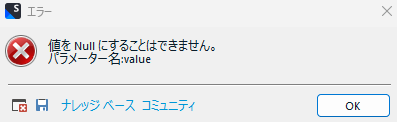
訳文の生成時、値をNullにすることはできません。パラメーター名:valueのエラーがでます。

Error dialog in Trados Studio with a red cross icon, stating 'Cannot set value to Null. Parameter name: value' in Japanese, with OK button and navigation options below.

Trados Studio 2022 SR2とTrados Studio 2024でも試してみました。

同じエラーがでます。

訳文の生成時、値をNullにすることはできません。パラメーター名:valueのエラーがでます。

日本語のidmlデータを英語に翻訳して、その後フランス語に翻訳しました。

英語の訳文の生成時にはエラーは起きなかったのに、フランス語の方はこのエラーがでました。

エディター画面で検証もしてみましたが、「検証が完了しました。エラーは報告されませんでした。」と表示されました。

ハイパーリンクの箇所のエラーのようですが、ハイパーリンクのタグの中を確認してもvalue=の後ろはちゃんと入ってました。


Removed AI Suggestion
[edited by: Ayumi Hori at 8:32 AM (GMT 1) on 31 Mar 2026]

emoji
Parents
  • Probability score: 0.6  

    Question improvement suggestion: Please provide the exact steps you took before encountering the error, including any specific settings or configurations you used in Trados Studio. Additionally, including the exact version of the software you are using would be helpful.  

    In the meantime, based on the information you have provided, here is a suggested answer to your question:  

    Hello,  

    It seems you are encountering a "value cannot be null" error when generating translations in Trados Studio, specifically when translating from English to French. Here are some steps you can take to troubleshoot and potentially resolve this issue:

    **Step 1:** Check for Hyperlink Issues  

    Since you mentioned that the error seems related to hyperlinks, ensure that all hyperlinks in your source document are correctly formatted. You can try to extract only the hyperlink text or choose to never process hyperlinks in your project settings. This can be done by going to:  

    - File > Options > File types > Microsoft Word 2007-2013 > Common  

    - Change "Always process hyperlinks" to "Extract only hyperlink text" or "Never process hyperlinks."

    **Step 2:** Validate the Source Document  

    Open your source document in MS Word and perform a validation check. Look for any fields or links that may not be properly set up. You can unlink fields by selecting all (Ctrl + A) and then using Ctrl + Shift + F9 to remove field codes.

    **Step 3:** Create a New Project  

    If the issue persists, consider creating a new project using a cleaned-up version of your source document. This can help eliminate any hidden issues that may be causing the error.

    **Step 4:** Check for Empty TQA Elements  

    If you have TQA elements in your document, ensure there are no empty entries. You can use a text editor to search for and remove any empty TQA elements.

    **Step 5:** Update Trados Studio  

    Make sure you are using the latest version of Trados Studio. If you are on an older version, consider updating to the latest release, as some bugs may have been fixed in newer versions.

    If these steps do not resolve the issue, please provide more details about the specific configurations you are using, and I would be happy to assist further.  

    I hope this answer addressed your question. If not, please reject the answer, add the question improvement suggestion information, and click the RWS Community AI checkbox on the right to try again.  

    RWS Community AI

    emoji
Reply
  • Probability score: 0.6  

    Question improvement suggestion: Please provide the exact steps you took before encountering the error, including any specific settings or configurations you used in Trados Studio. Additionally, including the exact version of the software you are using would be helpful.  

    In the meantime, based on the information you have provided, here is a suggested answer to your question:  

    Hello,  

    It seems you are encountering a "value cannot be null" error when generating translations in Trados Studio, specifically when translating from English to French. Here are some steps you can take to troubleshoot and potentially resolve this issue:

    **Step 1:** Check for Hyperlink Issues  

    Since you mentioned that the error seems related to hyperlinks, ensure that all hyperlinks in your source document are correctly formatted. You can try to extract only the hyperlink text or choose to never process hyperlinks in your project settings. This can be done by going to:  

    - File > Options > File types > Microsoft Word 2007-2013 > Common  

    - Change "Always process hyperlinks" to "Extract only hyperlink text" or "Never process hyperlinks."

    **Step 2:** Validate the Source Document  

    Open your source document in MS Word and perform a validation check. Look for any fields or links that may not be properly set up. You can unlink fields by selecting all (Ctrl + A) and then using Ctrl + Shift + F9 to remove field codes.

    **Step 3:** Create a New Project  

    If the issue persists, consider creating a new project using a cleaned-up version of your source document. This can help eliminate any hidden issues that may be causing the error.

    **Step 4:** Check for Empty TQA Elements  

    If you have TQA elements in your document, ensure there are no empty entries. You can use a text editor to search for and remove any empty TQA elements.

    **Step 5:** Update Trados Studio  

    Make sure you are using the latest version of Trados Studio. If you are on an older version, consider updating to the latest release, as some bugs may have been fixed in newer versions.

    If these steps do not resolve the issue, please provide more details about the specific configurations you are using, and I would be happy to assist further.  

    I hope this answer addressed your question. If not, please reject the answer, add the question improvement suggestion information, and click the RWS Community AI checkbox on the right to try again.  

    RWS Community AI

    emoji
Children
No Data
