The Trados cloud platform will be undergoing maintenance on Saturday, 9th May 2026 between 05:00 to 17:00 UTC. During this time, you will not be able to log in to the Trados platform.

Trados 2017 Floating "User must run verification before returning the package" greyed out and unavailable

Hi. We have this problem with Trados 2017 Floating: "User must run verification before returning the package" greyed out and unavailable. We receive packages from InfoShare/Enterprise and create our own packages for linguists and we need this setting to be on. Any idea how to make it work?
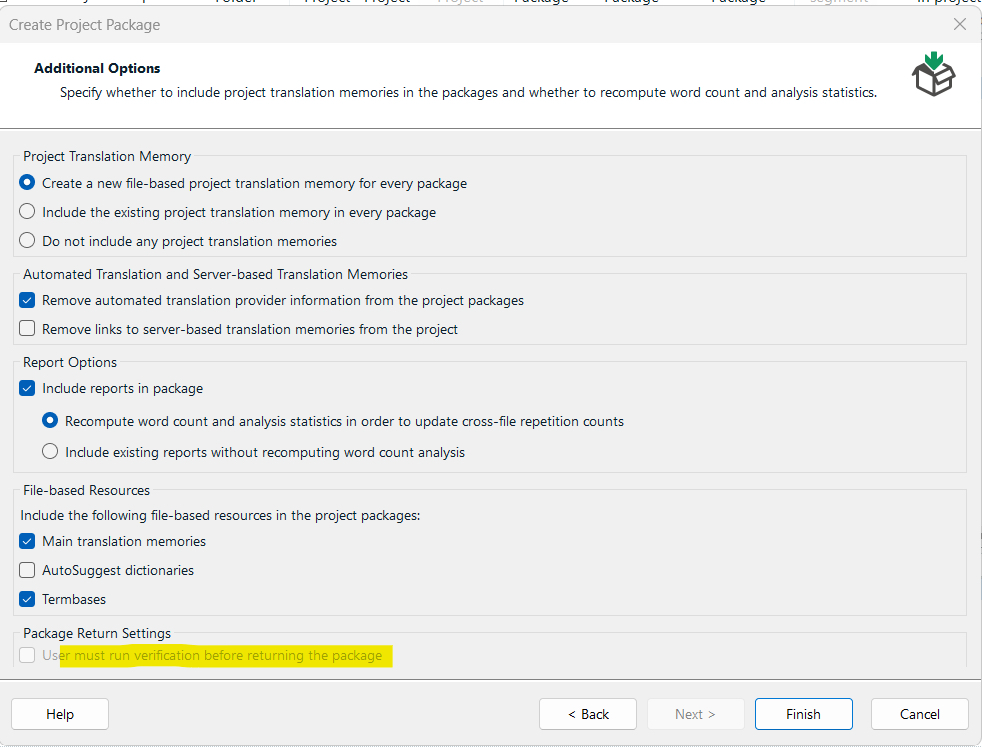
Trados Studio 2017 Create Project Package window showing options for translation memory, automated translation, reports, file-based resources, and package return settings. 'User must run verification before returning the package' is greyed out and unavailable.


Removed AI Suggestion
[edited by: Marek Makosiej at 1:53 PM (GMT 1) on 22 Apr 2026]

emoji
  • Probability score: 0.6  

    Question improvement suggestion: Provide specific steps you have already taken to troubleshoot the issue, and mention the exact version of Trados Studio 2017 you are using.  

    In the meantime, based on the information you have provided, here is a suggested answer to your question:  

    Hello,  

    It seems you're encountering an issue with the "User must run verification before returning the package" option being greyed out in Trados Studio 2017 Floating. Here are some steps you can take to troubleshoot and potentially resolve this issue:  

    **Step 1:** Ensure you are creating the project package correctly.  

    - Open Trados Studio and select the project you want to create the package for.  

    - Follow the project creation package wizard until you reach the Additional Options step. Make sure to select "User must run verification before returning the package."  

    **Step 2:** Check your project settings.  

    - Go to Project Settings > Verification and ensure that the relevant options are enabled.  

    **Step 3:** Reset Trados Studio basic settings.  

    - Close all RWS applications.  

    - Navigate to the following folder: `C:\Users\[USER_NAME]\AppData\Roaming\SDL\SDL Trados Studio\14.0.0.0` (replace `[USER_NAME]` with your actual username).  

    - Rename the `14.0.0.0` folder to `14.0.0.0_old`.  

    **Step 4:** Run a repair installation.  

    - Open Control Panel and go to Programs > Programs and Features.  

    - Find Trados Studio 2017 in the list, select it, and click on Repair.  

    **Step 5:** Check for updates.  

    - Open Trados Studio, click on Help, and select Check for Updates. Download and install any available updates.  

    If the issue persists after trying these steps, please provide more details about any troubleshooting steps you've already taken and the exact version of Trados Studio you are using. This information will help in diagnosing the problem more effectively.  

    I hope this answer addressed your question. If not, please reject the answer, add the question improvement suggestion information, and click the RWS Community AI checkbox on the right to try again.  

    RWS Community AI

    emoji
  •  

    Looks more like generic fishing for answers

    If so, you can do something specific by rejecting the AI answer.

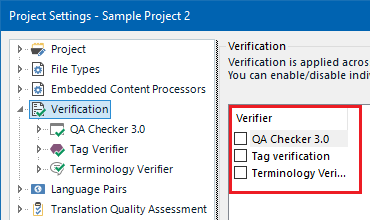
    Have you checked that there is something to Verify? For example, here:

    Trados Studio Project Settings window showing the Verification section with options for QA Checker 3.0, Tag verification, and Terminology Verifier, all checkboxes unchecked.

    I don't have the Trados Studio 2017 version to repro the disabled checkbox, but if I were you, I'd check this first of all.

    emoji


    Generated Image Alt-Text
    [edited by: RWS Community AI at 3:55 PM (GMT 1) on 22 Apr 2026]
  • Thank you. The situation looks like this:

    1. Our PMs always have these options on.

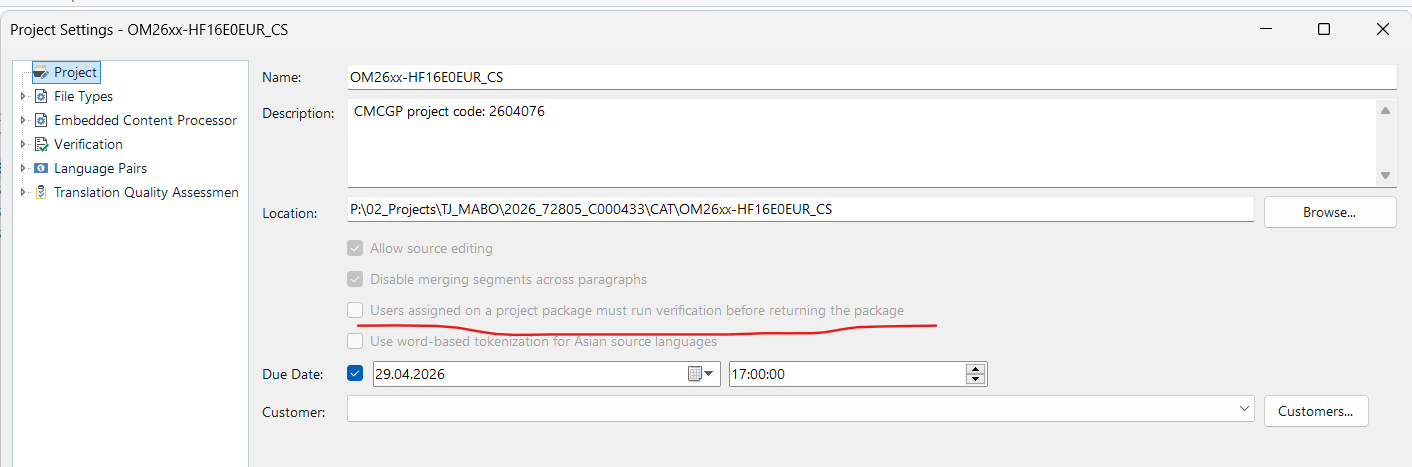
    2. We have checked all the possible project settings in Studio, and haven't found anything that could be related to this "run verification before..." apart from the checkbox in the Project Settings "Users assigned on a project..." but this one is greyed out, too. See the screenshot below.

    Now:

    1. ChatGPT suggests the PM working on the project doesn't have PM rights. Can this be true? We are a vendor to a large agency in this case, they send us packages from Enterprise/InfoShare, we unpack and create our own packages for our providers. Is that possible that our client would have to set something up on their end re this before they create their project/package(s) before distributing to us?

    2. Perhaps it's something else?

    Thanks,

    Trados Studio Project Settings window showing project details. The checkbox 'Users assigned on a project package must run verification before returning the package' is greyed out.

    emoji


    Generated Image Alt-Text
    [edited by: RWS Community AI at 11:23 AM (GMT 1) on 23 Apr 2026]
  • Hi  

    When you say "we unpack and create our own packages for our providers", do you create these packages based on the package you received from the agency? If yes, I presume this setting is already set on project level and can't be changed unless you extract all the resources (source files, TMs, TBs) and create a new project from scratch, from which you then create a new project package.


    Instead of creating a new project from scratch, you could also open the sldproj file in a text editor (e.g. Notepad++) and search for "verification". You'll possibly find something like this:
    A text editor displaying XML code with a highlighted line showing a setting 'RunVerificationBeforeReturningPackage' set to 'False' within a 'ReturningPackageSettings' group.

    You could then try to change "False" to "True" manually and see if this activates the option you're looking for.

    To do so, make sure to first remove the project from your list, open the sdlproj file in a text editor, change the setting manually, save the changes, and open the project again in Studio. Then, create a new project package and see whether the box is ticked.

    I don't know if this is suitable as this is a manual workaround which might create a lot of manual work.

    And I haven't tested it, so no guarantee this works. Just some thoughts on how you could possilbly work around what you describe.

    I'm curious to read about your results.

    Good luck

    Seraina

    emoji


    Generated Image Alt-Text
    [edited by: RWS Community AI at 5:55 AM (GMT 1) on 27 Apr 2026]