


How to display text flagged as "no translation" in the Editor?

Hello,

I am working with Trados Studio 2024, and I am searching for a way to display texts in the Editor despite them being flagged as "do not translate":

We have a custom file type with an edit rule in the parser section that sets texts to "do not translate", and it works perfectly (with the following properties set in the "Edit Rule" dialog: "Translate" set to "No", "Tag type" set to "Structure", "Whitespace" to "Inherit from parent").

However, with the current setting, our translators may only be seeing the 1-2 sentences of a full text that are to be translated without any context, while the largest portion of the text will be invisible to them. This is not a good starting position for a good translation, so we would like to adjust the files in a way that all texts are displayed in the Edtor to provide the needed context, terminology, etc., with only the "do not translate" texts remaining untranslateable (maybe as "locked" texts?).

I saw that in the advanced settings of the parser rules, there seems to be a setting that might help, "ShowElementContent", but I have not been able to make it work (maybe because I do not know what to set as "Name", "Code" and "Description", or maybe because that section is not intended for this purpose?).
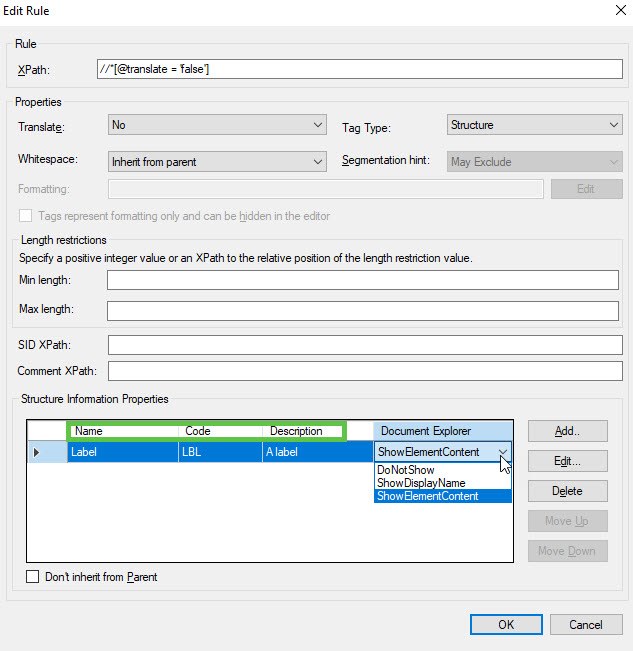
Screenshot of the Edit Rule dialog in Trados Studio. XPath is set to @translate = false. Properties include Translate set to No, Tag Type set to Structure, and Whitespace set to Inherit from parent. The Structure Information Properties section shows a row with Name as Label, Code as LBL, Description as A label, and Document Explorer set to ShowElementContent.

Is there any way to set this in Trados?


Removed AI Suggestion
[edited by: Barbara Dassinger at 10:45 AM (GMT 1) on 28 Apr 2026]

emoji
  • Probability score: 0.7  

    Question improvement suggestion: Provide specific examples of the content you want to display and clarify the desired outcome for the "do not translate" texts.  

    In the meantime, based on the information you have provided, here is a suggested answer to your question:  

    Hello!  

    To display text flagged as "do not translate" in the Editor of Trados Studio 2024, you can follow these steps:

    **Step 1:** Modify the Edit Rule  

    - Go to **File > Options > File Types** and select your custom file type.  

    - Navigate to the **Parser** section and locate the edit rule for the tag you want to adjust.  

    - Change the **Segmentation hint** from "May Exclude" to "Include with text." This will allow the content to be included in the Editor view while still being marked as non-translatable.

    **Step 2:** Adjust the Parser Settings  

    - In the same Parser section, look for the **ShowElementContent** setting. If you want to display the content of elements that are marked as "do not translate," you may need to set this up correctly.  

    - Ensure that you provide the correct **Name**, **Code**, and **Description** for the elements you want to display. This may require some experimentation to see what works best for your specific file type.

    **Step 3:** Use the Tag Display Options  

    - In the Editor, go to the **View tab > Options group** and select the **Toggle formatting tag display** option. This will allow you to see the tags and their content, which can help provide context for the translators.  

    - You can also adjust the **Tag Display Mode** to show full tag text, partial tag text, or no tag text, depending on your preference.

    **Step 4:** Test the Changes  

    - After making these adjustments, open a document in the Editor to see if the changes have taken effect. Ensure that the "do not translate" texts are visible but remain locked for editing.

    By following these steps, you should be able to provide your translators with the necessary context while keeping the "do not translate" texts intact. If you encounter any issues, consider revisiting the parser rules or consulting the documentation for further guidance.  

    I hope this answer addressed your question. If not, please reject the answer, add the question improvement suggestion information, and click the RWS Community AI checkbox on the right to try again.  

    RWS Community AI

    emoji