


The Trados cloud platform will be undergoing maintenance on Saturday, 9th May 2026 between 05:00 to 17:00 UTC. During this time, you will not be able to log in to the Trados platform.

unable to reset window layout

Hello,

I have used two screens and somehow the layout got mixed up. I have tried "Reset Window Layout" without success. Of course, I can still continue to work, but  when using the "Advanced display filter" (Under "View"), the results do not show up. 

Any ideas you might have to solve the problem are appreciated! I am using Trados Studio 2022.

Regards,Ellen
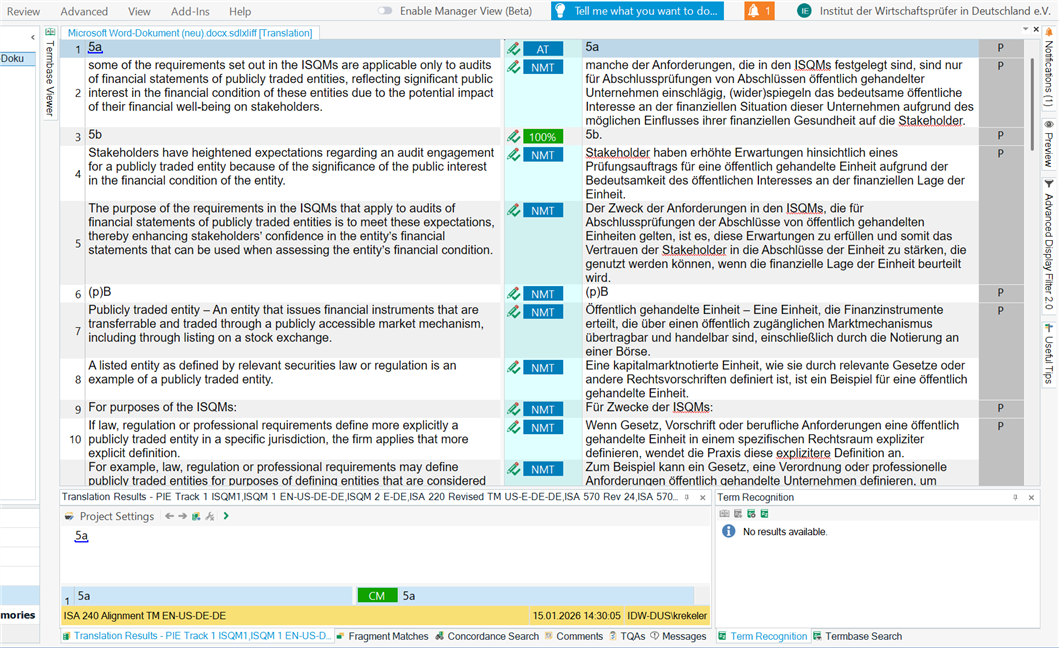
Screenshot of Trados Studio 2022 showing a bilingual document with English and German text in a side-by-side layout. The Advanced Display Filter panel on the right shows 'No results available.'


Removed AI Suggestion
[edited by: Ellen Krekeler at 9:24 AM (GMT 1) on 8 May 2026]

emoji
  • Probability score: 0.7  

    Question improvement suggestion: Provide more details about the specific behavior of the "Advanced display filter" and any error messages encountered.  

    In the meantime, based on the information you have provided, here is a suggested answer to your question:  

    Hello Ellen,  

    It sounds like you're experiencing some layout issues with Trados Studio after using multiple screens. Here are some steps you can take to try and resolve the problem:  

    **Step 1:** **Reset Window Layout**  

    - Go to the **View** tab in Trados Studio.  

    - Click on **Reset Window Layout**. This should restore the layout to its default state.  

    **Step 2:** **Check for Open Windows**  

    - Sometimes, windows may be open but not visible. Click on the Trados Studio taskbar icon to see if the window is listed as open.  

    - Use **Alt + Tab** to cycle through open windows to bring the desired window into focus.  

    **Step 3:** **Move Off-Screen Windows**  

    - If you suspect that a window is off-screen, hold **Shift** and right-click the Trados Studio taskbar icon, then select **Move**. Use the arrow keys to move the window back into view.  

    - Alternatively, you can press **Windows + Shift + Left/Right Arrow** to shift the window between monitors.  

    **Step 4:** **Repair Installation**  

    - If the above steps do not resolve the issue, consider running a repair installation of Trados Studio.  

    - Close all RWS applications, go to the Control Panel, find Trados Studio 2022, and select **Repair**.  

    **Step 5:** **Reset Trados Studio Settings**  

    - If the problem persists, you can reset Trados Studio's basic settings. Close all RWS applications and navigate to:  

     `C:\Users\%username%\App Data\Roaming\Trados\Trados Studio\`  

    - Rename the **Studio17** folder to **Studio17_old** and restart Trados Studio.  

    These steps should help you restore your window layout and resolve the issue with the "Advanced display filter." If you continue to experience problems, please provide more details about the behavior you're observing, and I'll be happy to assist further!  

    I hope this answer addressed your question. If not, please reject the answer, add the question improvement suggestion information, and click the RWS Community AI checkbox on the right to try again.  

    RWS Community AI

    emoji