Freelance literature translator: Is trados even for me?

I've been testing Trados studios for a month now, and frankly, I'm underwhelmed. I'm a freelance literature translator, and as of now, the only good thing that comes out of it for me is the user interface, which is slightly more comfortable than translating from page to page.

Are there any literature translators here using Trados studios?

As of now, it has only made life harder for me.

It starts with input: I usually translate from pdf master prints (so the pages look like the pages in a printed book); it's a hell of a lot of work to clean them up, and about a quarter of the time, the segments still don't match up with the sentences or are broken by page numbers. Combining segments is a pain (having to press Ctrl.+enter for every single line).

Similarly, the shortcut for accepting a translation needs both hands, which slows me down extremely.

Trados hides the structure of the text: I can't see paragraphs. Often, that makes it hard to understand who is speaking in dialogue.

After translating a few hundred pages, I still get only very few matches, and the ones I get are useless - okay, it's great that Trados can confidently translate "Chapter 5". But really, it's not such a great help. Even worse, matches for short sentences like "Come on!" or "I don't know" are usually presented as 100% confident, but in context, most of the time they are just wrong. And when I change them, next time trados doesn't offer me a list of possible matches (which would actually be useful), but instead only the last translation I used. Again, this is worse then useless. As is offering me partial matches - changing them is more trouble then just translating the sentence myself.

Worst of all is trados insisting on formatting the output like the original file. I don't want any formatting in the output. I just want text. The formatting gets in the way and creates mistakes downstream. But if there's a way to tell trados that I just want text output, and that I want paragraph control, I can't find it.

Basically, I'm wondering if I don't understand trados at all, or if I should just get rid of it and warn all literary translators away from it.


Removed AI Suggestion
[edited by: Jakob Schmidt at 10:44 AM (GMT 1) on 13 May 2026]

emoji
Parents
  •  

    Not a literature translator here, but here is my two cents:

    I usually translate from pdf master prints (so the pages look like the pages in a printed book); it's a hell of a lot of work to clean them up, and about a quarter of the time, the segments still don't match up with the sentences or are broken by page numbers. Combining segments is a pain (having to press Ctrl.+enter for every single line).

    PDF files lost information at the very moment of their creation in order to win other advantages. Although Trados Studio can open PDF files, the best procedure is to use other tool to clean the PDF file, such as Microsoft Word (I guess you know that Trados Studio created a Word file which is the format you are translating right now, and eventually you'll get a translated Word file). A tool like Word is ideal for joining paragraphs. Trados Studio can join paragraphs, yeah, but it is another kind of beast and definitely not intended to implement many edits. En Microsoft Word there are even free VBA macros to help you go faster when joining paragraphs.

    the shortcut for accepting a translation needs both hands, which slows me down extremely.

    Some translators find useful the ENTER key for confirming segments. You can search for more posts here in this forum to know how.

    Trados hides the structure of the text: I can't see paragraphs.

    Open the Preview panel and you'll see the structure. The Preview tab be in the right part of Trados Studio and you can unpin it to move it where best suits you, even to a second screen, so you have more space for Trados Studio.

    After translating a few hundred pages, I still get only very few matches

    Yeah, this is what I'd say in literature translation.

    And when I change them, next time trados doesn't offer me a list of possible matches (which would actually be useful), but instead only the last translation I used.

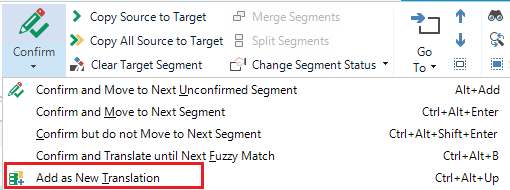
    Instead of confirming this kind of segments you can use Add as New Translation. In this way, the old translation is not deleted from your translation memory and next time it'll be offered as a possible translation:

    Add as New Translation highlighted

    Worst of all is trados insisting on formatting the output like the original file. I don't want any formatting in the output. I just want text. The formatting gets in the way and creates mistakes downstream. But if there's a way to tell trados that I just want text output, and that I want paragraph control, I can't find it.

    What formatting you refer to? If it's in the PDF, that formatting will be in the automatically generated Word file that Trados Studio creates for you. In the cleaning phase mentioned above, you could have cleaned the formatting you don't need. BTW, the conversion PDF > DOCX may create a useless soup of tags everywhere. Again, an editing tool such as Microsoft Word is ideal prior the translation itself. A preparation step before the translation itself is generally advisable, but with PDFs as a source files this step is a must. Last, sometimes clients give the original file itself (such as a DOCX file) and you avoid the formatting issues and the carriage returns issues.

    Summarising, I think you did use Trados Studio in the default-factory mode, but as a powerful and complex tool, there is a learning curve and there are capabilities you could have taken advantage of.

    I remember having read a post about CAT tools for literature translators, not sure if it was Trados Studio. I'll try to find it (it was ages ago) and share it with you. https://multifarious.filkin.com/2013/01/10/translating-literature/ 

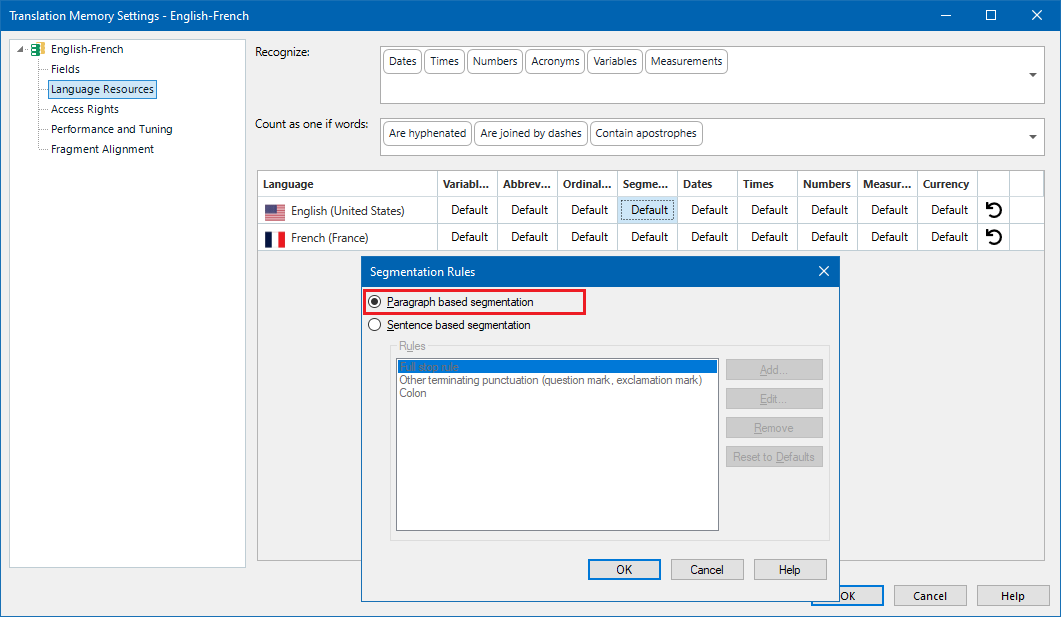
    I know that the translation memory can be set to segment paragraphs, not sentences, and this may be more useful in your case:

    Trados Studio Translation Memory Settings window showing segmentation rules with 'Paragraph based segmentation' selected and highlighted in red.

    Some literature translators can share their experience here.

    emoji


    Generated Image Alt-Text
    [edited by: RWS Community AI at 8:36 AM (GMT 1) on 14 May 2026]
Reply
  •  

    Not a literature translator here, but here is my two cents:

    I usually translate from pdf master prints (so the pages look like the pages in a printed book); it's a hell of a lot of work to clean them up, and about a quarter of the time, the segments still don't match up with the sentences or are broken by page numbers. Combining segments is a pain (having to press Ctrl.+enter for every single line).

    PDF files lost information at the very moment of their creation in order to win other advantages. Although Trados Studio can open PDF files, the best procedure is to use other tool to clean the PDF file, such as Microsoft Word (I guess you know that Trados Studio created a Word file which is the format you are translating right now, and eventually you'll get a translated Word file). A tool like Word is ideal for joining paragraphs. Trados Studio can join paragraphs, yeah, but it is another kind of beast and definitely not intended to implement many edits. En Microsoft Word there are even free VBA macros to help you go faster when joining paragraphs.

    the shortcut for accepting a translation needs both hands, which slows me down extremely.

    Some translators find useful the ENTER key for confirming segments. You can search for more posts here in this forum to know how.

    Trados hides the structure of the text: I can't see paragraphs.

    Open the Preview panel and you'll see the structure. The Preview tab be in the right part of Trados Studio and you can unpin it to move it where best suits you, even to a second screen, so you have more space for Trados Studio.

    After translating a few hundred pages, I still get only very few matches

    Yeah, this is what I'd say in literature translation.

    And when I change them, next time trados doesn't offer me a list of possible matches (which would actually be useful), but instead only the last translation I used.

    Instead of confirming this kind of segments you can use Add as New Translation. In this way, the old translation is not deleted from your translation memory and next time it'll be offered as a possible translation:

    Add as New Translation highlighted

    Worst of all is trados insisting on formatting the output like the original file. I don't want any formatting in the output. I just want text. The formatting gets in the way and creates mistakes downstream. But if there's a way to tell trados that I just want text output, and that I want paragraph control, I can't find it.

    What formatting you refer to? If it's in the PDF, that formatting will be in the automatically generated Word file that Trados Studio creates for you. In the cleaning phase mentioned above, you could have cleaned the formatting you don't need. BTW, the conversion PDF > DOCX may create a useless soup of tags everywhere. Again, an editing tool such as Microsoft Word is ideal prior the translation itself. A preparation step before the translation itself is generally advisable, but with PDFs as a source files this step is a must. Last, sometimes clients give the original file itself (such as a DOCX file) and you avoid the formatting issues and the carriage returns issues.

    Summarising, I think you did use Trados Studio in the default-factory mode, but as a powerful and complex tool, there is a learning curve and there are capabilities you could have taken advantage of.

    I remember having read a post about CAT tools for literature translators, not sure if it was Trados Studio. I'll try to find it (it was ages ago) and share it with you. https://multifarious.filkin.com/2013/01/10/translating-literature/ 

    I know that the translation memory can be set to segment paragraphs, not sentences, and this may be more useful in your case:

    Trados Studio Translation Memory Settings window showing segmentation rules with 'Paragraph based segmentation' selected and highlighted in red.

    Some literature translators can share their experience here.

    emoji


    Generated Image Alt-Text
    [edited by: RWS Community AI at 8:36 AM (GMT 1) on 14 May 2026]
Children
  • First of all thank you very much for taking the time! A lot of your advice sounds like it might be helpful (I already did the cleanup and used a word file as an input for trados, but my cleanup of the 400pp file wasn't actually that clean ...). Paragraph based segmentation might make sense, and "Add as new translation" is exactly what I was looking for!

    In the end, I'm not sure if the software will actually do anything for me that makes all the work going into preparing the files for it and checking the output worthwile; since I have no interest in integrating machine translation (and am actually contractually bound not to make significant use of AI translation tools), maybe there's not a lot that trados can do for me. But at the very least, your advice has given me some more things I can experiment with that might be help to streamline my work.

    emoji