
 Translate



Hi all,
Despite some bedtime reading efforts, I aseem to best stuck.
SITUATION: I received an Excel file with some but not all text in red in some cells. (Please re-read).
REQUIREMENT: Text in red should be left untouched (i.e. NOT be translated, nor counted) but MUST appear in the resulting translation.
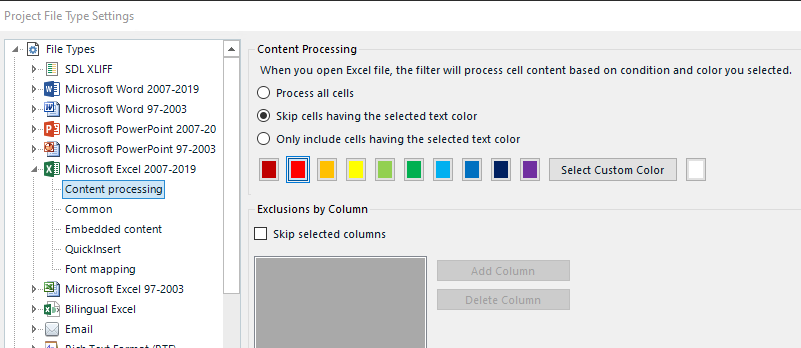
APPROACH: Before entering the file into my Trados Studio 2022 project, I go to File types, then Microsoft Excel 2007-2019 , then Content processing,
FINDINGS: Trados 2022 only seems to allow me to "Skip cells having the selected text colour", seemingly referring to ALL text in one cell.This is not what I need.
WISH: I am in need of an option such as "Skip TEXT colour having the selected text"
QUESTION: HOW CAN I SOLVE THIS?
Any help would be greatly appreciated.
TIAFYA.
Regards,
Matthew VAN HOORN
VVH business translations
Generated Image Alt-Text
[edited by: RWS Community AI at 2:18 PM (GMT 1) on 19 May 2026]


