Translating php files

Hello,

Can you advise how I could translate php files such as this one in such a way that Trados deals with the tags and that I get on and translate only the text such as 'Erreur de clé API'.

Many thanks, in advance

<?php

$lang['api_key_error'] = 'Erreur de clé API';
$lang['api_key_error_p'] = 'Erreur de clé API : %s';
$lang['api_method_error'] = 'Erreur de méthode';
$lang['api_unknown'] = 'Erreur de méthode';
$lang['api_compute_error'] = 'Erreur de calcul de produit';
$lang['api_typelivraison_error'] = 'Erreur de type de livraison';
$lang['api_adresselivraison_error'] = 'Erreur d\'adresse de livraison';
$lang['api_redirect_unknown'] = 'Erreur, redirection inconnue';
$lang['api_input_error'] = 'Input error : %s';


Parents Reply Children
  • First, you should use a typographic apostroph in French.

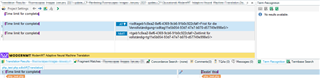
    Second, it seems, that you should create a special file type for your php, where parts '...' => ' will be made untranslatable. Usint the regex text file type the opening pattern here would be ^'.+?' => ' and the closing pattern ',
    This way when opening the file only "Time limit for complete" would be visible and nothing within this segment would break any phrases.

    _________________________________________________________

    When asking for help here, please be as accurate as possible. Please always remember to give the exact version of product used and all possible error messages received. The better you describe your problem, the better help you will get.

    Want to learn more about Trados Studio? Visit the Community Hub. Have a good idea to make Trados Studio better? Publish it here.

  • If I understand you correctly, you are looking for a way to have a single quote in the php string. The answer is that you have to escape the single quote. The simple way would be to write \' instead of ', or to instruct Studio to do so. (https://stackoverflow.com/questions/6269188/how-do-i-escape-only-single-quotes)

    However, one of the participants of the source mentioned this:

    Replacing with &#039; should work. I don't think you can make Studio do this for you, you would have to do this with some kind of regex search and replace in Notepad++ or similar.

    The HTML file types offer entity conversion, which is what you are looking for. Unfortunately, the HTML file types don't allow for regex to identify the translatable text.

    You can make it work, but it depends a bit on how your actual source file looks:

    It will initially look like this:

    Then you can change the non-translatable text into tags using the data protection suite:

    Nota bene that the MT results were odd and the tags were not generated correctly, I don't know why and don't have time to figure out, unfortunately.

    You set in character conversion that you want the apostrophe character to be encoded as numeric unicode. The, after translation, you unprotect your files and generate target translations. The output looked like this for me:

    Quite convoluted, but possible.

    I would treat it as text file and post-process it, as stated above.

    Daniel