Disable preview?

Hello all, 

I have a very annoying problem: for some reason I cannot understand, all of a sudden my Trados 2015 starts generating a preview, eventhough the preview window is closed, and I am not aware of using the shortcut for generating the preview. This is very frustrating and takes a lot of time, and slows me down a lot. 

Does anyone know how to disable the preview function? Or any other solution to this problem?

Thanks.

Parents Reply Children
  • Well, only control-enter when moving to the next segment, as far as I know. It's possible that I'm also hitting adjacent keys with clumsy fingers. Then, every few segments, I get a blue spinning circle and a "Generating preview" message at the bottom of the screen (not sure of exact wording; I don't want to wait till it happens before responding) and the application is unresponsive for a couple of minutes.
  • Hi Michael,

    Thanks for the information.
    The first thing I would do is go to your spell check settings and make sure it is set to Hunspell.
    Then I would reset Trados.

    After that, if the blue spinning circle appears and says "Generating Preview",
    open the Task Manager (Ctrl+Shift+Esc) and check for WINWORD.EXE (Im assuming this is a word file, but if it isnt, please let me know).
    If you find a WINWORD.EXE, right-click it and select "End Process".

    Let me know if any of this helps.

    Jesse
  • Spelling is set to Hunspell. Not sure what you mean by reset, but perhaps it isn't necessary since I didn't change anything? Task Manager shows only SDL Trados Studio (32 bit) and Task Manager itself.
  • Hi Michael,

    Are you looking under the "Processes" tab?
    If possible could you post a screenshot of that?

  • Ah, sorry, I found the view you were talking about. Lots of processes, but no WINWORD.EXE, and the only ones taking up any significant CPU are Studio and Task Manager.
  • Hello,

    So, has anyone found a solution to this problem yet? I cannot find a real answer to Deborah's and Michael's questions here.

    We are experiencing the same problem. We are working with Groupshare and whenever I confirm a segment (Strg + Enter) it says "Generating preview" at the bottom line of Studio. I have not enabled the Preview and Studio is not opening a preview either, it just says at the bottom that it is generating a preview. This leads to very slow response times in Studio and I would really like to deactivate this in any way.

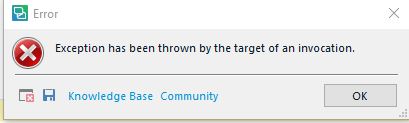
    I have also noticed that the WINWORD.EXE is activated when I confirm a segment (even though the souces file is an html file). I have ended the task in the task manager, but now I cannot confirm any segments in Studio at all anymore. I get the following error message

    "Excpetion has been thrown by the target of an invocation.

    I have searched the Knowledge Base and the Community for help, but I was not able to find a solution to this problem.

    So I would very much appreciate if anyone could get back to me on this problem.

    As I said, it really seams to slow Studio down generating this preview, especially if it seems to only be doing so in the background.

    Thank you

    Sina


    <SDLErrorDetails time="11.04.2018 10:28:48">
      <ErrorMessage>Exception has been thrown by the target of an invocation.</ErrorMessage>
      <Exception>
        <Type>System.Reflection.TargetInvocationException, mscorlib, Version=4.0.0.0, Culture=neutral, PublicKeyToken=b77a5c561934e089</Type>
        <HelpLink />
        <Source>mscorlib</Source>
        <HResult>-2146232828</HResult>
        <StackTrace><![CDATA[   at System.RuntimeType.InvokeDispMethod(String name, BindingFlags invokeAttr, Object target, Object[] args, Boolean[] byrefModifiers, Int32 culture, String[] namedParameters)
       at System.RuntimeType.InvokeMember(String name, BindingFlags bindingFlags, Binder binder, Object target, Object[] providedArgs, ParameterModifier[] modifiers, CultureInfo culture, String[] namedParams)
       at System.Type.InvokeMember(String name, BindingFlags invokeAttr, Binder binder, Object target, Object[] args)
       at SoftTran.GrammarChecking.MSWord.OleObject.GetProperty(String propertyName)
       at SoftTran.GrammarChecking.MSWord.OleObject.GetOleProperty(String propertyName)
       at SoftTran.GrammarChecking.MSWord.MSApplicationWrapper.ExitWord()
       at SoftTran.GrammarChecking.MSWord.MSApplicationWrapper.RecoverWordApplication()
       at SoftTran.GrammarChecking.MSWord.MSWordDocumentWrapper.RecoverWordApplication()
       at SoftTran.GrammarChecking.MSWord.MSWordDocumentWrapper.CheckConnectionToWord()
       at SoftTran.GrammarChecking.MSWord.MSWordDocumentWrapper.IsDocumentAvailable()
       at SoftTran.GrammarChecking.MSWord.MSWordGrammarCheckerWrapper.VerifyISOCodeAndPrepareToCheck(String pSentence, String isoCode)
       at SoftTran.GrammarChecking.MSWord.MSWordGrammarCheckerWrapper.IsValidSentence(String pSentence, String isoCode)
       at SoftTran.GrammarChecking.MSWord.MSWordGrammarChecker.IsValidSentence(String pSentence)
       at Sdl.MSGrammarChecker.Extended.MSGrammarCheckerMain.CheckParagraphUnit(IParagraphUnit paragraphUnit)
       at Sdl.MSGrammarChecker.Extended.MSGrammarCheckerMain.ProcessParagraphUnit(IParagraphUnit paragraphUnit)
       at Sdl.FileTypeSupport.Framework.Core.Utilities.BilingualApi.BilingualContentHandlerAdapter.ProcessParagraphUnit(IParagraphUnit paragraphUnit)
       at Sdl.FileTypeSupport.Framework.Core.Utilities.BilingualApi.BilingualContentHandlerAdapter.ProcessParagraphUnit(IParagraphUnit paragraphUnit)
       at Sdl.FileTypeSupport.Framework.Core.Utilities.BilingualApi.BilingualContentHandlerAdapter.ProcessParagraphUnit(IParagraphUnit paragraphUnit)
       at Sdl.FileTypeSupport.Framework.Core.Utilities.BilingualApi.BilingualContentHandlerAdapter.ProcessParagraphUnit(IParagraphUnit paragraphUnit)
       at Sdl.FileTypeSupport.Framework.Integration.AbstractBilingualProcessorContainer.ProcessParagraphUnit(IParagraphUnit paragraphUnit)
       at Sdl.FileTypeSupport.Framework.BilingualApi.AbstractBilingualContentProcessor.ProcessParagraphUnit(IParagraphUnit paragraphUnit)
       at Sdl.FileTypeSupport.Framework.Integration.LocationMarkerLocator.ProcessParagraphUnit(IParagraphUnit paragraphUnit)
       at Sdl.FileTypeSupport.Framework.Integration.AbstractBilingualProcessorContainer.ProcessParagraphUnit(IParagraphUnit paragraphUnit)
       at Sdl.FileTypeSupport.Framework.Integration.FileExtractor.ProcessParagraphUnit(IParagraphUnit paragraphUnit)
       at Sdl.TranslationStudio.Editor.TranslationEditor.TranslatableDocument.SingleParagraphUnitBilingualParser.ParseNext()
       at Sdl.FileTypeSupport.Framework.Integration.FileExtractor.ParseNext()
       at Sdl.FileTypeSupport.Framework.Integration.MultiFileConverter.ParseNext()
       at Sdl.FileTypeSupport.Framework.Integration.MultiFileConverter.Parse()
       at Sdl.TranslationStudio.Editor.TranslationEditor.TranslatableDocument.VerifySegment(ISegmentContainerNode segmentContainerNode, IParagraphUnitContainerNode paragraphContainerNode, IFileContainerNode fileContainerNode)
       at Sdl.TranslationStudio.Editor.TranslationEditor.SideBySideDocumentEditingView.VerifySegment()
       at Sdl.TranslationStudio.Editor.TranslationEditor.Actions.AbstractConfirmSegmentAction.ExecuteActiveSegment()
       at Sdl.TranslationStudio.Editor.TranslationEditor.Actions.AbstractConfirmSegmentAction.Execute()
       at Sdl.Desktop.Platform.Implementation.CommandBars.ActionService.<>c__DisplayClass30_0.<ExecuteAction>b__0()
       at Sdl.Desktop.Platform.Implementation.Services.Log.Resources(Object message, Action action)
       at Sdl.Desktop.Platform.Implementation.CommandBars.ActionService.ExecuteAction(IAction action, ActionOrigin origin, Boolean allowToggle)
       at Sdl.Desktop.Platform.Implementation.CommandBars.ActionService.ExecuteActionForShortcut(Keys shortcut)
       at Sdl.Desktop.Platform.WinForms.StudioWindowForm.OnKeyDown(KeyEventArgs e)
       at System.Windows.Forms.Control.ProcessKeyEventArgs(Message& m)
       at System.Windows.Forms.Form.ProcessKeyPreview(Message& m)
       at System.Windows.Forms.Control.ProcessKeyPreview(Message& m)
       at System.Windows.Forms.Control.ProcessKeyPreview(Message& m)
       at System.Windows.Forms.Control.ProcessKeyPreview(Message& m)
       at System.Windows.Forms.Control.ProcessKeyPreview(Message& m)
       at System.Windows.Forms.Control.ProcessKeyPreview(Message& m)
       at System.Windows.Forms.Control.ProcessKeyPreview(Message& m)
       at System.Windows.Forms.Control.ProcessKeyPreview(Message& m)
       at System.Windows.Forms.Control.ProcessKeyPreview(Message& m)
       at System.Windows.Forms.Control.ProcessKeyPreview(Message& m)
       at System.Windows.Forms.Control.ProcessKeyPreview(Message& m)
       at System.Windows.Forms.Control.ProcessKeyPreview(Message& m)
       at System.Windows.Forms.Control.ProcessKeyPreview(Message& m)
       at System.Windows.Forms.Control.ProcessKeyPreview(Message& m)
       at System.Windows.Forms.Control.ProcessKeyPreview(Message& m)
       at System.Windows.Forms.Control.ProcessKeyPreview(Message& m)
       at System.Windows.Forms.Control.ProcessKeyPreview(Message& m)
       at System.Windows.Forms.Control.ProcessKeyMessage(Message& m)
       at System.Windows.Forms.Control.WmKeyChar(Message& m)
       at System.Windows.Forms.Control.WndProc(Message& m)
       at System.Windows.Forms.Control.ControlNativeWindow.OnMessage(Message& m)
       at System.Windows.Forms.Control.ControlNativeWindow.WndProc(Message& m)
       at System.Windows.Forms.NativeWindow.Callback(IntPtr hWnd, Int32 msg, IntPtr wparam, IntPtr lparam)]]></StackTrace>
        <InnerException>
          <Type>System.Runtime.InteropServices.COMException, mscorlib, Version=4.0.0.0, Culture=neutral, PublicKeyToken=b77a5c561934e089</Type>
          <ErrorCode>-2147023174</ErrorCode>
          <HelpLink />
          <Source />
          <HResult>-2147023174</HResult>
          <StackTrace><![CDATA[]]></StackTrace>
        </InnerException>
      </Exception>
      <Environment>
        <ProductName>SDL Trados Studio</ProductName>
        <ProductVersion>14.0.0.0</ProductVersion>
        <EntryAssemblyFileVersion>14.1.10009.15268</EntryAssemblyFileVersion>
        <OperatingSystem>Microsoft Windows 10 Pro</OperatingSystem>
        <ServicePack>NULL</ServicePack>
        <OperatingSystemLanguage>1031</OperatingSystemLanguage>
        <CodePage>1252</CodePage>
        <LoggedOnUser>CORP\sdoberstein</LoggedOnUser>
        <DotNetFrameWork>4.0.30319.42000</DotNetFrameWork>
        <ComputerName>KR-WS-37</ComputerName>
        <ConnectedToNetwork>True</ConnectedToNetwork>
        <PhysicalMemory>8292716 MB</PhysicalMemory>
      </Environment>
    </SDLErrorDetails>

  • Hello everybody, I don't know when my Studio did start to display the message Generating preview (maybe since CU7 of GroupShare). Did someone find a solution to that?
    As for the opening of Word, it has to do with the Spell Checking if you chose Word Spell Checker instead of Hunspell. Studio needs an instance of Word to check your text against the feature in Word. I deacivated this, but I still get the message Generating preview which slows significantly confirmation of segments.

    Thanks for any help

    Angelo