Trados Studio 2021 Activation error

Hello,

I was changing my 2nd activation for the perpetual licence for 2021 from one laptop to another, in the original laptop I followed the steps to deactivate the licence so I can free up the slot to activate it on the new laptop but came across the following error when pasting the activation code:

" Could not activate this licence ' Activation is not allowed because entitlement is in DISABLED state. "

Another big issue is that on the licences tab on my account, my 2021 licence is not showing up anywhere.

Tried to log in in the community hub that is listed under assistance in my profile but each time I try to log in so I can log the case, the page just refreshes and doesnt let me input my user/password at all.

emoji
Parents
  • Hi  

    In your account you have a Trados 2024 Freelance license activated in 2024. Do you own any other separate Trados 2021 license? If so, please provide an order number.

    If you are looking for a 2021 license in the same account, that's not accessible anymore, since you upgraded to Trados 2024. An upgrade does not guarantee you the right to use old versions as separate licenses. In any case, Trados 2021 is not supported and, in case your client uses 2021, files created in Trados 2024 are compatible. If this is about using Trados on a second device, you upgraded to Freelance (not Plus), so you only have one desktop activation. Alternatively, you could use the cloud version: https://eu.cloud.trados.com/ please see the differences between the cloud and desktop version at this link down the page: www.trados.com/.../

    Kind regards,

    Elisa Maxim| RWS Group

    Design your own training!
    You've done the courses and still need to go a little further, or still not clear?
    Tell us what you need in our Community Solutions Hub

    emoji
  • Hello Elisa,

    Thank you for your message. have carefully reviewed the details provided, and I must formally disagree with the current stance on my licensing.After that, I must say that I fully disagree with its content.

    I have been a loyal SDL/Trados user since 2016, consistently upgrading my Freelance License with the explicit understanding that it included two activations (for desktop and laptop use).

    I feel it is important to highlight the following points:

    • I attended webinars and reviewed news on rws for the 2024 upgrade. At no point was it disclosed that upgrading would result in the forfeiture of my second 2021 activation.
    • My work often takes me to remote areas, such as Patagonia, where internet access is non-existent or really bad. The cloud version is not a viable professional solution for me; I require the local second activation that I have paid for across multiple versions (2017, 2019, and 2021).

    I have already uninstalled the software from my previous laptop and simply need to move that existing activation to my new hardware.

    Given my long-standing history with Trados, I am asking you to manually intervene and restore my second 2021 activation. I expect the terms of my previous purchases to be honored, regardless of the 2024 upgrade.

    My 2021 license (that says Perpetual) corresponds to Order # 637454,. Upgrade from Trados Studio 2017 Freelance Plus to Trados Studio 2021 Freelance Plus. 

    I look forward to a prompt resolution so I can resume my work.

    Best regards,

    emoji
  • Hello  

    First of all, please note there is a difference between Freelance and Freelance Plus. Freelance is a single user license with one desktop activation, while Freelance Plus is a single user license with 2 activations, not 2 separate licenses.

    Yes, I agree you always have used Freelance Plus, which makes it rather odd that in 2024, when you ordered from our authorized reseller, you ordered an upgrade from Trados Studio 2021 Freelance Plus to Trados Studio 2024 Freelance (so not Trados 2024 Freelance Plus). If you think this was a misunderstanding and you actually wanted Trados 2024 Freelance Plus, please contact tpresellers@rws.com and my colleagues will assist you.

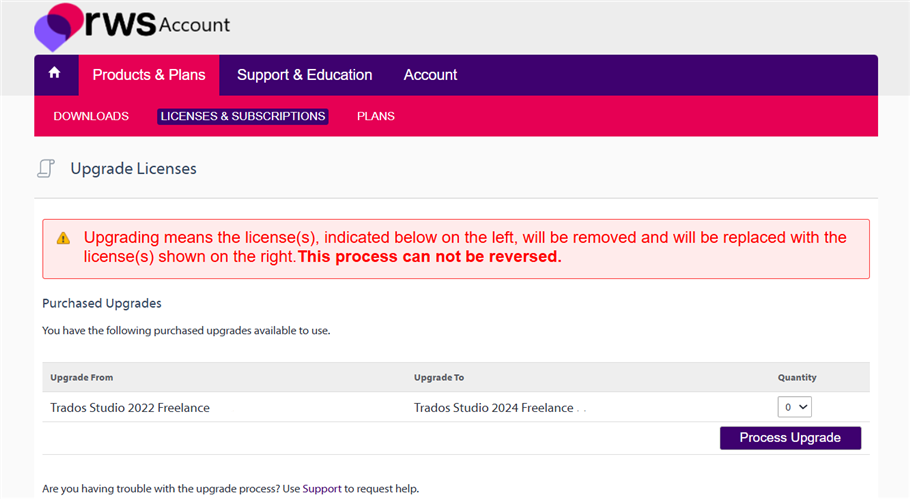
    As for 2021, it has always been the case that with an upgrade you don't retain your license rights for old licenses, this is not new and has always been our policy. So unfortunately we cannot restore your Trados 2021 license. Your upgrade from Trados Studio 2017 Freelance Plus to Trados Studio 2021 Freelance Plus is also an upgrade order (so not an order for Trados 2021 as a separate new license), where you officially lost the license rights for Trados 2017. If Trados 2017 somehow still works for you, that doesn't mean we guarantee its functioning. This information is highlighted in red each time you process an upgrade, for example:

    RWS Account page showing the 'Upgrade Licenses' section with a warning message in red: 'Upgrading means the license(s) will be removed and replaced. This process cannot be reversed.'

    If you'd like to move your Trados 2024 Freelance license to a different computer, please follow the procedure in this article  05.7. How to... Transfer my existing licence to a new computer? 

    If you have any further questions, please feel free to reach out to the above mentioned e-mail address, as this is a commercial matter and not a technical issue. Thank you for your understanding!

    Kind regards,

    Elisa Maxim| RWS Group

    Design your own training!
    You've done the courses and still need to go a little further, or still not clear?
    Tell us what you need in our Community Solutions Hub

    emoji


    Generated Image Alt-Text
    [edited by: RWS Community AI at 4:48 PM (GMT 0) on 28 Jan 2026]
Reply
  • Hello  

    First of all, please note there is a difference between Freelance and Freelance Plus. Freelance is a single user license with one desktop activation, while Freelance Plus is a single user license with 2 activations, not 2 separate licenses.

    Yes, I agree you always have used Freelance Plus, which makes it rather odd that in 2024, when you ordered from our authorized reseller, you ordered an upgrade from Trados Studio 2021 Freelance Plus to Trados Studio 2024 Freelance (so not Trados 2024 Freelance Plus). If you think this was a misunderstanding and you actually wanted Trados 2024 Freelance Plus, please contact tpresellers@rws.com and my colleagues will assist you.

    As for 2021, it has always been the case that with an upgrade you don't retain your license rights for old licenses, this is not new and has always been our policy. So unfortunately we cannot restore your Trados 2021 license. Your upgrade from Trados Studio 2017 Freelance Plus to Trados Studio 2021 Freelance Plus is also an upgrade order (so not an order for Trados 2021 as a separate new license), where you officially lost the license rights for Trados 2017. If Trados 2017 somehow still works for you, that doesn't mean we guarantee its functioning. This information is highlighted in red each time you process an upgrade, for example:

    RWS Account page showing the 'Upgrade Licenses' section with a warning message in red: 'Upgrading means the license(s) will be removed and replaced. This process cannot be reversed.'

    If you'd like to move your Trados 2024 Freelance license to a different computer, please follow the procedure in this article  05.7. How to... Transfer my existing licence to a new computer? 

    If you have any further questions, please feel free to reach out to the above mentioned e-mail address, as this is a commercial matter and not a technical issue. Thank you for your understanding!

    Kind regards,

    Elisa Maxim| RWS Group

    Design your own training!
    You've done the courses and still need to go a little further, or still not clear?
    Tell us what you need in our Community Solutions Hub

    emoji


    Generated Image Alt-Text
    [edited by: RWS Community AI at 4:48 PM (GMT 0) on 28 Jan 2026]
Children
No Data