
 Translate



Hi All,
Here is my dilemma:
1. Studio v2017's aligner module fails on very large alignment files (2000+ pages), so I had to use Déjà vu X3 Workgroup's aligning module, and then exported the resulting DVX translation memory to a .tmx file, which I can then import in a Studio TM.
2. However, imported segments from .tmx files not created by Studio alignment project do not contain the extra info that Studio aligner puts in, namely:
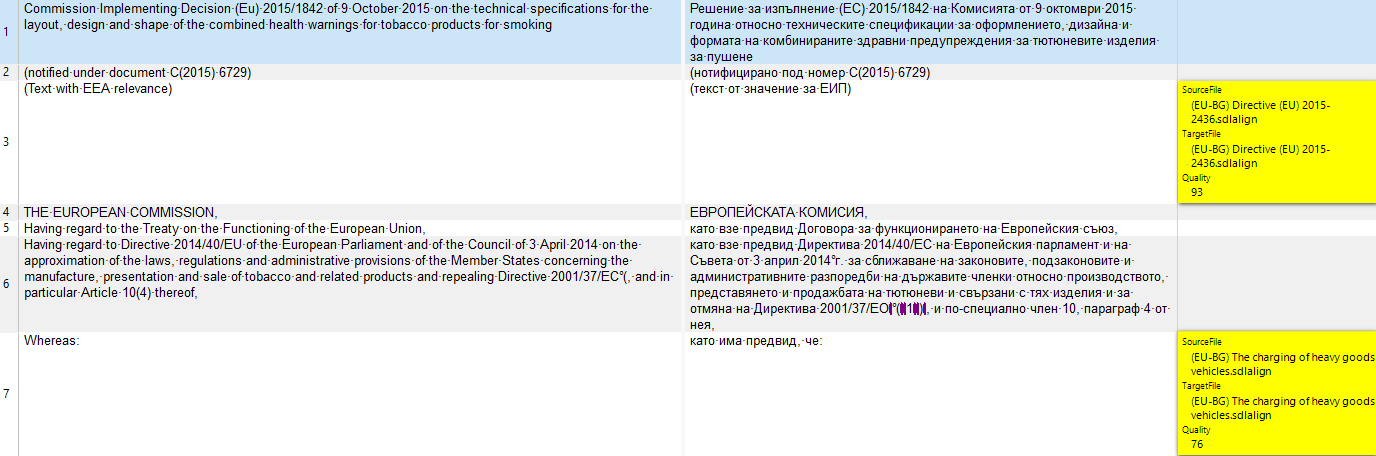
... the information I need to put in is highlighted in yellow above.
4. I need to somehow input into the .tmx file or in the resulting Trados TM at least the source file info, so that I know which EU Directive the segment is coming from.
How can I do that?
Best regards,
Pavel
Generated Image Alt-Text
[edited by: Trados AI at 9:04 PM (GMT 0) on 28 Feb 2024]



