


Can I use SDL online or not?

Studio newbie using trial 2017

After finding that I could use online machine translation with Studio, when I sent to set up a translation memory it appears the SDL Online machine translation is one of the choices:
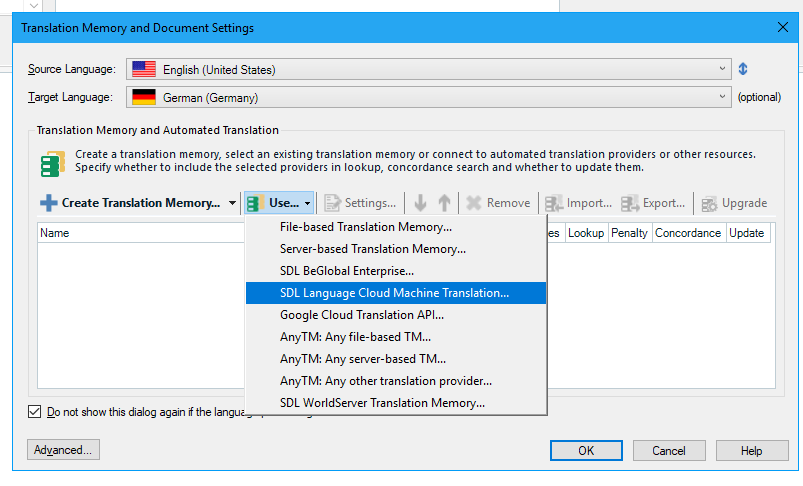
Trados Studio Translation Memory and Document Settings window showing SDL Language Cloud Machine Translation as an option in the dropdown menu.

After I set up a trial account with SDL online, I then tried to attach it to a test document and was told I could NOT use it:
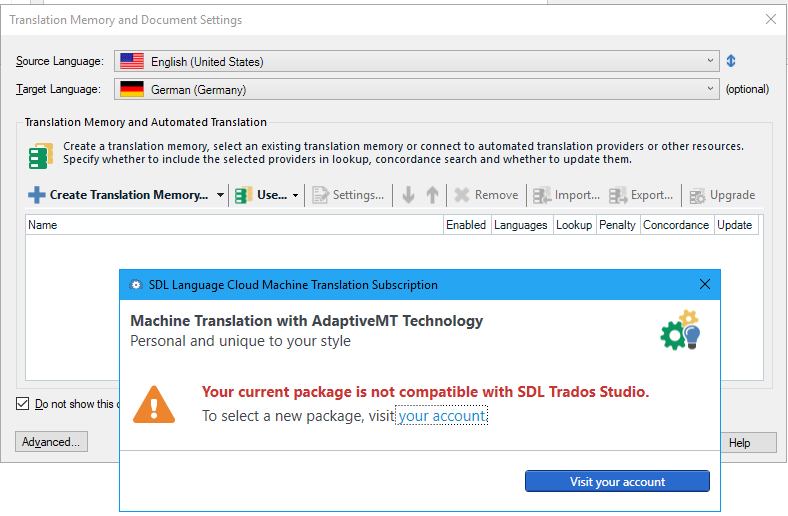
Error message in Trados Studio stating 'Your current package is not compatible with SDL Trados Studio. To select a new package, visit your account.'

Which is it? 

Can I use it?

Or can't I use it?

If I can use it, how to I attach it to Studio?


Generated Image Alt-Text
[edited by: Trados AI at 1:43 PM (GMT 0) on 28 Feb 2024]

emoji
Parents Reply
  • Hello

    Yes it does. You can translate interactively as you describe, or you can run whats called a batch task and translate all the files in your project using Machine Translation, or a combination of Machine Translation and conventional Translation Memories, in the background so they are fully translated when you open them again. You can also decide what fuzzy value you would consider preferential to a Machine Translation match. So for example, you could say if the conventional Translation Memory only has a 80% match or less then use Machine Translation... which value you'd use would be down to experience.

    Paul Filkin | RWS

    Design your own training!
    You've done the courses and still need to go a little further, or still not clear? 
    Tell us what you need in our Community Solutions Hub

Children