


Can I use SDL online or not?

Studio newbie using trial 2017

After finding that I could use online machine translation with Studio, when I sent to set up a translation memory it appears the SDL Online machine translation is one of the choices:
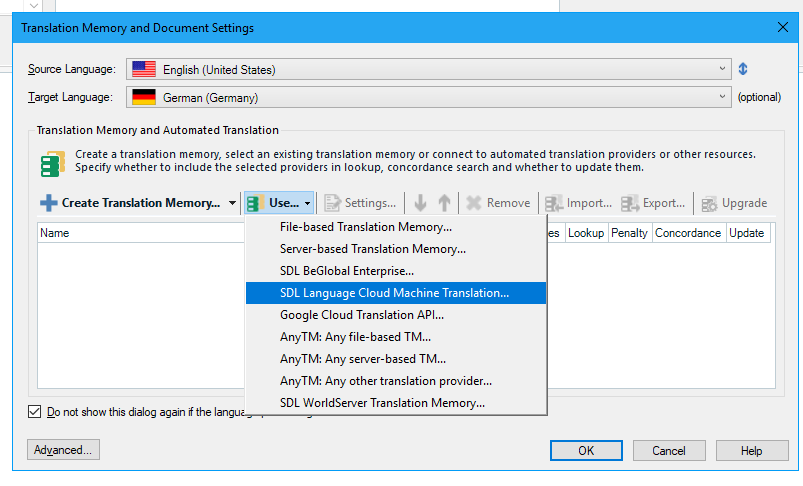
Trados Studio Translation Memory and Document Settings window showing SDL Language Cloud Machine Translation as an option in the dropdown menu.

After I set up a trial account with SDL online, I then tried to attach it to a test document and was told I could NOT use it:
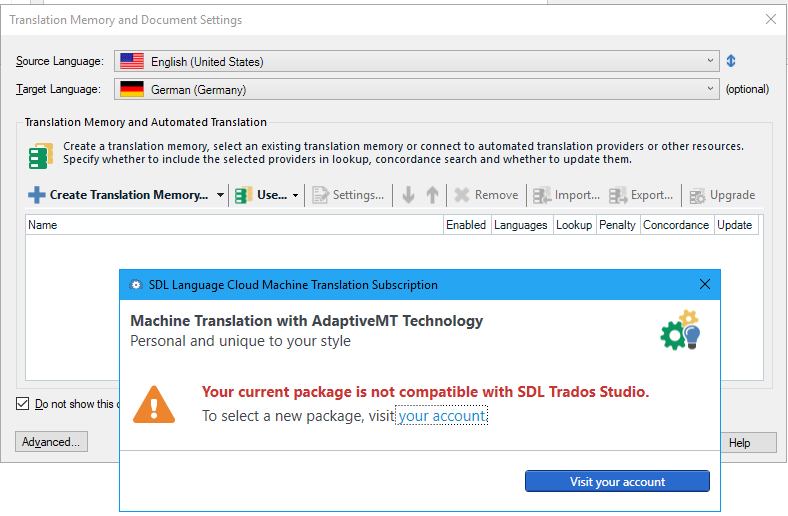
Error message in Trados Studio stating 'Your current package is not compatible with SDL Trados Studio. To select a new package, visit your account.'

Which is it? 

Can I use it?

Or can't I use it?

If I can use it, how to I attach it to Studio?


Generated Image Alt-Text
[edited by: Trados AI at 1:43 PM (GMT 0) on 28 Feb 2024]

emoji
Parents
  • Dear

    The Language cloud would need a licensed version, and with the trial is not possible to use the LC. However with the freelance version, once purchased, you also get a free plan of 400000 characters /month.
    If you would like to MT and test , I would recommend to use in this period also the free 10 days trial of the online editor- www.sdltrados.com/.../ . It is a separate tool from SDL trados but should help you if you are also looking in this period to have the help of an MT.


    Best regards,

    Loredana
  • A follow-on question (since I cannot determine this with the trial version) -
    Once you attach either the SDL online editor or Google Translation API (or any other machine translation source) as a TM, does machine translation become automated?

    That is, when you click on a line in the original (source) file - the left pane in Studio Editor - does Studio automatically look into the TM sources and place the machine translation in the target file side, the right pane? (Sorry I don't know the UI terms for these).
  • Hello

    Yes it does. You can translate interactively as you describe, or you can run whats called a batch task and translate all the files in your project using Machine Translation, or a combination of Machine Translation and conventional Translation Memories, in the background so they are fully translated when you open them again. You can also decide what fuzzy value you would consider preferential to a Machine Translation match. So for example, you could say if the conventional Translation Memory only has a 80% match or less then use Machine Translation... which value you'd use would be down to experience.

    Paul Filkin | RWS

    Design your own training!
    You've done the courses and still need to go a little further, or still not clear? 
    Tell us what you need in our Community Solutions Hub

  • Very nice. Thanks, Paul. If I'm reading this right, if you have multiple TMs, there is a way to control the precedence -- that is, which one you most want to have place its output into the right-hand editor window.
  • Hi ,

    You can control when Machine Translation is used or not based on the existence and quality of a match from a translation memory, if you use them both. You can penalise the results of a translation memory so that results that have the same match value in several translation memories for example are delivered to a different priority, and you can set the order in which they are looked up and results presented when they are all the same match value by setting the order in your settings... TM at the top will come first, TM at the bottom will come last. You can test that just using TMs in your trial version of Studio.

    The same goes for multiple MT providers if you use several. But as there isn't a fuzzy match value for MT you would just put the MT provider you wanted to be used every time at the top of your list when you added them. However, doing this does have drawbacks since many of the MT providers won't lookup a result if you have already translated the segment. This is to prevent you being charged, if they are not free or have a free allowance, every time you enter a segment. But you could set up Studio to only display the results in the TM Results window and not put the translation into the target segment (on the right hand side). Then you would see all the results from all engines and you just use the one you select.

    Paul Filkin | RWS

    Design your own training!
    You've done the courses and still need to go a little further, or still not clear? 
    Tell us what you need in our Community Solutions Hub

Reply
  • Hi ,

    You can control when Machine Translation is used or not based on the existence and quality of a match from a translation memory, if you use them both. You can penalise the results of a translation memory so that results that have the same match value in several translation memories for example are delivered to a different priority, and you can set the order in which they are looked up and results presented when they are all the same match value by setting the order in your settings... TM at the top will come first, TM at the bottom will come last. You can test that just using TMs in your trial version of Studio.

    The same goes for multiple MT providers if you use several. But as there isn't a fuzzy match value for MT you would just put the MT provider you wanted to be used every time at the top of your list when you added them. However, doing this does have drawbacks since many of the MT providers won't lookup a result if you have already translated the segment. This is to prevent you being charged, if they are not free or have a free allowance, every time you enter a segment. But you could set up Studio to only display the results in the TM Results window and not put the translation into the target segment (on the right hand side). Then you would see all the results from all engines and you just use the one you select.

    Paul Filkin | RWS

    Design your own training!
    You've done the courses and still need to go a little further, or still not clear? 
    Tell us what you need in our Community Solutions Hub

Children