 Translate



Hi all,
I have recently updated to SDL 2019 but I am frustrated that it is unable to open pdf files. What could be wrong?

Hi all,
I have recently updated to SDL 2019 but I am frustrated that it is unable to open pdf files. What could be wrong?

Oana Nagy | QA Engineer | RWS Group

Oana Nagy | QA Engineer | RWS Group
Oana Nagy | QA Engineer | RWS Group
Hi,
Was this issue ever resolved? I recently upgraded to Studio 2019 and I seem to have the exact same issue. The program is completely new on my computer and I have basically done nothing with the settings, aside from that I have it set to old SDLX shortcuts.
I've tried several different old pdf files that worked before, but none of them gets converted. I tried downloading a pdf from Eur-Lex and using that, which also didn't work. Available here: https://eur-lex.europa.eu/legal-content/EN/TXT/PDF/?uri=CELEX:32016L2258&from=SV
The error message reads "Type initiator for SolidFrameworkNativePINVOKE triggered an exception. Failed to load C:\Program Files (x86)\SDL\SDL Trados Studio\Studio15\SolidFramework\SolidFrameworkNative, Error code = 1114"
I'm using Windows 10.
Not urgent for me right now, but would be good to get this fixed. Help please?
Let's see if I can attach the complete awsome error message:
<SDLErrorDetails time="2018-11-15 21:02:41">
  <ErrorMessage>Typinitieraren för SolidFrameworkNativePINVOKE utlöste ett undantag.</ErrorMessage>
  <Exception>
    <Type>System.Exception, mscorlib, Version=4.0.0.0, Culture=neutral, PublicKeyToken=b77a5c561934e089</Type>
    <HelpLink />
    <Source>Sdl.FileTypeSupport.Native.PDF</Source>
    <HResult>-2146233088</HResult>
    <StackTrace><![CDATA[   vid Sdl.FileTypeSupport.Native.PDF.PDFPreTweaker.TweakFilePreParsing(IPersistentFileConversionProperties properties, IPropertiesFactory propertiesFactory)
   vid Sdl.FileTypeSupport.Framework.Integration.FileExtractor.RunFileTweakersPreParsing(IPersistentFileConversionProperties properties)
   vid Sdl.FileTypeSupport.Framework.Integration.FileExtractor.ParseNext()
   vid Sdl.FileTypeSupport.Framework.Integration.MultiFileConverter.ParseNext()
   vid Sdl.FileTypeSupport.Framework.Integration.MultiFileConverter.Parse()
   vid Sdl.ProjectApi.AutomaticTasks.Conversion.ConversionTask.ProcessFile(IExecutingTaskFile executingTaskFile)
   vid Sdl.ProjectApi.AutomaticTasks.AbstractFileLevelAutomaticTaskImplementation.Execute()]]></StackTrace>
    <InnerException>
      <Type>System.TypeInitializationException, mscorlib, Version=4.0.0.0, Culture=neutral, PublicKeyToken=b77a5c561934e089</Type>
      <TypeName>SolidFrameworkNativePINVOKE</TypeName>
      <HelpLink />
      <Source>SolidFramework</Source>
      <HResult>-2146233036</HResult>
      <StackTrace><![CDATA[   vid SolidFrameworkNativePINVOKE.new_SolidFramework_Converters_PdfToWordConverterBase()
   vid SolidFramework.Converters.PdfToWordConverterBase..ctor()
   vid Sdl.FileTypeSupport.Native.PDF.PDFPreTweaker.Convert(Object paths)]]></StackTrace>
      <InnerException>
        <Type>System.InvalidOperationException, mscorlib, Version=4.0.0.0, Culture=neutral, PublicKeyToken=b77a5c561934e089</Type>
        <HelpLink />
        <Source>SolidFramework</Source>
        <HResult>-2146233079</HResult>
        <StackTrace><![CDATA[   vid SolidFramework.Configuration.Installer.InitializeNativePlatform(ProgressTicker ticker)
   vid SolidFrameworkNativePINVOKE..cctor()]]></StackTrace>
      </InnerException>
    </InnerException>
  </Exception>
  <Environment>
    <ProductName>SDL Trados Studio</ProductName>
    <ProductVersion>15.0.0.0</ProductVersion>
    <EntryAssemblyFileVersion>15.0.1.36320</EntryAssemblyFileVersion>
    <OperatingSystem>Microsoft Windows 10 Home</OperatingSystem>
    <ServicePack>NULL</ServicePack>
    <OperatingSystemLanguage>1053</OperatingSystemLanguage>
    <CodePage>1252</CodePage>
    <LoggedOnUser>LAPTOP-S8731LFF\AACH</LoggedOnUser>
    <DotNetFrameWork>4.0.30319.42000</DotNetFrameWork>
    <ComputerName>LAPTOP-S8731LFF</ComputerName>
    <ConnectedToNetwork>True</ConnectedToNetwork>
    <PhysicalMemory>16615732 MB</PhysicalMemory>
  </Environment>
</SDLErrorDetails>

Paul Filkin | RWS
Design your own training!
You've done the courses and still need to go a little further, or still not clear?
Tell us what you need in our Community Solutions Hub
Hi,
I have installed this IRIS plugin, but still cannot process pdf. files. I have done it without problems so far...I have just installed an update to my 2019 version today and boom, I cannot work with pdf files anymore. I do not understand...

Hi Cornelia Mincu,
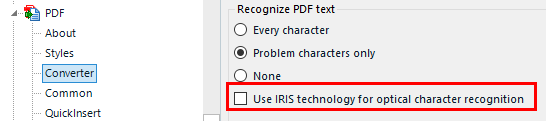
Is this ticked in your project/options > File Type > PDF?
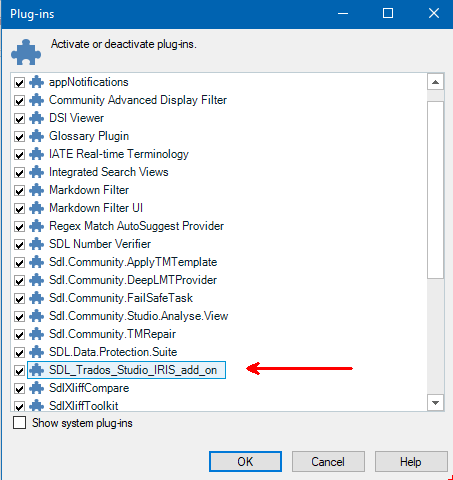
Is the IRIS plugin listed in Add-ins tab > Plug-ins button:

Hi Cornelia Mincu,
Is this ticked in your project/options > File Type > PDF?
Is the IRIS plugin listed in Add-ins tab > Plug-ins button: