 Translate



Each time I try running the F8 verification option on a signle file (even a very short file of about 10 segments), the operation takes ages.
Even cancelling it (because too time-consuming) takes ages.
Is there a Reason for this? maybe a setting ?

Each time I try running the F8 verification option on a signle file (even a very short file of about 10 segments), the operation takes ages.
Even cancelling it (because too time-consuming) takes ages.
Is there a Reason for this? maybe a setting ?


Hello Coralie Mergault
I think if this was a direct Studio issue, we would be seeing many more similar reports.
Therefore I think the culprit is maybe an installed app such as MS Grammar Checker.
Try disabling the app under project settings- Verification
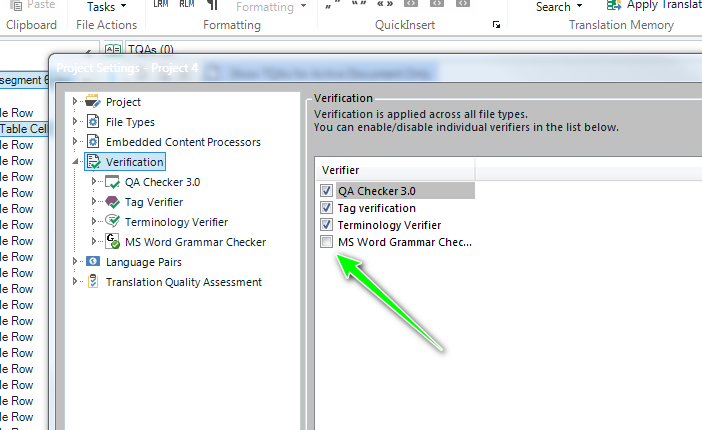
and now rerun the verification process.
Does this now work for you?
Oana Nagy | QA Engineer | RWS Group


Oana Nagy | QA Engineer | RWS Group

Paul Filkin | RWS
Design your own training!
You've done the courses and still need to go a little further, or still not clear?
Tell us what you need in our Community Solutions Hub
Unknown said:My question is, if it isa possible to revert the app to the 1.3 version, where this behavior is missing, and update it for 2019. I have still the 1.3 version installed on Studio 2017 and I do not have this problem.
This would be a pointless exercise. We got to the new versions by making these changes only:
2017 -> all we did was add the maxversion attribute to the 1.3 version to prevent it from being installed into 2019. It won't work at all in 2019.
2019 -> all we did was update the 1.3 version so it works in 2019
So you are effectively asking us to do what we have already done!
Paul Filkin | RWS
Design your own training!
You've done the courses and still need to go a little further, or still not clear?
Tell us what you need in our Community Solutions Hub
Hi Paul (pfilkin),
I believe what you say, but somewhere something went wrong when you updated the app. You can try it yourself.
In Studio 2017, to verify a segment it takes me 1 second with 1.3 (with Show error descripion on), but 25 seconds with 1.9.01 (with Show error description off). With longer segments or bigger files (I didn't figure that out) it takes more.
But it's ok, I will not use the app with Studio 2019, and if I really need it, I will verify in Studio 2017 with version 1.3.
Best regards,
Angelo