Po Files: Wrong representation of german special charaters (umlaut)

Hello,

we are struggeling with some po-files due to a wrong representation of "umlaut" (üöä) in Trados.

If we open the files in a poeditor (i.e. https://localise.biz/free/poeditor ) they are displayed properly:
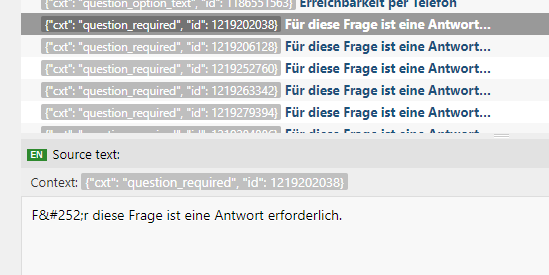
Screenshot of Trados Studio showing incorrect representation of umlauts in the source text, displaying 'Ü' instead of ' '. Screenshot of Trados Studio with incorrect umlaut representation, showing 'F&252;r' instead of 'F r' in the source text.


but in Trados they are displayed wrong:

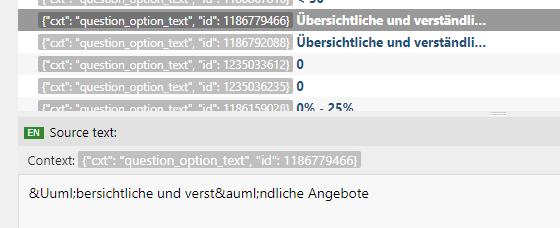
Close-up of Trados Studio source text with HTML entities 'Ü' and 'ä' instead of the umlaut characters ' ' and ' '. Close-up of Trados Studio source text displaying 'F&252;r' where it should show the umlaut character ' ' in the word 'F r'.


Does someone know want kind of settings we have to change in Trados?


Thank you very much in advance


Generated Image Alt-Text
[edited by: Trados AI at 2:44 PM (GMT 0) on 28 Feb 2024]
emoji
  • Hi

    What filetype are you using to handle these files in Studio?
    What version of Studio are you using?
    Can we see a sample of the text in the PO file?

    Paul Filkin | RWS Group

    ________________________
    Design your own training!

    You've done the courses and still need to go a little further, or still not clear? 
    Tell us what you need in our Community Solutions Hub

  • Hi Paul Filkin,

    Thanky for your reply.

    We use the filetype "Portable Object" (PO files v 1.0.0.0) in Trados Studio 2017, but we tried also to handle the file in the Testversion of Studio 2019...withthe same result.

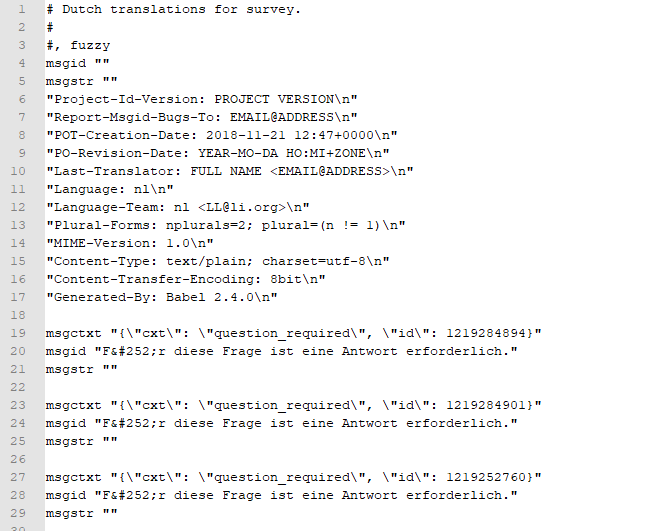
    That is what we see if we open the file in notepad++:

    Screenshot of a PO file opened in Notepad++ showing lines of code with keys and values for Dutch translations for a survey.


    Thank you very much in advance for your help

    emoji


    Generated Image Alt-Text
    [edited by: Trados AI at 2:44 PM (GMT 0) on 28 Feb 2024]
  • Hello, Fabio

    what you are seeing is not a wrong representation but simply HTML encoding, as I am sure you know.

    As far as I can see, the po file format definition does not have an embedded HTML decoder. I encounter the same issue when I use the bilingual Excel format to work with bilingual XML files.

    The solution is actually very simple: Before you add the file to your Studio project, you replace the codes with the letters they represent:

    Ü = Ü
    ü = ü
    etc.

    I replace the Umlauts (Ä, ä, Ü, ü, Ö, ö) and the sharp s (ß).

    Then you add the file to your project, translate and finalize it.

    It might be necessary to reverse the replacement process before you can use the file normally or return it to your customer, but that is just as trivial.

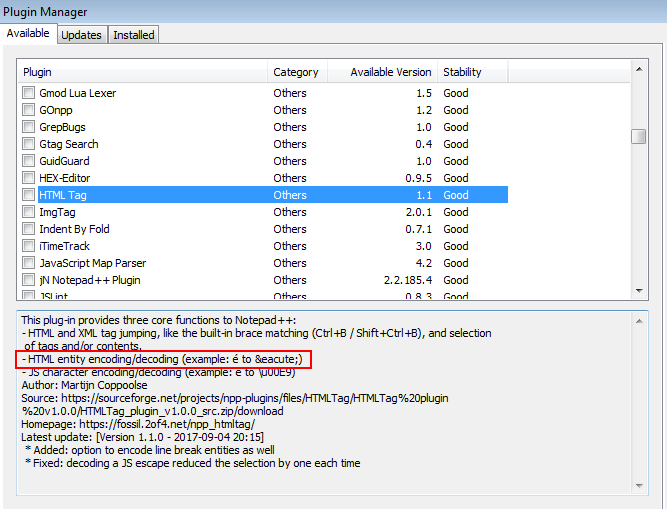
    I am using macros for this, which really makes it a breeze. Since I do this within Excel, I also do all these conversions there. You won't want to do that with a po file, so you could use Notepad++ which has a plugin that as far as I remember does all these conversions with one click for you:

    Screenshot of Trados Studio Plugin Manager showing a list of plugins. Highlighted is the 'HTML Tag' plugin with a description about its HTML encodingdecoding feature.

    All the best

    Daniel

    emoji


    Generated Image Alt-Text
    [edited by: Trados AI at 2:44 PM (GMT 0) on 28 Feb 2024]