 Translate



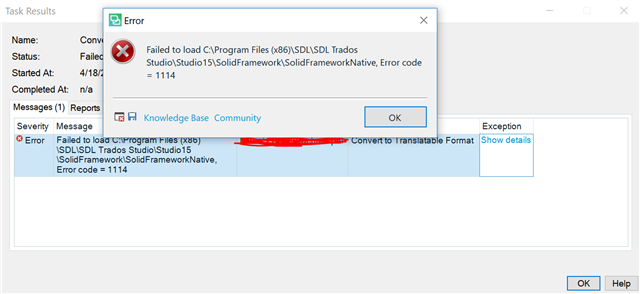
Whenever I try to open a PDF file, Trados 2019 returns this error. I couldn't find a way to contact support. Does anyone know of a way to fix this?
Thanks!
Generated Image Alt-Text
[edited by: Trados AI at 4:58 PM (GMT 0) on 28 Feb 2024]


Whenever I try to open a PDF file, Trados 2019 returns this error. I couldn't find a way to contact support. Does anyone know of a way to fix this?
Thanks!


Have you installed the plugin for Studio?
https://appstore.sdl.com/language/app/iris-pdf-ocr-support-for-studio/794/
I'd make sure I had the latest version of this installed first. Then if you still have a problem I'd run a repair of Studio 2019 through the windows control panel.
Paul Filkin | RWS
Design your own training!
You've done the courses and still need to go a little further, or still not clear?
Tell us what you need in our Community Solutions Hub
Thanks, Paul Unfortunately, this didn't help.
Hi Ida Zaghi
just because it is so well phrased, I would like to quote from the article linked above:
We all know, I think, that translating a PDF should be the last resort. PDF stands for Portable Document Format and the reason they have this name is because they were intended for sharing with users on any platform irrespective of whether they owned the software used to create the original file or not. Used to share so they could be read. They were not intended to be editable, in fact the format is also used to make sure that the version you are reading can’t be edited. So how did we go from this original idea to so many translators having to find ways to translate them?
What you need is a program that converts pdf to a normal, editable format. I don't know why Studio's built in solution does not work for you, but you can also use Acrobat Pro if you have the Adobe Suite. If not, there are many freeware online converters which might be an option unless your document is confidential.
By far the best solution would be to get to the customer and ask for the source document of the pdf, which might be a Word of InDesign file.
Daniel
Hi Ida Zaghi
just because it is so well phrased, I would like to quote from the article linked above:
We all know, I think, that translating a PDF should be the last resort. PDF stands for Portable Document Format and the reason they have this name is because they were intended for sharing with users on any platform irrespective of whether they owned the software used to create the original file or not. Used to share so they could be read. They were not intended to be editable, in fact the format is also used to make sure that the version you are reading can’t be edited. So how did we go from this original idea to so many translators having to find ways to translate them?
What you need is a program that converts pdf to a normal, editable format. I don't know why Studio's built in solution does not work for you, but you can also use Acrobat Pro if you have the Adobe Suite. If not, there are many freeware online converters which might be an option unless your document is confidential.
By far the best solution would be to get to the customer and ask for the source document of the pdf, which might be a Word of InDesign file.
Daniel

Hi Daniel,
I absolutely agree with you. We were able to work around this issue. Main reason for my posting was so this could get fixed. A previous version of Trados was able to process the file. So we figured this was a bug for the current version and thought maybe someone had found a workaround. Thanks for your reply.
