


Termbase Viewer layout preferences lost in SDL Trados Studio 2019 SR2

Hello

I installed SDL Trados Studio 2019 SR2 last week and I noticed that the Termbase Viewer layout keeps resetting each time I close/re-open Studio.

My preferred layout is the "Default layout" (quicker to edit entries) but Studio systematically reverts back to the "Flags layout" (not as user-friendly). In MultiTerm 2019 (CU4), my layout preferences ("Default layout") are kept.

I remember having that issue a few CUs ago and it was later fixed. I think it was OK in my previous version of Studio (SR1 CU3).

Has anyone experienced this issue with SDL Trados Studio 2019 SR2? Any suggestions? Thanks in advance for your help.

I’m attaching screenshots showing my current Studio/MultiTerm settings as well as the TB Viewer layouts mentioned.
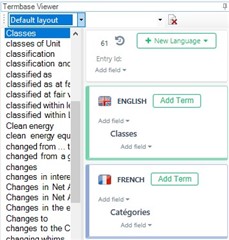
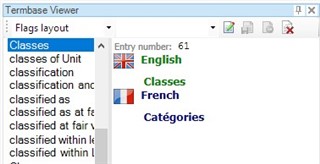
Screenshot of Trados Studio Termbase Viewer with Default layout selected, showing English and French term entry fields. Screenshot of Trados Studio Termbase Viewer with Flags layout selected, displaying term entry number and language flags.

Screenshot of the 'About SDL Trados Studio' window showing version 2019 SR2 - 15.2.0.1041 with copyright and license information.Screenshot of the 'About SDL MultiTerm' window showing version 2019 - 15.0.4.56035 with copyright and license information.


Generated Image Alt-Text
[edited by: Trados AI at 5:50 PM (GMT 0) on 28 Feb 2024]

emoji
Parents Reply
  • Sorry.

    Does this happen for all termbases or only for particular one. I seem to remember, that I have tried to change the layout as you did for a certain TB, but then in Studio it was again the flags layout. But in this very case the same layout was also activated in MT, so the situation is not exactly as yours.
    My last idea would be simply installing Studio first and then Multiterm, taking the latest downloads from your account and executing them both as administrator.

    _________________________________________________________

    When asking for help here, please be as accurate as possible. Please always remember to give the exact version of product used and all possible error messages received. The better you describe your problem, the better help you will get.

    Want to learn more about Trados Studio? Visit the Community Hub. Have a good idea to make Trados Studio better? Publish it here.

Children