Translate



I have a large number of measurements like 123 x 456 cm. Between the "456" and the "cm" is supposed to be a non-breaking space.
When I enter the second measurement, it offers to autopropagate, which is wonderful, but it replaces the U+202F with a normal space in all the autopropagated segments:
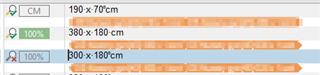
On this screenshot, the first segment and third segments are manually entered, while the second is autopropagated (from the first).
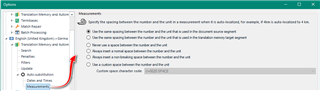
The autopropagate function does not have a "normalize spaces" setting that I could disable - at least I did not find any.
Any input?
Daniel
Generated Image Alt-Text
[edited by: Trados AI at 6:52 PM (GMT 0) on 28 Feb 2024]