Autopropagate replaces narrow non-breaking space with normal space

I have a large number of measurements like 123 x 456 cm. Between the "456" and the "cm" is supposed to be a non-breaking space.

When I enter the second measurement, it offers to autopropagate, which is wonderful, but it replaces the U+202F with a normal space in all the autopropagated segments:
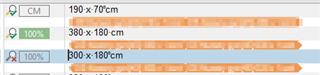
Screenshot of Trados Studio showing three segments with measurements. The first and third segments have non-breaking spaces, while the second, autopropagated segment has a normal space.

On this screenshot, the first segment and third segments are manually entered, while the second is autopropagated (from the first).

The autopropagate function does not have a "normalize spaces" setting that I could disable - at least I did not find any.

Any input?

Daniel


Generated Image Alt-Text
[edited by: Trados AI at 6:52 PM (GMT 0) on 28 Feb 2024]
emoji
Parents
  • I ran a quick test using CU4 (as there are fixes in here for some problems associated with this).  I get this:

    Screenshot of Trados Studio showing a list of measurement units in source and target columns with correct autopropagation.

    I used an empty TM and the first segment was automatically handled as the numbers were recognised, then the others were all autopropogated correctly.

    So I have three suggestions... hopefully one of them will help:

    1. Upgrade to CU4 and try again
    2. Reindex your TM (if it still fails after you are on CU4) and try again
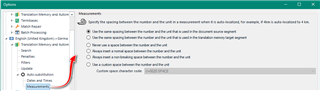
    3. Make sure you have the specific language pair settings as required:
      Trados Studio options menu with Measurements settings highlighted, showing options for number and unit recognition.
      I used the first option as I put a non-breaking space in the source.  You need to use whatever is appropriate based on your source.

    Paul Filkin | RWS Group

    ________________________
    Design your own training!

    You've done the courses and still need to go a little further, or still not clear? 
    Tell us what you need in our Community Solutions Hub

    emoji


    Generated Image Alt-Text
    [edited by: Trados AI at 6:52 PM (GMT 0) on 28 Feb 2024]
Reply
  • I ran a quick test using CU4 (as there are fixes in here for some problems associated with this).  I get this:

    Screenshot of Trados Studio showing a list of measurement units in source and target columns with correct autopropagation.

    I used an empty TM and the first segment was automatically handled as the numbers were recognised, then the others were all autopropogated correctly.

    So I have three suggestions... hopefully one of them will help:

    1. Upgrade to CU4 and try again
    2. Reindex your TM (if it still fails after you are on CU4) and try again
    3. Make sure you have the specific language pair settings as required:
      Trados Studio options menu with Measurements settings highlighted, showing options for number and unit recognition.
      I used the first option as I put a non-breaking space in the source.  You need to use whatever is appropriate based on your source.

    Paul Filkin | RWS Group

    ________________________
    Design your own training!

    You've done the courses and still need to go a little further, or still not clear? 
    Tell us what you need in our Community Solutions Hub

    emoji


    Generated Image Alt-Text
    [edited by: Trados AI at 6:52 PM (GMT 0) on 28 Feb 2024]

Children