Hard drive crashed, need to finish projects in the meantime. Best way to proceed?

Hello:

As stated in the subject line, the hard drive on my main computer crashed. While it's being repaired I would like to finish some projects I have pending, which have deadlines in the next couple of days.

I could deactivate my license, install Studio on another computer and activate the license there. I'll have to repeat this process once I get my computer back. Is it worth the hassle? Seems like more trouble than it's worth. I am talking only 2-3 days before I get my computer back.

Could I install SDL Trados on another computer and run it in Demo mode? I don't recall if Demo mode allows me to open projects with multiple files and save them. Would this work?

Any other suggestions are appreciated. Thanks in advance,

Regards,

Enrique

P.D.: I tried adding tags, but when I attempt it, this page goes completely blank and I lose everything I've written, so no tags, sorry!

Parents
  • Hi 

    If you have not already used a version of Studio on the other computer for the full length of time of the 'trial license' then you will be able to run it in Professional mode though I'm not sure how big a TM you will be able to use.

    However, it would definitely be worth the hassle of deactivating and reactivating your license, it only takes seconds.

    That which takes the time is the installation, which will take the same amount of time whether you use your license or not.

    If you have a Freelance license, you can deactivate it on your account My licenses page.

    If for any reason that doesn't work, for example if you you have a Professional license, you can ask the SDL licencing team to reset your license for you here:

    Licensing and Installation Help

    You will see the following:

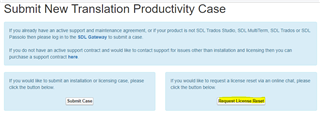
    Screenshot of the 'Submit New Translation Productivity Case' page with options to 'Submit Case' or 'Request License Reset'.

    Click on Request License Reset and a chat form will open up and there will be someone to chat with who can reset your license straight away. It is rare that there is nobody available on chat but if this is the case, the button will indicate it and you can proceed via 'Submit Case' and you'll get a license reset within 24 hours.

    All the best,

    Ali Slight smile

    emoji


    Generated Image Alt-Text
    [edited by: Trados AI at 8:48 PM (GMT 0) on 28 Feb 2024]
Reply
  • Hi 

    If you have not already used a version of Studio on the other computer for the full length of time of the 'trial license' then you will be able to run it in Professional mode though I'm not sure how big a TM you will be able to use.

    However, it would definitely be worth the hassle of deactivating and reactivating your license, it only takes seconds.

    That which takes the time is the installation, which will take the same amount of time whether you use your license or not.

    If you have a Freelance license, you can deactivate it on your account My licenses page.

    If for any reason that doesn't work, for example if you you have a Professional license, you can ask the SDL licencing team to reset your license for you here:

    Licensing and Installation Help

    You will see the following:

    Screenshot of the 'Submit New Translation Productivity Case' page with options to 'Submit Case' or 'Request License Reset'.

    Click on Request License Reset and a chat form will open up and there will be someone to chat with who can reset your license straight away. It is rare that there is nobody available on chat but if this is the case, the button will indicate it and you can proceed via 'Submit Case' and you'll get a license reset within 24 hours.

    All the best,

    Ali Slight smile

    emoji


    Generated Image Alt-Text
    [edited by: Trados AI at 8:48 PM (GMT 0) on 28 Feb 2024]
Children
No Data