SDL 2019 auto-substitution of numbers NOT WORKING

Project Settings --> Language Pairs --> "French -> English" --> Translation Memory and Automated Translation --> Auto-substitution

In the Auto-substitution dialog it makes no difference whether I check "Numbers" or not:

The effing heap of xxx calling itself a CAT tool seems to recognise a number in a segment (underlines it) but refuses point-blank to substitute it automatically.

e.g. a segment consisting of a currency figure "181 961 806,00 €" --> it considers that this "84% match" is the closest it can find: "-3 126 286,00 €".  Laughable if it weren't so pathetic, and if clients didn't oblige me to use this dreadful application.

e.g. 2: a segment consisting solely of a number: NOPE, too stupid to recognise that this is a number and should simply be copied into the target.

Also, why are some categories in bold here, Dates, Times, Alphanumeric strings, etc., but two categores not bolded: Numbers, Acronyms?

This question https://community.sdl.com/product-groups/translationproductivity/f/studio/21100/numbers-and-alphanumeric-strings-not-being-auto-substituted-consistently/73212#73212 provides no answer.

I've been just coping with this dysfunctionality for about a year, and just getting on DESPITE IT, as I regard SDL as a hindrance which I'm obliged to use, rather than a helpful tool.  Nor do I ever expect to get any solution here because I presume this is just baked-in amateurish dysfunctionality.

Hope springs eternal however. Please prove me wrong.

Parents
  • Would you please make sure the number auto propagation is not switched off in your project settings AND in your TM(s)?

    On top of this, why do you not simply use the display filter for showing number only segments, copy them to target and then confirm in one go? If you have 1,000 number only segments in your file, the AP process will last for a while, while filtering, copying and confirming takes just few seconds. You can even go a step further and use this simple regex ^[\d\W]*$ to filter for ALL non-tranlatable segments in your file and have them confirmed in seconds instead of waiting for the software doing them for you.

    And I fully agree with Paul, there must be a problem with your setup, as the number AP works out of the box. However, one must remember, that the number format in the source language MUST fit to what the language uses. So for example number like you show (space as thousand separator) will most certainly NOT be recognized as number in a German text. The same will be, if there are accidentally double spaces while single spaces would have been expected.

    _________________________________________________________

    When asking for help here, please be as accurate as possible. Please always remember to give the exact version of product used and all possible error messages received. The better you describe your problem, the better help you will get.

    Want to learn more about Trados Studio? Visit the Community Hub. Have a good idea to make Trados Studio better? Publish it here.

  • Hi,

    Thanks for the suggestion about filtering. I'll try that, but it would be a "workaround" of course.

    I'm confused by your suggestion about Auto-propagation.  The ONLY Auto-propagation settings available to me in my application are accessed by going File --> Options --> Editor --> Auto-propagation.  There is absolutely NO setting to include or exclude numbers.

    There is also no specific Auto-propagation setting EITHER for "Project settings" OR for the individual TMs.  Either your application is very different to mine (SDL 2019 15.0.0.29074), or you are maybe using the term "auto-propagation" when you mean something else...?

    If you want I can send you the "test project" I have just created for Paul... please supply email address if so.

Reply
  • Hi,

    Thanks for the suggestion about filtering. I'll try that, but it would be a "workaround" of course.

    I'm confused by your suggestion about Auto-propagation.  The ONLY Auto-propagation settings available to me in my application are accessed by going File --> Options --> Editor --> Auto-propagation.  There is absolutely NO setting to include or exclude numbers.

    There is also no specific Auto-propagation setting EITHER for "Project settings" OR for the individual TMs.  Either your application is very different to mine (SDL 2019 15.0.0.29074), or you are maybe using the term "auto-propagation" when you mean something else...?

    If you want I can send you the "test project" I have just created for Paul... please supply email address if so.

Children
  • I do not mean the auto propagation settings, but only the number recognition settings.

    And the regex solution is not a workaround, but much more powerful as this. Using regex for filtering will save you time. Imagine an auto propagation of thousands of numbers in an annual report - this will take several minutes or even hours, if you do not have a powerful PC. With regex the same will be done in minutes. And even if you spare 2 minutes per project, these are 2000 minutes - giving you more or less three fully paid working days off with no effort.

    _________________________________________________________

    When asking for help here, please be as accurate as possible. Please always remember to give the exact version of product used and all possible error messages received. The better you describe your problem, the better help you will get.

    Want to learn more about Trados Studio? Visit the Community Hub. Have a good idea to make Trados Studio better? Publish it here.

  • It's always very helpful indeed if you can use the right terms for settings AND give the precise pathway to the options you're talking about... because one of SDL's many many defects is that it is very poorly designed with far too much complexity with regard to configuration, etc.

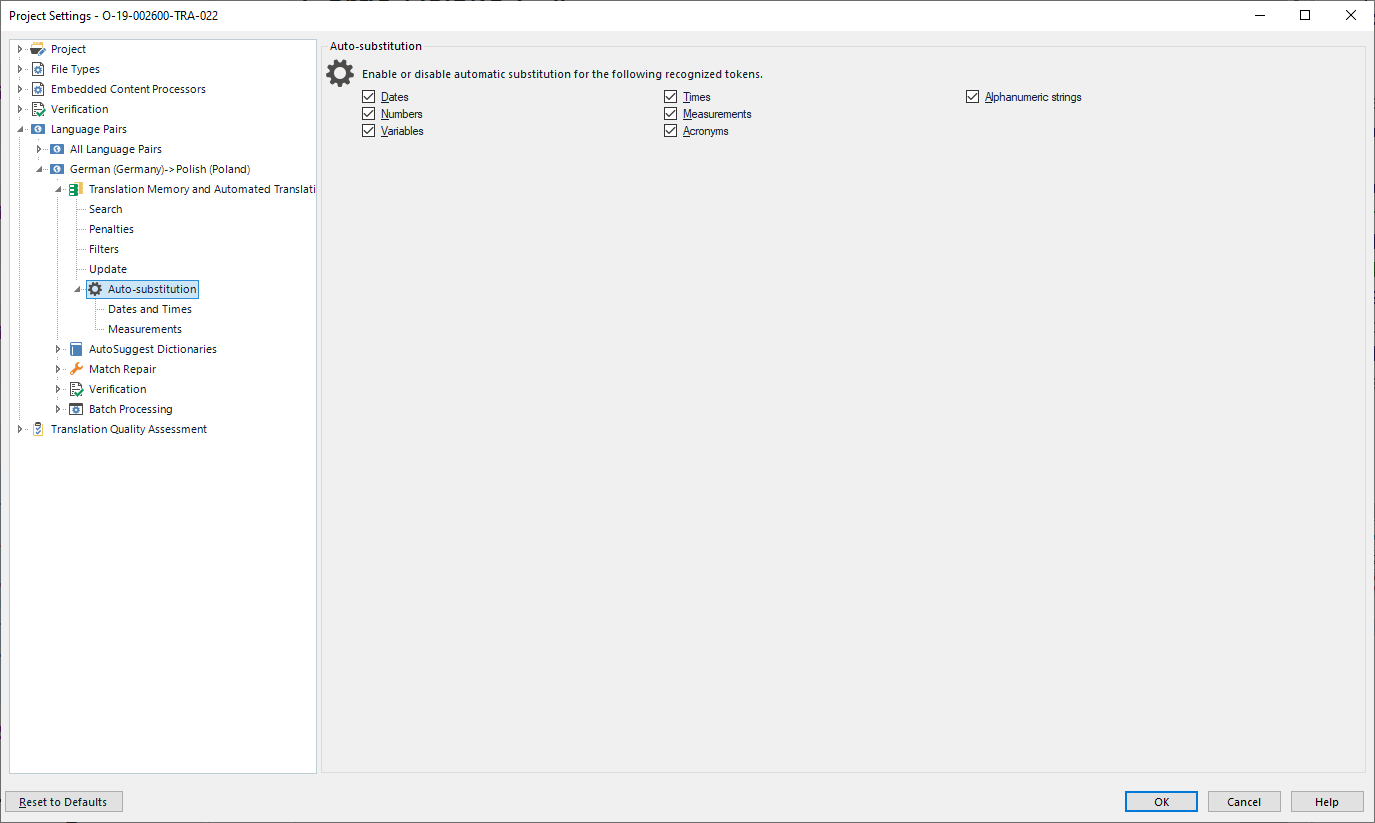
    So I understand you're talking about Project Settings --> Language Pairs --> "All language pairs" or [Specific pair] --> Translation Memory and AT --> "Settings" tab (in the right-hand frame) --> Fields and settings --> Recognize. 

    The answer to your question is Yes, Numbers are checked and being recognised... But I knew that anyway, as I said in the original question, since these are underlined.

    You would be right about regex filters, if I didn't have a powerful PC.  In fact all my machines are very powerful and if I can find an answer to this preposterous difficulty I'm having I won't need to think about it ever again: in the (fairly rare) documents I do where there are large tables of numbers these would just flash past and I wouldn't have to think about it...

  • My PC is most probably not much weaker than yours, I use an Intel i8700k powered PC with 48 GB RAM and a PCIe based ssd. And even then you save time with regex, but it is of course your choice. Btw, regex is not only about numbers.

    It seems, that even trying to give you the exact path you fail to find the settings I am talking about. So I give you a screenshot:

    Screenshot of Trados Studio Project Settings window showing Auto-substitution options for Dates and Times, Numbers, Measurements, Acronyms, and Alphanumeric strings.

    Does it make things a little bit clearer?

    _________________________________________________________

    When asking for help here, please be as accurate as possible. Please always remember to give the exact version of product used and all possible error messages received. The better you describe your problem, the better help you will get.

    Want to learn more about Trados Studio? Visit the Community Hub. Have a good idea to make Trados Studio better? Publish it here.

    emoji


    Generated Image Alt-Text
    [edited by: Trados AI at 7:12 PM (GMT 0) on 28 Feb 2024]
  • Hahaha. Oh dear.

    You are talking there about "Auto-substitution".  In your previous post you were talking about "only number recognition settings".  In the post before that you were talking about "auto-propagation".

    I'm beginning to believe you are a secret agent from SDL whose mission is to drive people who are infuriated by SDL completely insane by deliberately confusing the names of the terminology and settings.

    Yes, Jerzy, that is checked. Please rest assured, that Numbers Auto-SUBSTITUTION option is most definitely and unambiguously CHECKED.

    ***

    However, I am happy to hear about the "cumulative update" to SDL 2019 a few posts back. I will try this update.  HOWEVER, once again the über-dysfunctionality of SDL creates a problem: when one installs SDL, unlike with any professionally designed application, there is no option of installing it outside the C: drive in Windoze.  Normally I would have installed this in another drive.  What this means is that I shall have to make a Macrium disk image of my C: drive before trying this so-called upgrade of 2019, in anticipation of something going terribly wrong and my having to restore to the status-quo-ante.

    The simple fact is that most professional computer applications use some form of Continuous Integration and developments are made using Test-Driven Development (TDD). If SDL were a proper piece of professional software, therefore, a version (Service Pack upgrade or whatever) could NEVER have been published in which the regex Search and Replace functionality was broken.

  • Dear Christopher

    Sorry, if I in any way have confused you. Unfortunately, English is my helping language, not my working language. Being on a train, it is hard to check every single setting in Studio and prepare a screenshot, so I was relying on my memory, which seems to have left me today. Sorry again.

    But we are indeed a big step ahead, as we can exclude wrong settings more or less completely. As the underlaying problem does not seem to be identified easily, the only further option I see to get this bad behavior (which is really unusual) on the ground, we would need to do some steps:

    First, please upgrade your Studio to the very recent version. Before you do so, make sure you have the installer of your current version just in case.

    When you've done that and the problem still occurs even though all settings are correct, only a TeamViewer session remains to take a closer look on your problem. I am certain Paul from SDL or myself will be glad to assist you with this, if needed.

    ***

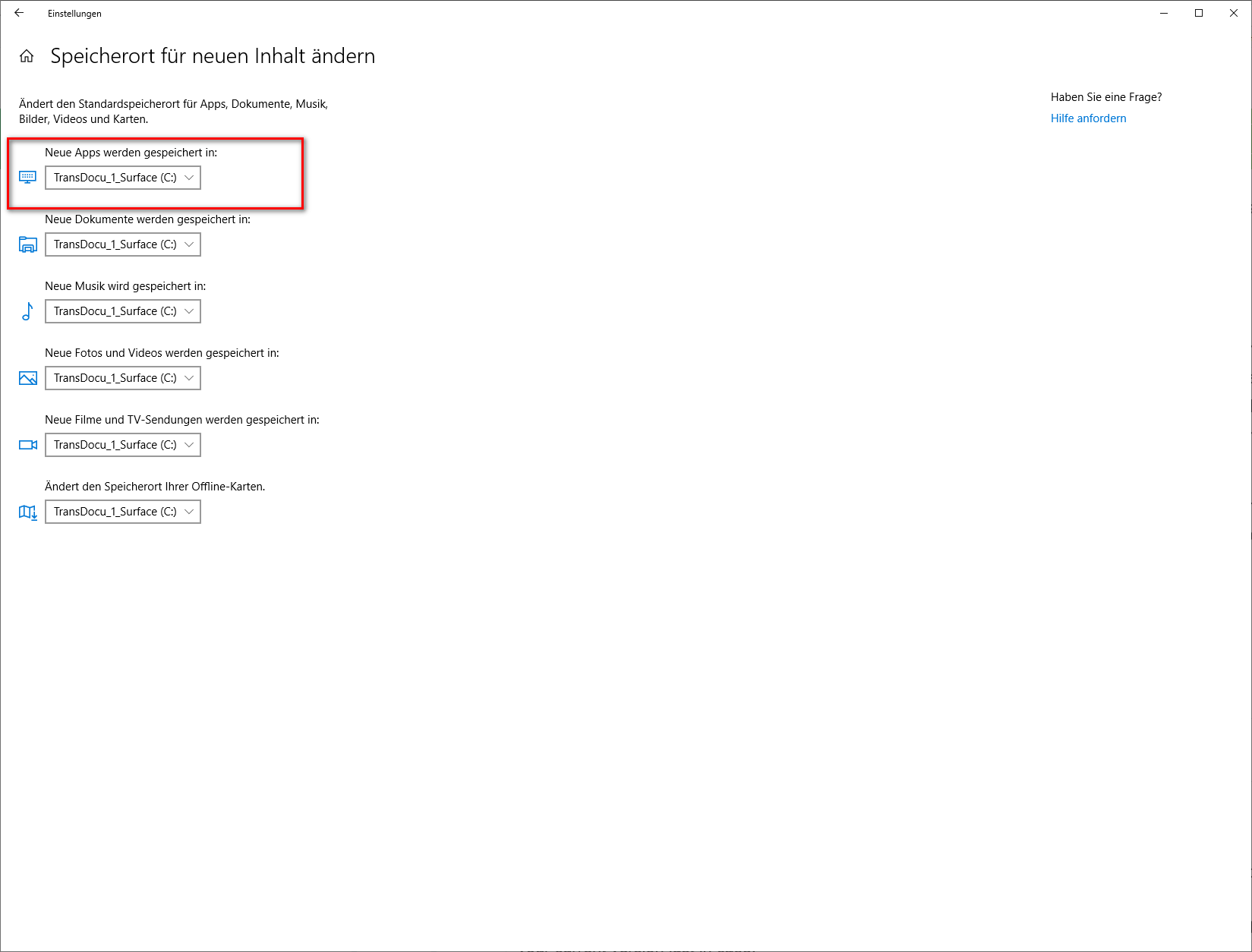
    OK, your comment on where Studio is installed may also be a hint in the right direction. My software (ALL) is installed on C, because this is the most simple way to use a PC. I am a quite experienced PC user, but I will not consider me a PC crack or IT specialist. Thus, I do not go for experiments. That said, I only install my programs on C:, while I keep ALL my data on other drives. And I never had problems with any software. I do not know many people trying to install their software on a drive different than C: But, if you really wish to do that, why not simply tell Windows 10 to do that for you:

    Windows settings screenshot showing options for changing the default save location for new apps, documents, music, pictures, videos, and offline maps to drive C:.

    Sorry for the German screenshot, I'm on the train in the middle of Ruhrgebiet with intermittend Internet connection and changing Windows language is a bit too much for a a travel home...

    I must admit I never tried this option, but the overall experience with Windows 10 tells me, that this will work without any additional hassle. And the good point about it is, that Windows does this on its own, so it really can be expected to do that properly. Maybe worth trying.

    In the meantime feel free to post any other info, we'll try to assist. Your problem is not common, so it is really a good thing to get to the very ground of it, to avoid such problems in the future. Being an employee of SDL or not does not matter, as such things may affect many users including myself, so I am highly interested in finding a solution just for the sake of the solution.

    _________________________________________________________

    When asking for help here, please be as accurate as possible. Please always remember to give the exact version of product used and all possible error messages received. The better you describe your problem, the better help you will get.

    Want to learn more about Trados Studio? Visit the Community Hub. Have a good idea to make Trados Studio better? Publish it here.

    emoji


    Generated Image Alt-Text
    [edited by: Trados AI at 7:12 PM (GMT 0) on 28 Feb 2024]
  • No problem.  I appreciate your help.  I will indeed try this upgrade and take it from there.

    Meanwhile Paul from SDL may find something out about the test project I have sent him.

  • Meanwhile Paul from SDL may find something out about the test project I have sent him.

    Thanks for sending me your project. I didn't find anything wrong with your project, and Studio handles the numbers as expected.  However, one thing I did notice is that you are "forcing" Studio to handle the numbers in a way it doesn't want.  So you are causing "incorrect" numbers to enter your TM and this approach wil never give you the right solution.

    I say "incorrect" because Studio will base it's auto-substitution on what windows believes is the correct localisation.  So this in FR:

    1 234 567 €

    Would be this in EN:

    € 1,234,567

    You have "forced" a copy of the source.  Autopropagation will never work like this and if your number recognition is off you will get fuzzy matches for different numbers since they are being treated as normal strings of text.

    So, I thought the easiest thing would be to create a short video as I have time sitting here in a hotel room!

    Paul Filkin | RWS Group

    ________________________
    Design your own training!

    You've done the courses and still need to go a little further, or still not clear? 
    Tell us what you need in our Community Solutions Hub

  • Hi Paul,

    Thanks very much for this video. It has really clarified the issue perfectly: I AM NOT GETTING A.T. !!!!

    In other words, AT - automatic translation (of currency figures), IS NOT HAPPENING.

    I just tried putting together another "virgin project", again creating a TM from scratch, with no special settings applied to it, with number recognition.  The language pair, as before, is: source - French (France), target - English (UK).

    But when I get to segment 21, "6 915 573 €", what SDL puts automatically in the target is "6 915 573 €". And yet the blue underlining clearly indicates that number recognition is working perfectly.

    I am aware of the different formatting of Euro figures in the UK... what I have been doing over this past year is to use regex search-and-replace (at the end of the project) to change Euro figures globally into UK-formatted ones, with commas for thousand-separators and preceding €, and also dot instead of comma for the decimal marker.

    The reason I do this is because SDL does not do it for me!

    Can you please suggest where and how and why SDL is failing to apply this regional transformation (for this language pair, which is the only one I ever use)?

    Meanwhile I myself shall also be googling this from tomorrow morning.

    Thanks

    PS thanks too for giving an example of how to use regex-based filtering. I'm actually quite techy, and pretty conversant with regexes. I repeat that in my view this is a "workaround", albeit a potentially useful one, but what I really need to sort out is the missing A.T. functionality.

  • But when I get to segment 21, "6 915 573 €", what SDL puts automatically in the target is "6 915 573 €". And yet the blue underlining clearly indicates that number recognition is working perfectly.

    What happens if you press Ctrl+comma in segment 21?  Does this still give you the same content as the source or the localized version?

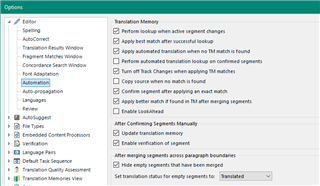
    Maybe check your automation settings:

    Screenshot of Trados Studio options menu with Translation Memory and Automated Translation settings, highlighting options such as 'Apply best match when no exact match found'.

    Paul Filkin | RWS Group

    ________________________
    Design your own training!

    You've done the courses and still need to go a little further, or still not clear? 
    Tell us what you need in our Community Solutions Hub

    emoji


    Generated Image Alt-Text
    [edited by: Trados AI at 7:12 PM (GMT 0) on 28 Feb 2024]
  • Ctrl+comma gives the localised version of the number, "6,915,573".

    I looked at the automation settings: everything is ticked as with your settings, except I also have the following ticked:

    - Copy source when no match is found

    - Enable LookAhead

    I just unchecked those: now, if I put in a number only with no currency symbol for segment 21 (i.e. "6,915,573"), this propagates correctly throughout the rest of the file, i.e. each currency "target box" has the UK-localised version of the number: e.g. seg 22 target then becomes "6,238,451".  With no currency symbol.

    However, if I put "€ 6,915,573" or "€6,915,573" in seg 21 nothing is put in the target of seg 22.  But a "translation match" is displayed, i.e. that of seg 21, and the match is said to be 84% again.