


Errore durante generazione traduzione di destinazione

Buon pomeriggio,

scrivo perché sto riportando problemi durante la finalizzazione del file, allego screenshot in modo da essere più chiara. Non riesco proprio a capire come fare, qualcuno sa aiutarmi?

Grazie mille,

Cristiana
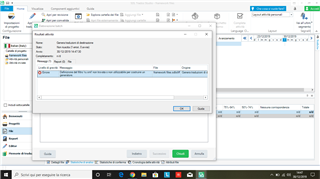
Trados Studio error message window stating 'Error: Cannot finalize target file' with an 'OK' button.


Generated Image Alt-Text
[edited by: Trados AI at 7:39 PM (GMT 0) on 28 Feb 2024]

emoji
Parents Reply Children
  • Well, I proceed as usual: I just click Crtl+S. Would you have any suggestion on how to manage it? 

  • So you are trying to save the SDLXLIFF files, not the target files.  This is a different problem.  Can you share the error stack?

    Error message window showing 'Accesso al percorso C:UsersCristiana BottamediAppDataLocalTemp1_it-it.zip.m6010p01.xml_649578.sdlxliff negato.' with an OK button.

    Then use the Insert menu in the forum to add the file:

    Dropdown menu with 'Insert imagevideofile' option highlighted and an arrow pointing to it, indicating to click there to add a file.

    Paul Filkin | RWS Group

    ________________________
    Design your own training!

    You've done the courses and still need to go a little further, or still not clear? 
    Tell us what you need in our Community Solutions Hub

    emoji


    Generated Image Alt-Text
    [edited by: Trados AI at 7:40 PM (GMT 0) on 28 Feb 2024]
  • Error message window in Trados Studio indicating denied access to a specified file path, with options for Knowledge Base and Community below, and an overlaid text bubble saying 'Sorry... I meant here!'

    Paul Filkin | RWS Group

    ________________________
    Design your own training!

    You've done the courses and still need to go a little further, or still not clear? 
    Tell us what you need in our Community Solutions Hub

    emoji


    Generated Image Alt-Text
    [edited by: Trados AI at 7:40 PM (GMT 0) on 28 Feb 2024]
  • Yes I'm trying to save the SDLXLIFF files, here is the file!

    <SDLErrorDetails time="30/12/2019 18:34:38">
      <ErrorMessage>Accesso al percorso 'C:\Users\Cristiana Bottamedi\AppData\Local\Temp\Temp1_it-IT.zip\xml_module1_666979.sdlxliff' negato.</ErrorMessage>
      <Exception>
        <Type>System.UnauthorizedAccessException, mscorlib, Version=4.0.0.0, Culture=neutral, PublicKeyToken=b77a5c561934e089</Type>
        <HelpLink />
        <Source>mscorlib</Source>
        <HResult>-2147024891</HResult>
        <StackTrace><![CDATA[   in System.IO.__Error.WinIOError(Int32 errorCode, String maybeFullPath)
       in System.IO.File.InternalDelete(String path, Boolean checkHost)
       in System.IO.File.Delete(String path)
       in Sdl.FileTypeSupport.Bilingual.SdlXliff.XliffFileWriter.Complete()
       in Sdl.FileTypeSupport.Framework.Integration.AbstractBilingualProcessorContainer.Complete()
       in Sdl.FileTypeSupport.Framework.Core.Utilities.BilingualApi.BilingualContentHandlerAdapter.Complete()
       in Sdl.FileTypeSupport.Framework.Integration.AbstractBilingualProcessorContainer.Complete()
       in Sdl.FileTypeSupport.Framework.Integration.MultiFileConverter.ParseNext()
       in Sdl.FileTypeSupport.Framework.Integration.MultiFileConverter.Parse()
       in Sdl.TranslationStudio.Editor.TranslationEditor.TranslatableDocument.SaveBilingualImpl(String[] bilingualFilePaths, Boolean copy, IJobExecutionContext context, Boolean isAutoSaved)
       in Sdl.TranslationStudio.Editor.TranslationEditor.TranslatableDocument.Save(IJobExecutionContext context)
       in Sdl.TranslationStudio.Api.Editor.SaveJobRequest.Execute(IJobExecutionContext context)
       in Sdl.Desktop.Platform.Implementation.Services.Job.<_worker_DoWork>b__47_0()
       in Sdl.Desktop.Logger.Log.Resources(Object message, Action action)
       in Sdl.Desktop.Platform.Implementation.Services.Job._worker_DoWork(Object sender, DoWorkEventArgs e)
       in System.ComponentModel.BackgroundWorker.OnDoWork(DoWorkEventArgs e)
       in System.ComponentModel.BackgroundWorker.WorkerThreadStart(Object argument)]]></StackTrace>
      </Exception>
      <Environment>
        <ProductName>SDL Trados Studio</ProductName>
        <ProductVersion>15.0.0.0</ProductVersion>
        <EntryAssemblyFileVersion>15.2.5.2145</EntryAssemblyFileVersion>
        <OperatingSystem>Microsoft Windows 10 Pro</OperatingSystem>
        <ServicePack>NULL</ServicePack>
        <OperatingSystemLanguage>1040</OperatingSystemLanguage>
        <CodePage>1252</CodePage>
        <LoggedOnUser>LAPTOP-4KCD4VSI\Cristiana Bottamedi</LoggedOnUser>
        <DotNetFrameWork>4.0.30319.42000</DotNetFrameWork>
        <ComputerName>LAPTOP-4KCD4VSI</ComputerName>
        <ConnectedToNetwork>True</ConnectedToNetwork>
        <PhysicalMemory>3986420 MB</PhysicalMemory>
      </Environment>
    </SDLErrorDetails>

  • Try this:

    1. Close Studio
    2. Rename folder 15.0.0.0 in C:\Users\[Username]\AppData\Roaming\SDL\SDL Trados Studio

    Then restart Studio and see if this helps.  If it doesn't then the problem might be related to your security software that could have corrupted the temp files Studio is using when working.  You could try this (after checking you don't have any security software "cleaning up" your temp folders and ignoring the fact Studio is working on them... antivirus software, or disk cleaning/enhancing software for example):

    1. Recreate your project with a new name (don't remove/delete the old one)
    2. Copy the SDLXLIFF files from the target language folder of your original project
    3. Paste them into the target language folder of your new project
    4. Open the new project and see if this works as expected

    Paul Filkin | RWS Group

    ________________________
    Design your own training!

    You've done the courses and still need to go a little further, or still not clear? 
    Tell us what you need in our Community Solutions Hub

  • I renamed the folder but as soon as I opened a file the folder appeared again in addition to the renamed old one. I recreated the project with a new name, opened one of the files, tried to save it and the error didn't occur! 
    Thanks a lot for your help, really!

  • I renamed the folder but as soon as I opened a file the folder appeared again in addition to the renamed old one.

    Yes... that is what was intended.  A fresh start on the settings in these files.

    I recreated the project with a new name, opened one of the files, tried to save it and the error didn't occur! 

    That's great... but be wary of the security software comments.  If the problem is related to this then it may occur again.  It's worth checking what software you have running on your machine and make sure you whitelist Studio to avoid things like this.

    Paul Filkin | RWS Group

    ________________________
    Design your own training!

    You've done the courses and still need to go a little further, or still not clear? 
    Tell us what you need in our Community Solutions Hub

  • Yes, you're right, I whitelisted Studio this morning because at first I thought it was the problem! Thanks again, you've been very helpful.