TM does NOT update with new numbers

Hi all,

One of my clients sends updates to the same document periodically throughout the year. After completing each update, I run "Update Main Translation Memory" as a batch task.

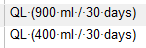
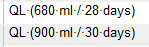
The document involves a lot of numbers, and often new segments will be added that are identical to segments already in the TM but with different numbers. For example, the TM already contains "30 g / 25 days" but the updated document also contains instances of "60 g / 25 days".

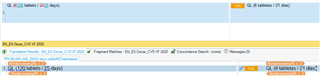
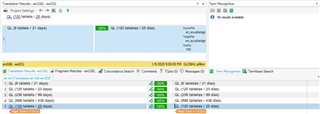
When working on the latest update, segments that were in the previous version of the document are NOT coming up when I run Pre-translate, and sure enough, when I search for the segment in the TM it is not there. Well, a comparable instance is there but with a different number, NOT the number that appeared in the last update. For example:

QL (30 tablets per 25 days) appears in the TM but not QL (120 tablets per 25 days)

QL (15 tablets/25 days) appears in the TM but not QL (120 tablets/25 days)

The instances with "120 tablets" were in the last version of this document, after which I updated the main TM.

I have tried the following solutions, to no avail:

1) exporting the TM to a .tmx and then importing it back into a brand-new, empty TM and updating using the latest xliff

2) deleting any Update fields that do not have anything in them

3) running an alignment with one of the segments from the last version of the document and importing it into the TM (a message appears that it has been successfully imported, but when I search the TM it is not actually there - only the comparable segment with a different number is there)

Given the amount of numbers that change from one document to the next, I need for the numbers to match exactly rather than having to change them all by hand based on fuzzy matches (that would mean changing the numbers for hundreds if not thousands of segments).

Thank you in advance for any solutions.

Parents
  • Another note:

    After updating the TM from the alignment I mentioned above in 3), the TM shows the metadata that I input with the alignment update. But the numbers do not match the documents I used for the alignment - they seem to have reverted back to the segment in the TM with the next-lowest numerical value (I aligned QL 120 tablets / 25 days and the unit in the TM with the metadata from that alignment show QL 6 tablets / 21 days).

  • Just in case you are not aware of the details about how TM works:

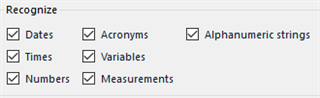
    Normally (i.e. if you don't turn this off explicitly), the TM engine is able to recognize certain tokens in the sentence... tokens like numbers, dates, times, measuring units, etc.
    And the segment in TM then does not store the ACTUAL VALUE of the token (like the number 6 or 21), but stores only the "the token goes here" information. However, the original value is still displayed to the user...

    So, when the TM shows you "30 g / 25 days", it in fact contains "<number> <unit> / <number> days".
    And this ensures that sentences containing the same text, but with different numbers, are still recognized as full match against the segment stored in the TM.

    But what often happens is that the text is NOT EXACTLY THE SAME, especially when numbers and/or measuring units are involved - very often there are spacing differences, i.e. the spaces between the numbers, measuring units, etc. and the surrounding text are different... typically a normal space vs. non-breaking space.
    Typographical rules in many languages require a non-breaking space between the number and units, which the text editing software (like Microsoft Word and the likes) automatically inserts when originally typing the text, but they are often lost when doing additional manual edits like copy & paste, deleting and manual re-typing the values, etc... or when doing edits in various programs (which are or are not configured to insert the non-breaking spaces), or by different people using differently configured programs, etc.

    So, you may want to check if the spaces in different segments are really the same as in your TM segments.

    Plus, there is always a chance that there is simply a bug in Studio... SDL seems to be doing some internal under-the-hood changes in Studio in the last couple of years, which unfortunately brings various weird bugs, even in parts which worked reliably for years.

Reply
  • Just in case you are not aware of the details about how TM works:

    Normally (i.e. if you don't turn this off explicitly), the TM engine is able to recognize certain tokens in the sentence... tokens like numbers, dates, times, measuring units, etc.
    And the segment in TM then does not store the ACTUAL VALUE of the token (like the number 6 or 21), but stores only the "the token goes here" information. However, the original value is still displayed to the user...

    So, when the TM shows you "30 g / 25 days", it in fact contains "<number> <unit> / <number> days".
    And this ensures that sentences containing the same text, but with different numbers, are still recognized as full match against the segment stored in the TM.

    But what often happens is that the text is NOT EXACTLY THE SAME, especially when numbers and/or measuring units are involved - very often there are spacing differences, i.e. the spaces between the numbers, measuring units, etc. and the surrounding text are different... typically a normal space vs. non-breaking space.
    Typographical rules in many languages require a non-breaking space between the number and units, which the text editing software (like Microsoft Word and the likes) automatically inserts when originally typing the text, but they are often lost when doing additional manual edits like copy & paste, deleting and manual re-typing the values, etc... or when doing edits in various programs (which are or are not configured to insert the non-breaking spaces), or by different people using differently configured programs, etc.

    So, you may want to check if the spaces in different segments are really the same as in your TM segments.

    Plus, there is always a chance that there is simply a bug in Studio... SDL seems to be doing some internal under-the-hood changes in Studio in the last couple of years, which unfortunately brings various weird bugs, even in parts which worked reliably for years.

Children