TM does NOT update with new numbers

Hi all,

One of my clients sends updates to the same document periodically throughout the year. After completing each update, I run "Update Main Translation Memory" as a batch task.

The document involves a lot of numbers, and often new segments will be added that are identical to segments already in the TM but with different numbers. For example, the TM already contains "30 g / 25 days" but the updated document also contains instances of "60 g / 25 days".

When working on the latest update, segments that were in the previous version of the document are NOT coming up when I run Pre-translate, and sure enough, when I search for the segment in the TM it is not there. Well, a comparable instance is there but with a different number, NOT the number that appeared in the last update. For example:

QL (30 tablets per 25 days) appears in the TM but not QL (120 tablets per 25 days)

QL (15 tablets/25 days) appears in the TM but not QL (120 tablets/25 days)

The instances with "120 tablets" were in the last version of this document, after which I updated the main TM.

I have tried the following solutions, to no avail:

1) exporting the TM to a .tmx and then importing it back into a brand-new, empty TM and updating using the latest xliff

2) deleting any Update fields that do not have anything in them

3) running an alignment with one of the segments from the last version of the document and importing it into the TM (a message appears that it has been successfully imported, but when I search the TM it is not actually there - only the comparable segment with a different number is there)

Given the amount of numbers that change from one document to the next, I need for the numbers to match exactly rather than having to change them all by hand based on fuzzy matches (that would mean changing the numbers for hundreds if not thousands of segments).

Thank you in advance for any solutions.

Parents
  • Another note:

    After updating the TM from the alignment I mentioned above in 3), the TM shows the metadata that I input with the alignment update. But the numbers do not match the documents I used for the alignment - they seem to have reverted back to the segment in the TM with the next-lowest numerical value (I aligned QL 120 tablets / 25 days and the unit in the TM with the metadata from that alignment show QL 6 tablets / 21 days).

  • Just in case you are not aware of the details about how TM works:

    Normally (i.e. if you don't turn this off explicitly), the TM engine is able to recognize certain tokens in the sentence... tokens like numbers, dates, times, measuring units, etc.
    And the segment in TM then does not store the ACTUAL VALUE of the token (like the number 6 or 21), but stores only the "the token goes here" information. However, the original value is still displayed to the user...

    So, when the TM shows you "30 g / 25 days", it in fact contains "<number> <unit> / <number> days".
    And this ensures that sentences containing the same text, but with different numbers, are still recognized as full match against the segment stored in the TM.

    But what often happens is that the text is NOT EXACTLY THE SAME, especially when numbers and/or measuring units are involved - very often there are spacing differences, i.e. the spaces between the numbers, measuring units, etc. and the surrounding text are different... typically a normal space vs. non-breaking space.
    Typographical rules in many languages require a non-breaking space between the number and units, which the text editing software (like Microsoft Word and the likes) automatically inserts when originally typing the text, but they are often lost when doing additional manual edits like copy & paste, deleting and manual re-typing the values, etc... or when doing edits in various programs (which are or are not configured to insert the non-breaking spaces), or by different people using differently configured programs, etc.

    So, you may want to check if the spaces in different segments are really the same as in your TM segments.

    Plus, there is always a chance that there is simply a bug in Studio... SDL seems to be doing some internal under-the-hood changes in Studio in the last couple of years, which unfortunately brings various weird bugs, even in parts which worked reliably for years.

  • Hi Evzen,

    Thank you for the insight.

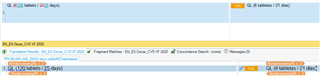
    The spacing in the segments is exactly the same (see below - the first screenshot is from the updated document processed in Studio and the second is of the only segment that appears in the Main TM even after I've tried updating it):

    Screenshot of Trados Studio segment showing text 'QL: (120 tablets  25 days)' with consistent spacing.

    Screenshot of Trados Studio segment showing text 'QL: (6 tablets  21 days)' with consistent spacing.

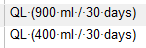
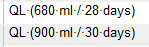
    I also created a Project TM and it does not seem to have this issue, as it contains all of the following TUs:

    Screenshot of Trados Studio Project TM with two entries 'QL: (900 ml  30 days)' and 'QL: (400 ml  30 days)' with consistent spacing.

    Screenshot of Trados Studio Project TM with two entries 'QL: (680 ml  28 days)' and 'QL: (900 ml  30 days)' with consistent spacing. 

    I should add that I am approaching this from a project management, not a translation, standpoint.

    emoji


    Generated Image Alt-Text
    [edited by: Trados AI at 7:43 PM (GMT 0) on 28 Feb 2024]
  • The spacing in the segments is exactly the same (see below - the first screenshot is from the updated document processed in Studio and the second is of the only segment that appears in the Main TM even after I've tried updating it):

    Screenshot of Trados Studio segment showing 'QL (120 tablets  25 days)' with '120' and '25' underlined indicating recognition.

    Screenshot of Trados Studio segment showing 'QL (6 tablets  21 days)' without any underlined text.

    I don't really see the problem with this example.  You can see in the first image that "120" and "25" are recognised because they are underlined.  This means that even if you have the following none of them should be added to the TM at all:

    QL (125 tablets / 23 days)

    QL (236 tablets / 99 days)

    QL (998 tablets / 436 days)

    Studio only needs the one that is already in there:

    QL (6 tablets / 21 days)

    It will replace the recognised numbers based on what is in the source.

    I also created a Project TM and it does not seem to have this issue, as it contains all of the following TUs:

    Screenshot of Trados Studio showing two segments, 'QL (900 ml  30 days)' and 'QL (400 ml  30 days)' without any underlined text.

    Screenshot of Trados Studio showing two segments, 'QL (680 ml  28 days)' and 'QL (900 ml  30 days)' without any underlined text. 

    This I don't understand, but would really need to see the whole TU to comment on it, and it would be useful to understand how they got in the TM in the first place... the process.  Interactive translation, importing a TM etc.

    Paul Filkin | RWS

    Design your own training!
    You've done the courses and still need to go a little further, or still not clear? 
    Tell us what you need in our Community Solutions Hub

    emoji


    Generated Image Alt-Text
    [edited by: Trados AI at 7:44 PM (GMT 0) on 28 Feb 2024]
  • Hi Paul,

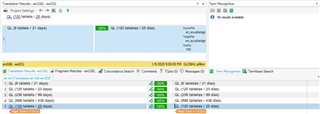
    The problem is that Studio is not replacing the recognized numbers based on what is in the source - I apologize if I did not make that clear from the beginning. It comes up as a 75% fuzzy match, like so:

    Screenshot showing Trados Studio interface with a 75% fuzzy match error where numbers are not replaced correctly in the target text.

    The second set of screenshots is a TM that I created using the final Xliff for the last version of this document. I opened the Xliff, went to the Update Main TM batch task and instead of updating a TM I created a new one.

    emoji


    Generated Image Alt-Text
    [edited by: Trados AI at 7:44 PM (GMT 0) on 28 Feb 2024]
  • I just aligned two files that were full of these texts.  The first point to note is that one one segment was added to my TM... as expected.  Interesting that the TU contains the first source TU and the last target TU, so the actual text in the TU is technically incorrect since the numbers don't match, but this doesn't matter as they are all tokens.

    I then created a project wth the TM and the original source file... the entire file is translated despite there only being one TU in my TM:

    Trados Studio translation results window showing one segment added to TM with mismatched source and target numbers.

    This is the expected behaviour.  So if you are not seeing this then it's likely one of these things is not set for you:

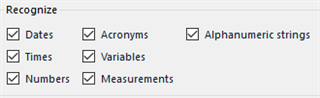
    • number recognition.  I have these settings on the TM I aligned to and use in my project:
      Trados Studio settings window with 'Recognize' options for Dates, Acronyms, Alphanumeric strings, Times, Variables, Numbers, and Measurements.
    • number auto-substitution in your Project Settings. I use these:
      Trados Studio 'Auto-substitution' settings window with options for Dates, Times, Numbers, Measurements, Variables, and Acronyms.

    If this doesn't help I think the only way we'll get to the bottom of this mystery is to see your files from start to finish and try to reproduce exactl what you have done.

    Paul Filkin | RWS

    Design your own training!
    You've done the courses and still need to go a little further, or still not clear? 
    Tell us what you need in our Community Solutions Hub

    emoji


    Generated Image Alt-Text
    [edited by: Trados AI at 7:44 PM (GMT 0) on 28 Feb 2024]
  • It was the Auto-substitution settings! Thank you so much - what a relief.

    A follow-up issue: I need to use this TM, whose target language is ES (SP), for translation to ES (US). How can I do that so that the numbers aren't auto-localized for ES (SP)?

  • How can I do that so that the numbers aren't auto-localized for ES (SP)?

    Export to TMX.

    Create a new TM with the languages you want.

    Import the TMX.

    Paul Filkin | RWS

    Design your own training!
    You've done the courses and still need to go a little further, or still not clear? 
    Tell us what you need in our Community Solutions Hub

Reply Children