


This discussion has been locked.
You can no longer post new replies to this discussion. If you have a question you can start a new discussion

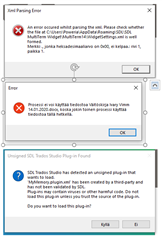
THREE error message I have to resolve! Any help is much appreciated.

Error message from Trados Studio about MultiTerm Widget parsing error with suggestion to check the widget settings at PluginSettings.xml.

Does anyone know how to fix these problems?
Trados version: SDL Trados Studio 2019 SR2 - 15.2.5.2145
    1. The first error message doesn't appear to cause any harm, but it would be nice to get rid of it. I have no idea what the MultiTerm Widget even is.
    2. URGENT. This error message stops me from working, so I urgently need a solution for this. It says that it can't open a Word document, as it is being used by another process, but it doesn't seem to be open anywhere else. I've tried changing the name of the file and rebooting the PC, but to no avail.
  • This is the MyMemory plugin, which was absolutely terrible anyway, but I get this error message every time I open Trados. I would love to avoid having to click NO each time I open Trados.
I have tried and failed to find an answer on the SDL site's labyrinth. I decided to purchase a support package, but when I called SDL, I got an automated message saying that the telephone service was not available. Got plenty of work, but can't do anything. Any help would be greatly appreciated and I will gladly reimburse someone for removing these glitches. Thanks in advance!


Generated Image Alt-Text
[edited by: Trados AI at 7:53 PM (GMT 0) on 28 Feb 2024]
emoji
Parents
  • The first error message doesn't appear to cause any harm, but it would be nice to get rid of it. I have no idea what the MultiTerm Widget even is.

    This is most likely because the version of the MultiTerm widget that you have installed is for an older version of MultiTerm.  I suggest you uninstall it.  Or follow the details in this article if the uninstall fails:

    https://gateway.rws.com/csm?id=kb_article_view&sysparm_article=KB0033482

    If you want to know what it is review this article:

    https://multifarious.filkin.com/2012/11/27/widget/

    URGENT. This error message stops me from working, so I urgently need a solution for this. It says that it can't open a Word document, as it is being used by another process, but it doesn't seem to be open anywhere else. I've tried changing the name of the file and rebooting the PC, but to no avail.

    Is this error coming from Studio or Word? Do you have the file open in another application?  When does this happen... so at what poin in whatever process you are running does this error occur?

    This is the MyMemory plugin, which was absolutely terrible anyway, but I get this error message every time I open Trados. I would love to avoid having to click NO each time I open Trados.

    The plugin is no signed... this suggests to me that the plugin you are using is an old one.  Where did you get it from?  This message appears for one of two reasons:

    1. The plugin has not been signed yet.  Not a bug, just a message telling you it's probably still a Beta and not a production release. Or

    2. The plugin was built with spaces in the dll names by the developer.  Te developer needs to correct this and submit a new version for signing.

    I just downloaded the latest version of this plugin for Studio 2019 and do not get this messagetells me you simply need to download the latest version from the appstore and instal it.  I have no idea where you got the one you are using from but I doubt it's the latest version for Studio 2019 on the appstore:

    https://appstore.sdl.com/language/app/mymemory/337/

    Paul Filkin | RWS

    Design your own training!
    You've done the courses and still need to go a little further, or still not clear? 
    Tell us what you need in our Community Solutions Hub

  • Hi Paul. Actually, the problem came up once again (process in use by another application. This time, LockHunter couldn't help. I cannot add any Word files to Trados, which is a pity, as most files I receive are Word files. Allow me to add that my PC only gives error messages for Trados, no other application. Any help would be appreciated.

Reply Children