
 Translate



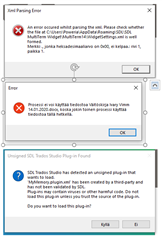
Does anyone know how to fix these problems?
Trados version: SDL Trados Studio 2019 SR2 - 15.2.5.2145
- The first error message doesn't appear to cause any harm, but it would be nice to get rid of it. I have no idea what the MultiTerm Widget even is.
- URGENT. This error message stops me from working, so I urgently need a solution for this. It says that it can't open a Word document, as it is being used by another process, but it doesn't seem to be open anywhere else. I've tried changing the name of the file and rebooting the PC, but to no avail.
- This is the MyMemory plugin, which was absolutely terrible anyway, but I get this error message every time I open Trados. I would love to avoid having to click NO each time I open Trados.
I have tried and failed to find an answer on the SDL site's labyrinth. I decided to purchase a support package, but when I called SDL, I got an automated message saying that the telephone service was not available. Got plenty of work, but can't do anything. Any help would be greatly appreciated and I will gladly reimburse someone for removing these glitches. Thanks in advance!
Generated Image Alt-Text
[edited by: Trados AI at 7:53 PM (GMT 0) on 28 Feb 2024]


