New entry in Termbase CTRL+F2 or CTRL+SHIFT+F2 via Project View

Hi,

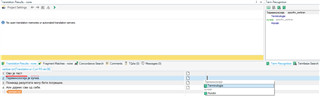
when I mark a word in the source segment and in the target segment Screenshot showing Trados Studio interface with a split view, the source segment word 'BIOGORIVO' highlighted in green and the target segment word 'BIOKRAFTSTOFF' highlighted in red. and wonna add it to the TB with the function Quick add to the termbase (CTRL+SHIFT+F2) it adds both words to the target langauge, then I have manually to add the source langauge (+new langauge), cut and delete one entry in the target langauge and copy it to the source langauge entry.

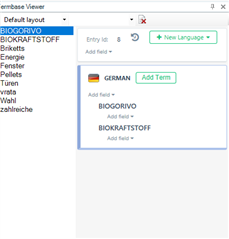
Termbase Viewer window in Trados Studio with the term 'BIOKRAFTSTOFF' added twice under the 'GERMAN' language section, indicating an error in term entry.

To get this:

Corrected Termbase Viewer window showing 'BIOKRAFTSTOFF' under 'GERMAN' and 'BIOGORIVO' under 'SERBIAN (LATIN)', demonstrating the manual correction of the term entry.

Don't know what I have done wrong by creating the TM, because in the SDL Multiterm is everything fine, only in the Project view I have this problem. Have done the last available update for Studio and Multiterm, but it didn't solved this problem.

Best regards,

Luka


Generated Image Alt-Text
[edited by: Trados AI at 1:11 AM (GMT 0) on 29 Feb 2024]

emoji
Parents Reply Children
  • Thanks

    I probably wasn't very clear:

    CRQ-18036
    Adding terms from Studio for Serbian termbase will add both source and target term to the same language

    This one is still unresolved.  But if you use the correct languages it seems to work so I'm not sure this needs any work to solve the problem you have reported here.  Probably not.

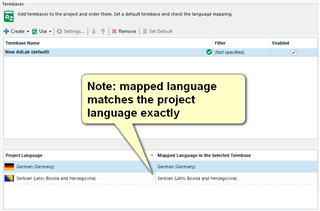
    So, if I set up a termbase like this:

    Screenshot of Trados Studio showing a note indicating that the mapped language matches the project language exactly, with German (Germany) as the project language and Serbian (Latin, Bosnia and Herzegovina) as the mapped language in the selected termbase.

    Then it works.

    In practice this should not be needed as it means you are forced to use specific languages rather than just the main group, but in all honesty I don't think this is anything we will ever fix in MultiTerm because the effort is too great for a product that is this old.

    If you use "SDL Language Cloud Terminology" you should find this works without any problems, and I believe you can also use the Excel Terminology Provider from the appstore which may be a good workaround if you don't have complex definitions for your termbases.

    So you have three workarounds, one still using MultiTerm and two others.  Hopefully this is going to help you?

    Paul Filkin | RWS

    Design your own training!
    You've done the courses and still need to go a little further, or still not clear? 
    Tell us what you need in our Community Solutions Hub

    emoji


    Generated Image Alt-Text
    [edited by: Trados AI at 1:14 AM (GMT 0) on 29 Feb 2024]
  • Hi Paul,

    the easiest way to explain it, is to check the option "Show sublanguages" by creating the TB. Thank you for the assistence.

    Screenshot of Trados Studio Termbase Wizard - Step 3 of 5, showing Language Fields settings with 'Serbian (Latin, Bosnia and Herzegovina)' selected and 'Show sublanguages' option checked.

    emoji


    Generated Image Alt-Text
    [edited by: Trados AI at 1:14 AM (GMT 0) on 29 Feb 2024]