Extra segments created by Studio

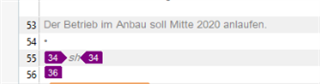
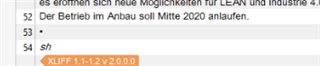
We have translated an xlf in Studio 2019 that was created from an InDesign file. Now, this normally goes without a hitch, but now the client is complaining that they cannot import the file back into InDesign as the source has been changed. The screenshot they sent shows that when they open the translated xlf in Studio, it shows two extra segments in the file, with only a tag in them. They're probably the reason why the import is unsuccessful, but as we can't see them in Studio (on our side everything appears normal), we can't fix the issue. This is the case with all the languages we translated, so it can't be one translator having messed up something.

Any ideas what happened and more importantly, how we can fix it?


Generated Image Alt-Text
[edited by: Trados AI at 2:44 PM (GMT 0) on 1 Mar 2024]
emoji
Parents Reply
  • So... it's not actually a bug.  The support team have explained that this is occurring because you have a couple of segments in the file that are source only and have no target content.  But as the source only contains a tag Studio moves this externally so you don't see it.  But once the file is fully segmented and the status changes you see these segments in Studio too... this happens when you save the target file.

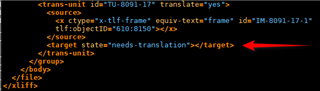
    So for example, look at the end of your file and you'll see this in the source:

    Screenshot of Trados Studio segment with source tag only and target state set to 'needs-translation', indicated by a red arrow.

    You can see that the target is empty.  The source only contains a tag and this is not seen when Studio opens the file for translation.  However, the target file is like this:

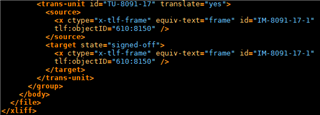
    Screenshot of Trados Studio segment with source and target tags present and target state set to 'signed-off'.

    Note that this time the target is also populated and Studio won't hide this when you open the file again, and the status is "signed-off".  This happens in two segments (40 and 56), and this accounts for the additional two lines in the file.  They have always been there and once you populate the target as well it becomes more obvious.

    If you change the target file so that the two affected segments are empty and given a "needs-translation" status then you'll have 54 segments again... as attached:

    fixed_10_11_LOOK 01_20_iÜ_Hügli_Eisberg_hu.zip

    It might be worth seeing if this makes the difference in importing back.  If it doesn't then the problem probably relates to something else and I think would need investigation in InDesign.

    Paul Filkin | RWS

    Design your own training!
    You've done the courses and still need to go a little further, or still not clear? 
    Tell us what you need in our Community Solutions Hub

    emoji


    Generated Image Alt-Text
    [edited by: Trados AI at 8:32 PM (GMT 0) on 28 Feb 2024]
Children