Translate



Well, gals and pals,
I'm newbee here, so I don't know where and how to ask. Sorry.
This case is totally silly, so do I become.
I'm working on a huge project for SDL and I receive jobs as sliced Groupshare sets of files.
Some of them are OK, some not so "heavy" aren't.
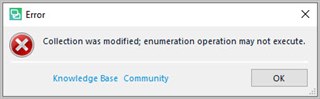
As I try and open some extracted files from the package, Trados works in the background and begins to consume memory resources up to more than 3 GB RAM, then crashes displaying error messages. It takes a long while before the crash. When I say "crashes", I mean, Trados displays one or many error messages, then vanishes, that's all!
These messages vary. Here are some of them. The outofmemory exception occurs sometimes, too.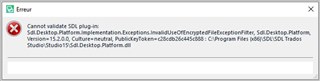
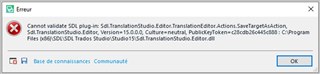
I first though this was due to my antivirus software, but the whole directory is set in the white list.
I'm a freelancer, so I don't have any access to the GS settings. I couldn't even copy the project file here.
Any Idea?
Please notice the end customer has already rebuilt the packages twice. I think they don't face this problem. Why do I?
My "lead" told me he faced the same issue in Montreal. Rebuilding the project didn't suffice to solve the issue.
They use a special version of XML, which is supplied with the project.
I don't use plugins, except Antidote connector.
Is there any log I could review for such cases, I could explore to find a cue or transfer to gurus?
Is there any setting in Trados Studio 2019 I could set to generate such log files?
Best regards,
William
Generated Image Alt-Text
[edited by: Trados AI at 8:40 PM (GMT 0) on 28 Feb 2024]