Trados consumes memory (>3GB), then crashes on specific files in a Groupshare project

Well, gals and pals,

I'm newbee here, so I don't know where and how to ask. Sorry.

This case is totally silly, so do I become.

I'm working on a huge project for SDL and I receive jobs as sliced Groupshare sets of files.
Some of them are OK, some not so "heavy" aren't.

As I try and open some extracted files from the package, Trados works in the background and begins to consume memory resources up to more than 3 GB RAM, then crashes displaying error messages. It takes a long while before the crash. When I say "crashes", I mean, Trados displays one or many error messages, then vanishes, that's all!

These messages vary. Here are some of them. The outofmemory exception occurs sometimes, too.
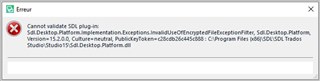
Error message in Trados Studio stating 'Cannot validate Sdl.Plugin'


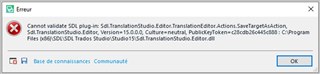
Error message in Trados Studio indicating a problem with the Sdl.TranslationStudio.Editor.Actions.SmartTagValidation plugin.

I first though this was due to my antivirus software, but the whole directory is set in the white list.

I'm a freelancer, so I don't have any access to the GS settings. I couldn't even copy the project file here.

Any Idea?

Please notice the end customer has already rebuilt the packages twice. I think they don't face this problem. Why do I?

My "lead" told me he faced the same issue in Montreal. Rebuilding the project didn't suffice to solve the issue.

They use a special version of XML, which is supplied with the project.

I don't use plugins, except Antidote connector.

Is there any log I could review for such cases, I could explore to find a cue or transfer to gurus?

Is there any setting in Trados Studio 2019 I could set to generate such log files?

Best regards,

William


Generated Image Alt-Text
[edited by: Trados AI at 8:40 PM (GMT 0) on 28 Feb 2024]
emoji
Parents
  • You have Studio GUI in French, so this makes things a bit more complicated. I assume, you cannot switch to English? But if you can, switch to English and then click the link to the "Knowledge Base" from your error message.

    The error message says, that a plugin cannot be loaded. Please try the solution described here https://gateway.rws.com/csm?id=kb_article_view&sysparm_article=KB0039395 - however I would rename both  the folder 15 and the folder 15.0.0.0

    This should resolve the problem with the plugins. When done, close Studio. Download all plugins you used from AppStore to make sure you have the most current ones and install them one by one. After that you should be able to work.

    _________________________________________________________

    When asking for help here, please be as accurate as possible. Please always remember to give the exact version of product used and all possible error messages received. The better you describe your problem, the better help you will get.

    Want to learn more about Trados Studio? Visit the Community Hub. Have a good idea to make Trados Studio better? Publish it here.

  • Thank you, and hello, Jerzy.

    Repair done. Same results on two specific .sdlxliff files in the package, among eight.
    (Both files weight about 8 MB each, whereas the others, wich pass suitably, weight less than 4 MB each.)

    Please notice the links to the KB and Community are "dead". Even in English.

    I also face this error message: https://gateway.rws.com/csm?id=kb_article_view&sysparm_article=KB0034903

    And right now, on the same "bad" file, this error message, after a long, long time:

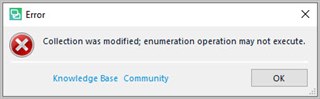
    Error message in Trados Studio stating 'Collection was modified; enumeration operation may not execute.' with non-functional Knowledge Base and Community links.

    The bottom links do not work either.

    Summary

    - Trados Free lance 2019 SR2 up to date. Repair Done.

    - Trados system files in Antivirus and firewall white lists.

    - Groupshare project, the files are extracted on the local drive.

    - Only 2 files/8 face those issues, different one time to the other.

    - Sometimes, I get the editor ready, but I can't do anything, neither move the cursor nor close the file.
      The only thing I can do then is to close Trados.

    - What's silly is that for the other 6 files, everything's OK.
      The client has already resent a new version of the files.

    So what? Tracks:

    - A Translation memory is on Groupshare too.

    - I've opened the faulty .sdlxliff file with NotePad++ and seen there are references to \\paths or even ///paths.
      I don't have access to those paths. Might it be a source of issue? I don't think so, as the other files work.
      My lead in Montreal faces the same problem, even when he can access those paths.

    I'm totally lost with this series of error messages.

    Maybe a solution could be to refactor the faulty files and split them in less than 4MB files?

    Best regards.

    emoji


    Generated Image Alt-Text
    [edited by: Trados AI at 8:40 PM (GMT 0) on 28 Feb 2024]
Reply
  • Thank you, and hello, Jerzy.

    Repair done. Same results on two specific .sdlxliff files in the package, among eight.
    (Both files weight about 8 MB each, whereas the others, wich pass suitably, weight less than 4 MB each.)

    Please notice the links to the KB and Community are "dead". Even in English.

    I also face this error message: https://gateway.rws.com/csm?id=kb_article_view&sysparm_article=KB0034903

    And right now, on the same "bad" file, this error message, after a long, long time:

    Error message in Trados Studio stating 'Collection was modified; enumeration operation may not execute.' with non-functional Knowledge Base and Community links.

    The bottom links do not work either.

    Summary

    - Trados Free lance 2019 SR2 up to date. Repair Done.

    - Trados system files in Antivirus and firewall white lists.

    - Groupshare project, the files are extracted on the local drive.

    - Only 2 files/8 face those issues, different one time to the other.

    - Sometimes, I get the editor ready, but I can't do anything, neither move the cursor nor close the file.
      The only thing I can do then is to close Trados.

    - What's silly is that for the other 6 files, everything's OK.
      The client has already resent a new version of the files.

    So what? Tracks:

    - A Translation memory is on Groupshare too.

    - I've opened the faulty .sdlxliff file with NotePad++ and seen there are references to \\paths or even ///paths.
      I don't have access to those paths. Might it be a source of issue? I don't think so, as the other files work.
      My lead in Montreal faces the same problem, even when he can access those paths.

    I'm totally lost with this series of error messages.

    Maybe a solution could be to refactor the faulty files and split them in less than 4MB files?

    Best regards.

    emoji


    Generated Image Alt-Text
    [edited by: Trados AI at 8:40 PM (GMT 0) on 28 Feb 2024]
Children
  • File size of 8 MB is tiny and should not matter. What format where the source files? Does this happen only with this specific kind of projects or even only for this very specific customer?
    I hope  someone fro SDL will take over here, I am not an expert on Groupshare.

    _________________________________________________________

    When asking for help here, please be as accurate as possible. Please always remember to give the exact version of product used and all possible error messages received. The better you describe your problem, the better help you will get.

    Want to learn more about Trados Studio? Visit the Community Hub. Have a good idea to make Trados Studio better? Publish it here.

  • That's it! Only for this customer. A brand new customer from South Corea.

    When opening a working file, I get in the Messages window a flow of:
    "This file was created using a file type definition that doesn't exist on your system (D-Link Sitecore XML v 1.3.0.0). The following functionality will be restricted or unavailable..."

    I think all this trouble comes from there. I got a new file type definition, now implemented, but anyway, the trouble is still there. Sometimes it goes, sometimes, not.

    I guess it means those files use a very specific file type, not handled by Trados.
    I tried and checked the definition of this file type among the Options. There are tons of parameters below this file type.
    It would suffice that one path or sth else were not set suitably, and the errors come in flow.

    The SDL parameter settings file is named D-Link_Sitecore_XML_v1.sdlftsettings

    It weights 247 KB. I've tried to open it with NotePad++. It's an XML file. Too heavy to expand it here.

    I'll cascade this track to the Montreal Team to check it, anyway. They'll decide whether to raise an incident ticket.

    Thanks anyway for your help. You manage to develop new tracks of possible solutions.

    Best regards,

    William

  • Where did you import the file type? If you did this via File -> Options, it has no influence on this project or any other already existing project. This file type must be within the project settings for your current project.

    From your description I suppose the project has not been prepared properly.

    _________________________________________________________

    When asking for help here, please be as accurate as possible. Please always remember to give the exact version of product used and all possible error messages received. The better you describe your problem, the better help you will get.

    Want to learn more about Trados Studio? Visit the Community Hub. Have a good idea to make Trados Studio better? Publish it here.

  • Well, gosh, my lead had the clue. Now, everything's OK.

    In fact, we got from the client a .sdlftsettings file to include in the options of Trados (see above). Imported, this file adds a new file type, among the file types options of Trados: D-Link Sitecore XML. Right?

    Then, it's not enough. This file type has to climb up to the 2nd place in the file types list, just below the standard XLIFF SDL file type. Otherwise, Trados searches away the clues to open the files. Then it fires to the stars.

    As my lead said, I didn't know this file order had so much importance.

    And now, the faulty files load in seconds, without any error message. No lagg, no memory starving.

    For sure, God exists. ;-)

    I'll suggest to close this case. I don't know how to.

    Thanks a lot for your help. Hello from South of France.