Auto-propagate treats fuzzy matches as 100% match...how to fix it?

Dear colleagues,

I hope this message finds you safe and healthy:)

I just finished a short translation that contains several date-and-day segments.  While Studio 2019 automatically replaced subsequent segments with correct date information, it incorrectly copied the translation for the day and claimed the fuzzy match to be a 100% match. (see attached screenshot)  

How do I fix the problem?  I am using Studio 2019 SR2-15.2.5.2145.

Thank you.

ChunyiScreenshot of Trados Studio showing incorrect 100% match for day translations. Left side displays English dates, right side shows Chinese translations with red highlight indicating error. 



Generated Image Alt-Text
[edited by: Trados AI at 8:41 PM (GMT 0) on 28 Feb 2024]
emoji
  • Well, March 26th was a Thursday, so it is correct so far.

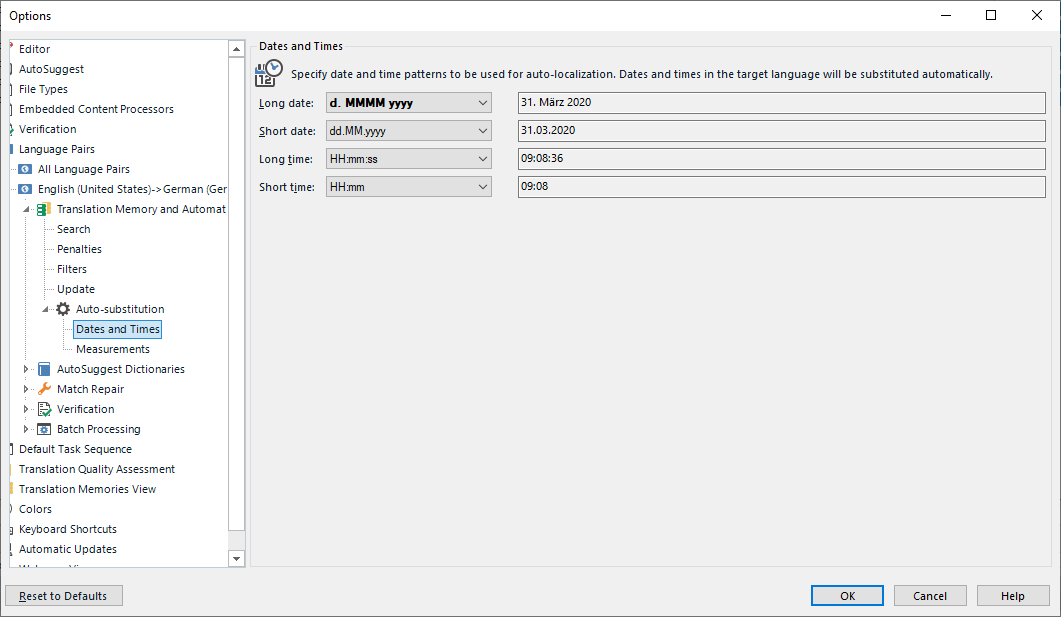
    To change this settings, go to Project Settings, Language Pairs, Chinese to English, Translation Memory ... Auto Substitution -> Dates and Times and change to this:

    Trados Studio Options dialog showing Auto-substitution settings for Dates and Times with patterns for long date as 'd. MMMM yyyy' and example '31. Marz 2020'.

    _________________________________________________________

    When asking for help here, please be as accurate as possible. Please always remember to give the exact version of product used and all possible error messages received. The better you describe your problem, the better help you will get.

    Want to learn more about Trados Studio? Visit the Community Hub. Have a good idea to make Trados Studio better? Publish it here.

    emoji


    Generated Image Alt-Text
    [edited by: Trados AI at 8:42 PM (GMT 0) on 28 Feb 2024]
  • I think your problem first of all stems from Studio not providing the option you need for your long date.  Studio attempts to provide this:

    Screenshot of Trados Studio showing a list of English dates with their incorrect Chinese translations, missing the day of the week.

    Looking at this I don't think there is an option to get you what you're after (I'm guessing at what this should be and assuming en(US) - zh(TW)):

    2020年3月27日,星期五
    2020年3月26日,星期四
    2020年3月25日,星期三

    It looks as though the days are missed off.  So the result is the AP is correct, insofar as it doesn't care about the actual day... which seems wrong to me.  I'll question this with support.

    Then the issue is exacerbated because your problem is that you have attempted to force a translation by writing in the translation you want, and as Studio sees the source as a recognised date it takes your translation and repeats it as a 100% match, which is clearly wrong.

    I don't believe you can fix this in the settings suggested because none of them provide you with what you need.  Your best bet is to use the Terminjector or the Regex AutoSuggest Provider because you won't be able to benefit from AP here anyway, so at least you can get some help with the typing.  I'd recommend you filter on the dates and tackle them first, then lock them.

    Paul Filkin | RWS Group

    ________________________
    Design your own training!

    You've done the courses and still need to go a little further, or still not clear? 
    Tell us what you need in our Community Solutions Hub

    emoji


    Generated Image Alt-Text
    [edited by: Trados AI at 8:42 PM (GMT 0) on 28 Feb 2024]