Auto-propagate treats fuzzy matches as 100% match...how to fix it?

Dear colleagues,

I hope this message finds you safe and healthy:)

I just finished a short translation that contains several date-and-day segments.  While Studio 2019 automatically replaced subsequent segments with correct date information, it incorrectly copied the translation for the day and claimed the fuzzy match to be a 100% match. (see attached screenshot)  

How do I fix the problem?  I am using Studio 2019 SR2-15.2.5.2145.

Thank you.

ChunyiScreenshot of Trados Studio showing incorrect 100% match for day translations. Left side displays English dates, right side shows Chinese translations with red highlight indicating error. 



Generated Image Alt-Text
[edited by: Trados AI at 8:41 PM (GMT 0) on 28 Feb 2024]
emoji
Parents
  • Well, March 26th was a Thursday, so it is correct so far.

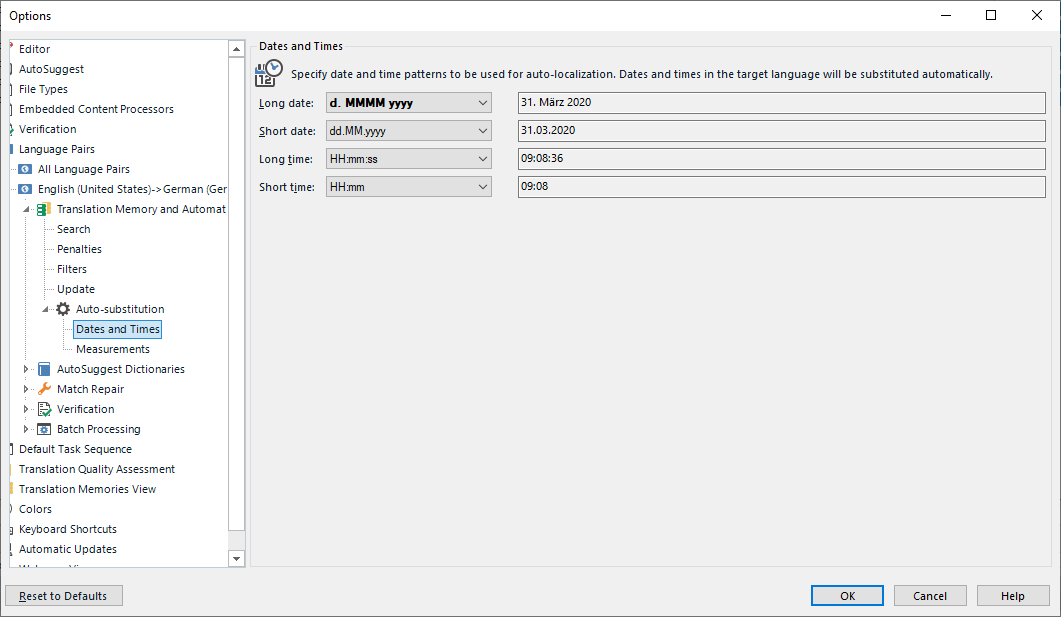
    To change this settings, go to Project Settings, Language Pairs, Chinese to English, Translation Memory ... Auto Substitution -> Dates and Times and change to this:

    Trados Studio Options dialog showing Auto-substitution settings for Dates and Times with patterns for long date as 'd. MMMM yyyy' and example '31. Marz 2020'.

    _________________________________________________________

    When asking for help here, please be as accurate as possible. Please always remember to give the exact version of product used and all possible error messages received. The better you describe your problem, the better help you will get.

    Want to learn more about Trados Studio? Visit the Community Hub. Have a good idea to make Trados Studio better? Publish it here.

    emoji


    Generated Image Alt-Text
    [edited by: Trados AI at 8:42 PM (GMT 0) on 28 Feb 2024]
Reply
  • Well, March 26th was a Thursday, so it is correct so far.

    To change this settings, go to Project Settings, Language Pairs, Chinese to English, Translation Memory ... Auto Substitution -> Dates and Times and change to this:

    Trados Studio Options dialog showing Auto-substitution settings for Dates and Times with patterns for long date as 'd. MMMM yyyy' and example '31. Marz 2020'.

    _________________________________________________________

    When asking for help here, please be as accurate as possible. Please always remember to give the exact version of product used and all possible error messages received. The better you describe your problem, the better help you will get.

    Want to learn more about Trados Studio? Visit the Community Hub. Have a good idea to make Trados Studio better? Publish it here.

    emoji


    Generated Image Alt-Text
    [edited by: Trados AI at 8:42 PM (GMT 0) on 28 Feb 2024]
Children
No Data