 Translate



Nothing changes after restarting my computer.
What should I do?
Thanks in advance,
J. Dupuy

Nothing changes after restarting my computer.
What should I do?
Thanks in advance,
J. Dupuy


Always good to check the KB:
https://gateway.rws.com/csm?id=kb_article_view&sysparm_article=KB0032269
Paul Filkin | RWS
Design your own training!
You've done the courses and still need to go a little further, or still not clear?
Tell us what you need in our Community Solutions Hub
Hi Paul,
Thanks for this. You're right.
I've looked at this procedure in the meantime and applied it.
I've renamed my plugin folder into "Plugin" instead of "Plugins" and done the repair action.
Now Studio can be opened BUT I don't have any plugins!
Should I rename the folder into "Plugins"?
Cheers,
Johanne
That would be because your plugins are all in here:
....\AppData\Roaming\SDL\SDL Trados Studio\15\Plugins\Packages\
So the easy way is to simply copy the plugins out of the Packages subfolder in the folder you renamed. Then copy them into the Packages subfolder of the new one that was created when you restarted Studio.
Paul Filkin | RWS
Design your own training!
You've done the courses and still need to go a little further, or still not clear?
Tell us what you need in our Community Solutions Hub
Ok, I've just done that... but I'm back to the very first error message...
Any idea?
ok... in this case it looks as though you have a problem with one of your plugins... as long as you didn't also copy over the Unpacked folder which you should not have done.
Assuming you did this exactly as I explained either remove the plugins and then add them back in again one at a time, or if you have a lot do this:
Once you find which one it is, first of all make sure you have got the latest version of this plugin from the appstore. If you haven't, download and install the latest and see if you get the same problem. If you do. or if you already have the latest version, let me know which one it is.
Paul Filkin | RWS
Design your own training!
You've done the courses and still need to go a little further, or still not clear?
Tell us what you need in our Community Solutions Hub
I've tried your method and each plugin one by one.
The only one which seems to generate the start error is Sdl.Community.projectTermExtract, although projectTermExtract, which was apparently installed at the same time doesn't cause the problem.
Do I need that particular one in order to run projectTermExtract ?
Perfect... you found the problem!
These are actually the same plugin, although one may be older and clearly not working in your version of Studio. The correct one is this one when installed correctly in your plugins folder:
projectTermExtract.sdlplugin
The other one could also be the name of the plugin as downloaded and if you manually copied this into the plugins folder instead of installing it (double clicking and running the plugin manager) that could also explain a problem of duplication.
Paul Filkin | RWS
Design your own training!
You've done the courses and still need to go a little further, or still not clear?
Tell us what you need in our Community Solutions Hub
Yes it probably happened when I installed this plugin because I had to copy it in the folder (the plugin installer never works properly on my computer and we never really found out why...).
So it's ok if I just delete the Sdl.Community.projectTermExtract from the packages folder?
Yes it probably happened when I installed this plugin because I had to copy it in the folder (the plugin installer never works properly on my computer and we never really found out why...).
So it's ok if I just delete the Sdl.Community.projectTermExtract from the packages folder?
So it's ok if I just delete the Sdl.Community.projectTermExtract from the packages folder?
Yes. But also make sure you remove it from the unpacked folder too otherwise the error will reoccur.
Paul Filkin | RWS
Design your own training!
You've done the courses and still need to go a little further, or still not clear?
Tell us what you need in our Community Solutions Hub
Yes but in the Unpacked folder, I've got this:
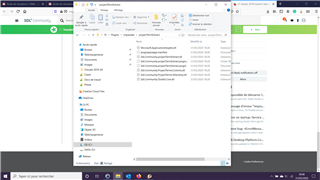
What should I remove exactly then?

You've gone a level too far and opened up the projecttermextract folder. So let's just do this:
1. Make sure you deleted Sdl.Community.projectTermExtract.sdlplugin
2. delete everything inside the Unpacked folder
Restart Studio. All the plugin in the Packages folder will be unpacked again.
Paul Filkin | RWS
Design your own training!
You've done the courses and still need to go a little further, or still not clear?
Tell us what you need in our Community Solutions Hub
Ok, I've done that.
Problem seems sorted.
Thanks!