 Translate



Why Auto-propagation doesn't work in two big files?

RWS Community
Why Auto-propagation doesn't work in two big files?
Hello Deborah Ann Landry ,
Did the problem occur from the start of the project or whilst you were already working on it?
How big are the files?
Are the files part of a package that you received? Or stand-alone files?
The more information that you can provide the better.
I would probably check first the Auto-propagation settings and that this is indeed enabled /match value properly set etc.
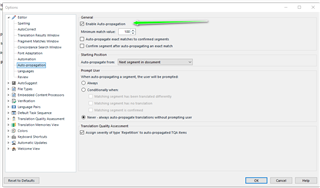
Then its worth restarting your PC and reopen Studio, as sometimes if a PC is left on for two long (sleep instead of properly shut down) then this can cause issues.
Oana Nagy | QA Engineer | RWS Group

Hello Deborah Ann Landry ,
Did the problem occur from the start of the project or whilst you were already working on it?
How big are the files?
Are the files part of a package that you received? Or stand-alone files?
The more information that you can provide the better.
I would probably check first the Auto-propagation settings and that this is indeed enabled /match value properly set etc.
Then its worth restarting your PC and reopen Studio, as sometimes if a PC is left on for two long (sleep instead of properly shut down) then this can cause issues.
Oana Nagy | QA Engineer | RWS Group

Hi Steven,
Thanks for your email and getting back to me so quickly.
I know how to configure the auto-prop settings and they are all the same as ever and as you have shown. Love the function and have been using it for years. I am now working on another laptop, so powering down doesn’t seem to work, nor did lowering the match percentage. With these 2 files, Studio 2019 crashes every hour. Same old story. Huge files and Studio can’t handle it.
The files Are part of a package that I received.

I just wanted to mention that I have also experienced the failure of auto-propogation in some files, generally large files.
The files I am referring to have the following problem:
If you open a file like this and then immediately press Ctrl-End to move to the end of the file, you end up part way through the file. Pressing Ctrl-End again moves you further towards the end.
Sometimes it can take a minute or more before you actually reach the end of the file, which suggests to me that Studio prepares a display buffer sequentially from the first segment in the sdlxliff file to the last.
In addition to auto-propogation sometimes failing in files like these, I have also had problems finding text strings.
Even if the find/replace dialog fails to find segments containing a certain text string in files like these, the segments can sometimes be found using the segment filter in the ribbon.
Bizarre.
H Bruce,
That's probably a good technical explanation. I've experience that too. Don't get be started on waiting for that buffering, like Generating preview...
I use the filter all the time too. It's a saving grace for harmonization, but that's not the point, auto-prop worked in the single file, but not across these huge files loaded together (16,400 words x 2).
Maybe the next version or a new update of 2019 will solve this issue. It would have been soooo nice for my project if that had worked.
Stay safe.
