
 Translate



HI,
I have Trados Studio Freelance Plus 2019 on a Win 10 Pro machine. A week ago or so, I downloaded and installed the latest update.
Everything was working fine.
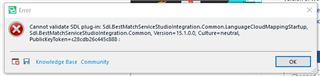
This morning, when I launched Studio, it wasn't long before the following error message (see attached screen capture) popped up:
cannot validate SDL plug-in: Sdl.BestMatchServiceStudiolntegration.Common.LanguageCloudMappingStartup, Sdl.BestMatchServiceStudiolntegration.Common, Version= 15. 1.0.0, Culture= neutral, PublicKeyToken=c28cdb26c445c888:
It is major, as I can't use the software at all and to be honest, I don't even understand what it means.
I feel pretty helpless as I don't really know where to start
to try solving this problem.
Any help is welcome.
Christian
Generated Image Alt-Text
[edited by: Trados AI at 9:07 PM (GMT 0) on 28 Feb 2024]


