xml-filter, export replaces " with "

Hi,

I use an xml filter (XML v 2.0.0.0) for my translation documents (wordpress wpml files ...), it works so far, but within the export file every " is replaced by "  - the ampersand version for double quotes.

I checked, the source document has " and is utf-8 encoded, within Trados there are also only simple ".

How can I keep the " within the exported files?

Many thanks

Ralf

Parents
  • Hi

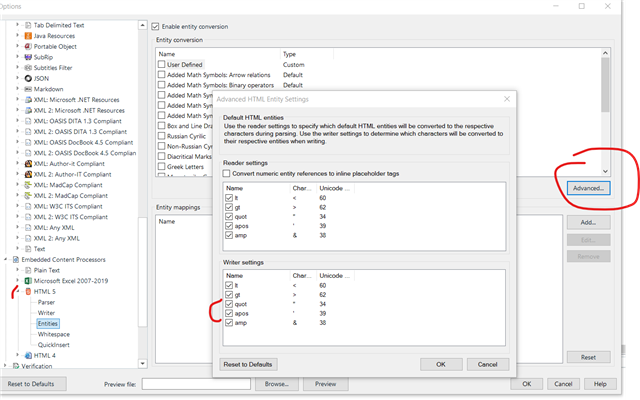
    This is related to the setings in the entities conversion of your filetype or in the entitities settings of the HTML Embedded Content you are using. You can select/customize what entities are converted in Studio and which ones are converted or not when writting the output file. Uncheck the quot / apos in the writer settings for single/double quotes.

    Trados Studio settings window showing Entity conversion options with Advanced HTML Entity Settings. The Writer settings section has quot and apos unchecked, with a red circle highlighting the Advanced button.

    emoji


    Generated Image Alt-Text
    [edited by: Trados AI at 9:08 PM (GMT 0) on 28 Feb 2024]
  • Hi Felipe,

    thanks for your reply, i tried it, but did not work. Tried with a new project with these settings. I checked, that the source file contains " .

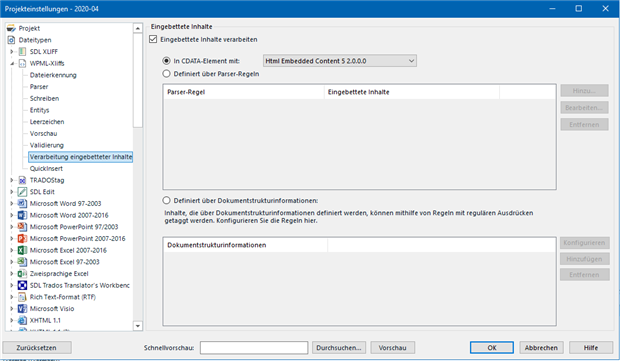
    Please find my settings for embedded content below - sorry, the UI is in german

    Trados Studio project settings window with Entity-Annotation settings in German. Red boxes highlight discrepancies in entity references for ampersand and quotes.

    and for embedded content within the filter

    Trados Studio project settings window showing options for processing embedded content with a dropdown menu for HTML Embedded Content 5.2.0.0.

    There are other settings to change?

    Thanks

    emoji


    Generated Image Alt-Text
    [edited by: Trados AI at 9:08 PM (GMT 0) on 28 Feb 2024]
  • Can we see a small sample of one of your files to test?  Just edit your file to only give us a couple of segments containing any old text but also the offending quotes.

    Paul Filkin | RWS Group

    ________________________
    Design your own training!

    You've done the courses and still need to go a little further, or still not clear? 
    Tell us what you need in our Community Solutions Hub

  • Hi Paul,

    thank, yes I can give examples.

    Within the normal text, the " is displayed on the website correctly, but [INSERT_ELEMENTOR id="20055"] is not text, it includes an element and that works only with "  ...

    Please find the 2 files here ( target and source) and following is an part of the file:

    Source:

    <trans-unit resname="package-string-257-119540" restype="string" datatype="html" id="package-string-257-119540">
    <source>
    <![CDATA[<h2>Newsletter bestellen</h2><p>Es gibt die 2 grundlegenden Varianten für die Newsletterbestellung:</p><p>[INSERT_ELEMENTOR id="14071"]</p><h2>Newsletter abbestellen</h2><p>Abbestellen geht natürlich nur, nachdem der Newsletter bestellt wurde, und geschieht eigentlich wie das Bestellen über den oben beschriebenen Weg mit den 2 Auswahlmöglichkeiten. Setzen sie dafür wie oben beschrieben das Makro „_Newsletterlink“ in der Mail ein. Wenn ein Abonnent ein "Nein, ich möchte kein Newsletter" wählt, wird der Newsletterstatus in der Adresse auf "Abbestellt" gesetzt.</p><h2>Manuelle Pflege</h2><p>Sie können den Newsletter-Status auch manuell in der Adresse setzen, dann ist aber der Nachweis, dass der Empfänger dem zugestimmt hat, entsprechend zu erfassen.</p>]]>
    </source>
    <target state="needs-review-translation" state-qualifier="tm-suggestion">
    <![CDATA[<h2>Newsletter bestellen</h2><p>Es gibt die 2 grundlegenden Varianten für die Newsletterbestellung:</p><p>[INSERT_ELEMENTOR id="14071"]</p><h2>Newsletter abbestellen</h2><p>Abbestellen geht natürlich nur, nachdem der Newsletter bestellt wurde, und geschieht eigentlich wie das Bestellen über den oben beschriebenen Weg mit den 2 Auswahlmöglichkeiten. Setzen sie dafür wie oben beschrieben das Makro „_Newsletterlink“ in der Mail ein. Wenn ein Abonnent ein "Nein, ich möchte kein Newsletter" wählt, wird der Newsletterstatus in der Adresse auf "Abbestellt" gesetzt.</p><h2>Manuelle Pflege</h2><p>Sie können den Newsletter-Status auch manuell in der Adresse setzen, dann ist aber der Nachweis, dass der Empfänger dem zugestimmt hat, entsprechend zu erfassen.</p>]]>
    </target>
    </trans-unit>

    Target:
    <trans-unit resname="package-string-257-119540" restype="string" datatype="html" id="package-string-257-119540">
    <source>
    <![CDATA[<h2>Newsletter bestellen</h2><p>Es gibt die 2 grundlegenden Varianten für die Newsletterbestellung:</p><p>[INSERT_ELEMENTOR id="14071"]</p><h2>Newsletter abbestellen</h2><p>Abbestellen geht natürlich nur, nachdem der Newsletter bestellt wurde, und geschieht eigentlich wie das Bestellen über den oben beschriebenen Weg mit den 2 Auswahlmöglichkeiten. Setzen sie dafür wie oben beschrieben das Makro „_Newsletterlink“ in der Mail ein. Wenn ein Abonnent ein "Nein, ich möchte kein Newsletter" wählt, wird der Newsletterstatus in der Adresse auf "Abbestellt" gesetzt.</p><h2>Manuelle Pflege</h2><p>Sie können den Newsletter-Status auch manuell in der Adresse setzen, dann ist aber der Nachweis, dass der Empfänger dem zugestimmt hat, entsprechend zu erfassen.</p>]]>
    </source>
    <target state="needs-review-translation" state-qualifier="tm-suggestion">
    <![CDATA[<h2>Subscribe to our newsletter</h2><p>There are the 2 basic variants for the newsletter order:</p><p>[INSERT_ELEMENTOR id=&quot;20055&quot;]</p><h2>Unsubscribe from the newsletter</h2><p>Unsubscribing is of course only possible after the newsletter has been ordered, and actually happens like ordering via the above described way with the 2 options. To do this, use the macro &quot;_Newsletterlink&quot; in the mail as described above. If a subscriber chooses a &quot;No, I don't want any newsletter&quot;, the newsletter status in the address is set to &quot;Unsubscribed&quot;.</p><h2>Manual maintenance</h2><p>You can also set the newsletter status manually in the address, but then the proof that the recipient has agreed to this must be entered accordingly.</p>]]>
    </target>
    </trans-unit>

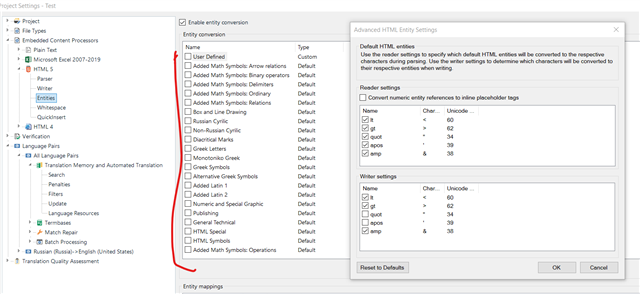
  • Can you try unchecking all entities conversions in the HTML embedded content Processor?.

    By default a couple of them are active.

    Trados Studio settings window showing the HTML embedded content processor with a list of entity conversions. The 'Enable entity conversion' checkbox is checked, and several entities are set to 'Default'.

    emoji


    Generated Image Alt-Text
    [edited by: Trados AI at 9:09 PM (GMT 0) on 28 Feb 2024]
Reply Children